Store Credit
Store Credit for Refunds, Goodwill and Rewards
Store credit is money a shopper holds with your store. A refund to store credit is instant and needs no bank details, a goodwill credit says sorry without a coupon, and rewards and referrals pay out in it.
- In every plan
- Free for 14 days


Kosha is a demo store on Mercayo. Its products, orders and customers are sample data.
In short
What It Does
Store credit is a balance in rupees that a shopper holds with your store only. It comes from:
- Refunds. The refund screen offers Store credit (no bank details needed) beside the original payment and cash or bank transfer. The credit is there at once, and the GST credit note is made exactly as for any refund.
- Credit from your team. GIVE CREDIT finds the customer by mobile number and gives (or takes back) an amount with a reason. Credit given to a number with no account waits for them.
- Cashback from rewards tiers and rewards from referrals.
It is spent at checkout: a signed-in shopper ticks Use my store credit and sees "₹300 of your store credit will be used. You pay ₹999." A gift card is used first, then credit, then cash on delivery or online payment for the rest. Credit is a way to pay, not a discount, so the order's total and its GST stay exactly the same.
Every movement is a line in a ledger that can never be edited: a correction is a new line. The balance can never go below zero, and two checkouts can never spend the same rupee. Store credit does not expire, and it cannot be withdrawn as cash or moved to someone else.
The Store Credit screen shows who holds credit (or everyone with history) and the whole ledger, with the totals: Outstanding, Given and Spent in the last 30 days, and the average balance.
The Store Credit Screen
Customers → Store Credit lists who holds credit now (or everyone with a history), and the store's whole ledger: every posting in or out, its reason, and who gave it. The totals show what customers hold today and the credit given and spent in the last 30 days against the 30 before, so you can see what your refunds and rewards really cost.
For your store
Why It Matters
Refunds are where many Indian online stores lose a customer: bank details over the phone, days of waiting, a shopper who never comes back. A refund to store credit is instant and keeps the money in your store, and for a returned COD order there is no bank account to ask for at all.
Goodwill credit is the gentlest way to make up for a late parcel: it lands in the shopper's account with your reason, and it brings them back to spend it.
And because cashback and referral rewards are paid in the same credit, your loyalty programme needs no points, no conversion tables and no separate wallet to explain: a rupee of credit is a rupee off.
Step by step
How It Works
Check the Settings
Store credit is on for a new store. In Settings → Rewards and Credit → Store Credit you choose whether credit can be spent at checkout, whether the refund screen offers it, the largest share of an order credit may pay, and the largest amount one staff member can give in one go (₹10,000 to start with).
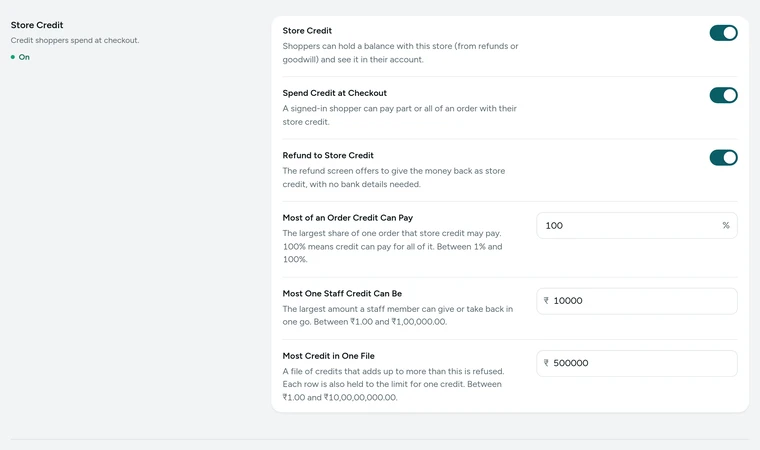
The Store Credit card in Settings → Rewards and Credit, on Kosha, a demo store on Mercayo. Refund to Store Credit
On an order, open the refund and under Refund to choose Store credit (no bank details needed). The preview reads "Give ₹1,299 back as store credit". The credit is on the shopper's account at once, with the credit note.
Give or Take Back Credit
On Store Credit, press GIVE CREDIT, type the customer's mobile number, choose to give or take back, the amount and a reason. A double tap gives once. Every credit is in the ledger and the activity log, with who gave it.
Shoppers Spend It
A signed-in shopper sees their balance at checkout and ticks Use my store credit. If credit pays the whole order, it is paid at once with no cash to collect. Their account's Store Credit page shows the balance and its history.

Your shoppers
What Your Shoppers See
A signed-in shopper sees Store Credit in their account: "Your Balance", "Use it at checkout. It does not expire.", and a history with each line's reason (Refund, Credit from the store, Cashback, Referral reward, Used on order #1042). At checkout, Use my store credit shows what is available and what is left to pay.
Settings
Settings You Control
All are under Settings → Rewards and Credit → Store Credit.
Mercayo
Mercayo's Controls
Mercayo's team can force or lock any store credit setting for your store, for example cap the share of an order credit may pay or the size of one staff credit, with a reason your admin shows and a record in Mercayo's audit log. Mercayo never adds or takes credit from your shoppers. Each store's credit is kept apart by the database itself: a shopper's credit in one store is never seen or spent in another.
Limits today
Good to Know Before You Start
- Credit is for signed-in shoppers; a guest's refund to credit waits on their phone number until they sign in with it.
- Credit for many customers at once comes from a file of phone numbers and amounts (ADD FROM A FILE) or a selection on Customers, within the store's limit per file.
- Credit cannot be withdrawn as cash, moved to another shopper, or used in another store.
- With online payment, credit always leaves at least ₹1 to pay online.
Questions
About Store Credit
Can I see how much credit my customers hold in total?
Yes. Store Credit shows what customers hold now, and the credit given and spent in the last 30 days against the 30 before.
Does store credit expire?
No. Store credit never expires, and your shoppers' account page says so.
Does paying with credit change the GST invoice?
No. Credit is a way to pay, not a discount, so the taxable value and the GST are exactly as they would be for any payment.
What happens to credit used on an order that is cancelled?
It comes back to the shopper's balance, as a new line in the ledger ("Returned from order").
Can I refund a COD order to store credit?
Yes. For a returned cash on delivery order, store credit needs no bank details and reaches the shopper at once.
Can I correct a credit given by mistake?
Yes, with GIVE CREDIT and "take back" with a reason. The ledger keeps both lines: nothing is ever edited or deleted.
How does credit work with part payment for COD?
The advance is worked out on the cash part, after credit or a gift card has paid its share.
Can credit be used on a cash on delivery order?
Yes. Credit pays its share first and the courier collects only the rest in cash. If credit pays the whole order, there is nothing to collect.
Can I see who gave a credit and why?
Yes. The Ledger tab lists every line with its reason, the order or refund it belongs to and who gave it, and every staff credit is also in your store's activity log.
Related
Related Features
- Gift CardsSell gift cards in fixed or custom amounts, send them by email or text on a chosen day, and let shoppers spend them at checkout a bit at a time.
- Rewards TiersShoppers move up tiers as they spend and earn cashback as store credit on delivered orders, with free delivery and offers for the tiers you choose.
- Refer and EarnShoppers share their own code; when a friend's first order is delivered, both get store credit, with an optional first-order discount for the friend.
- Returns and RefundsLet shoppers ask to return items for a refund; approve, receive and refund from one queue, with the GST credit note issued for you.
- Customer AccountsShoppers sign in with a one-time code by email or phone, or with Google, and find their orders, invoices, addresses and credit in one place.
More in Discounts and Offers: Discount Codes · Automatic Offers · Buy X Get Y · Quantity Prices · Bundles and Add-Ons · Free Gifts · One-Time Codes · Combining Offers · Offer Labels and Sale Page · Offer Reports · Gift Cards · Rewards Tiers · Refer and Earn · Affiliates
Try It on Your Own Store
Every feature is in every plan, free for 14 days.