Rewards Tiers
Rewards Tiers That Pay Cashback in Store Credit
Your best customers should feel it. Rewards tiers turn what a shopper has spent into a tier with perks, cashback paid into store credit when an order is delivered, and free delivery for the tiers you choose.
- In every plan
- Free for 14 days


Kosha is a demo store on Mercayo. Its products, orders and customers are sample data.
In short
What It Does
Rewards are off for a new store. Switch them on and set up to 8 tiers, each with:
- a name (Silver, Gold, Insider…) and the spend that reaches it;
- a cashback percentage, paid as store credit;
- free delivery on orders above an amount (or on every order) for that tier;
- an early access mark shown to its members.
A shopper's tier is worked out on Mercayo's server, never in the browser, from what they spent on delivered orders in your spend window (365 days to start with, or all time), less what was refunded. Cancelled and returned orders never count. Your team can also set a higher tier for a customer by hand.
Cashback is paid into the shopper's store credit when an order is delivered: the tier's percentage of the order's total without delivery, at the tier the shopper held before that order. You can cap the cashback on one order. A refund takes back its share; a cancelled or returned order takes back all of it, never more than the balance still holds.
Free delivery for a tier lowers the delivery rate's "free above" amount for signed-in members at checkout. And any discount can be limited to a reward tier or higher under Who Can Use It, so Gold members can have their own codes and offers.
There are no points to explain: a tier is a level, and cashback is rupees.
The Rewards Screen
Customers → Rewards shows your tiers and their earning rules in one card: cashback per tier on delivered orders, the cap per order, free delivery, and the spend window. The members list is worked out live for every customer at once (delivered spend in the window, less accepted refunds, the highest tier at or under it, or a higher tier your team set by hand), so it is right even while rewards are off and before the daily update runs. That lets you see who would be Silver or Gold before you switch rewards on.
For your store
Why It Matters
Most of a small brand's sales often come from shoppers who have bought before. Tiers give those shoppers a reason to come back to you instead of a marketplace, and cashback in store credit brings them back to spend it.
Paying on delivery, not on order, is what keeps a rewards programme honest in India: a cash on delivery order that is refused at the door never earns cashback, and nothing has to be clawed back by hand.
And it is simple to explain on a product page or in a WhatsApp message: "Gold members get 5% back and free delivery above ₹499." No points, no conversion tables, no expiry rules to argue about.
Step by step
How It Works
Switch Rewards On
In Settings → Rewards and Credit → Rewards Tiers, switch Rewards tiers on, choose the Days of Spending That Count (365 to start with; 0 counts all time) and, if you like, the Most Cashback on One Order. Store credit must be on, since cashback is paid in it.
Set Up the Tiers
On Rewards, the tiers card lists each tier with its spend, cashback, free delivery and early access. Add up to 8, with rising spends and different names, and save them with the save bar. Members are worked out again for everyone at once.
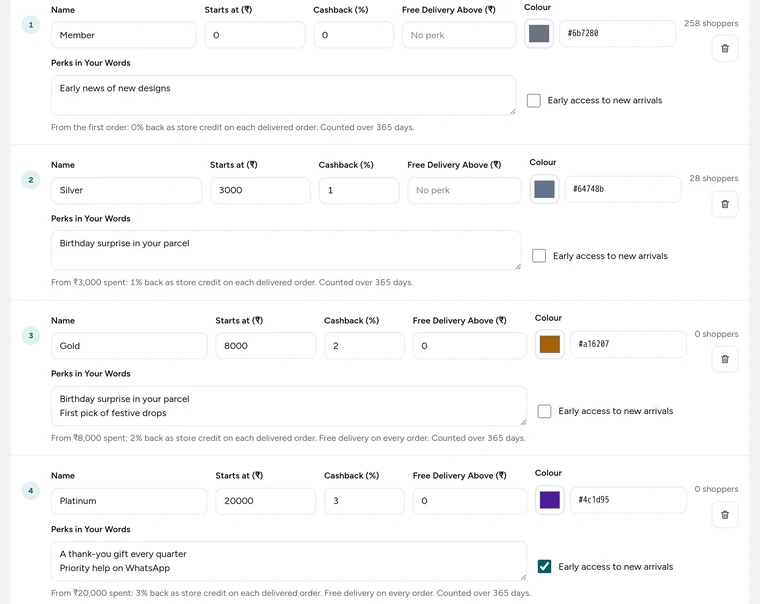
The tiers of Kosha's sample rewards programme on the Rewards screen, on Kosha, a demo store on Mercayo. Read How Customers Earn
How Customers Earn writes the rules out: which orders count, what each tier gives ("5% cashback", "Free delivery above ₹499"), the cap per order, and that cashback is paid on delivery and taken back on a refund or return.
Give Tier Offers
In any discount, under Who Can Use It, choose Reward tier or higher and the tier. The bag asks guests to sign in to get it, and members see it applied.
Change a Customer's Tier
Open a member on the Rewards screen to set a higher tier by hand, for example for a long-time offline customer. Their tier history keeps every change, and their account says "The store set this tier for you."

Your shoppers
What Your Shoppers See
A signed-in shopper's account has Your Rewards: their tier, "₹8,400 spent in the last 365 days", "₹1,600 more to reach Gold" with a progress bar, Your Perks ("5% back as store credit on delivered orders", "Free delivery on orders above ₹499"), the cashback earned so far, all the tiers with "You are here", and how their tier changed. After an order, "Rewards on this order" says what it will earn when delivered and whether it takes them to the next tier.
Settings
Settings You Control
All are under Settings → Rewards and Credit → Rewards Tiers.
Mercayo
Mercayo's Controls
Mercayo's team can switch rewards off or on for a store, or fix the spend window and the cashback cap, with a reason your admin shows beside the locked setting and a record in Mercayo's audit log. Mercayo never changes your tiers or a customer's tier, and never pays cashback itself: it is your store credit, from your store.
Limits today
Good to Know Before You Start
- There are no points: rewards are tiers and cashback in store credit.
- Cashback is paid on delivered orders only, never when an order is placed.
- Early access is shown to members but does not open anything early in the store.
- Birthday credit is not built.
- A tier's free delivery applies only when the shopper is signed in at checkout; a guest pays the usual delivery.
Questions
About Rewards Tiers
Are there points?
No. Mercayo keeps one currency: rupees. Tiers give cashback as store credit, free delivery and an early-access mark, so shoppers never have to work out what a point is worth.
Do guests' orders count towards a tier?
Yes, once the guest signs in with the phone number they ordered with: earlier orders on that verified number are linked to their account and count.
When is cashback paid?
When the order is delivered, into the shopper's store credit, at the tier they held before that order. If the order is later refunded, its share of the cashback is taken back.
Is cashback taken on delivery charges?
No. Cashback is the tier's percentage of the order's total without delivery.
Can a shopper move down a tier?
Yes, with a spend window: when older orders fall out of the window, the spend drops and so can the tier. With 0 (all time), tiers only rise, except after refunds.
Can I see members before I switch rewards on?
Yes. Members are worked out live from orders, so the Rewards screen shows who would be on each tier even while rewards are off.
Can I give one tier its own discount?
Yes. Any discount can be limited to a reward tier or higher under Who Can Use It. Such offers appear in the bag, not on product pages.
Does cashback count the part paid with store credit?
Yes. Cashback is the tier's percentage of the order's total without delivery, whatever way the order was paid, including store credit.
Related
Related Features
- Store CreditGive shoppers a balance with your store: instant refunds without bank details, goodwill credit, cashback and referral rewards, spent at checkout.
- Refer and EarnShoppers share their own code; when a friend's first order is delivered, both get store credit, with an optional first-order discount for the friend.
- Discount CodesMake codes for a percentage or an amount off, free delivery and more, with minimums, dates, limits and rules for who may use them.
- Customer AccountsShoppers sign in with a one-time code by email or phone, or with Google, and find their orders, invoices, addresses and credit in one place.
- CustomersEvery customer with their orders, spending and returned parcels, guests included, ready-made segments like VIP and RTO-Prone, tags, notes, credit and export.
More in Discounts and Offers: Discount Codes · Automatic Offers · Buy X Get Y · Quantity Prices · Bundles and Add-Ons · Free Gifts · One-Time Codes · Combining Offers · Offer Labels and Sale Page · Offer Reports · Gift Cards · Store Credit · Refer and Earn · Affiliates
Try It on Your Own Store
Every feature is in every plan, free for 14 days.