A customer's page brings together everything about one shopper: what they have bought, how to reach them, the credit and rewards they hold, and what your team has noted. Open it from the Customers list, from an order (the customer's name), or by searching their name or phone with Ctrl K.
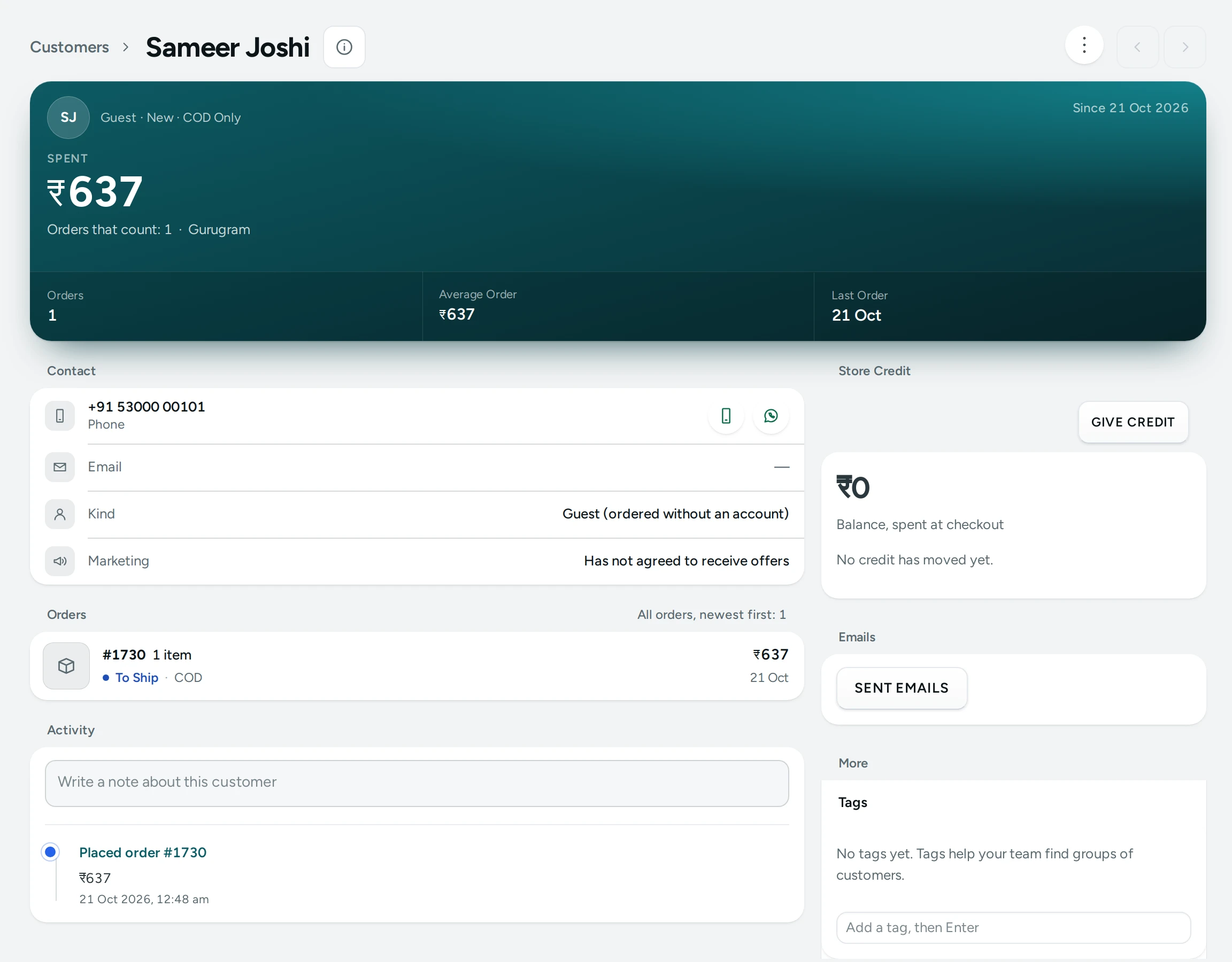
The Summary
At the top: their name (or "No name yet"), how to reach them, and "Customer since" the day of their first order or account. Then the numbers:
| Number | Meaning |
|---|---|
| Spent | Their orders confirmed to delivered, never cancelled or returned ("Orders that count: …") |
| Orders | How many orders they placed |
| Average Order | Spent divided by the orders that count |
| Last Order | When they last ordered |
| Store Credit | Their balance, spent at checkout |
| Returned to Origin | Parcels that came back undelivered |
Their segments (New, Returning, VIP, At Risk, COD Only, RTO-Prone) show as badges.
The RTO Warning
When the customer is RTO-prone, a warning sits above everything: "Parcels returned undelivered: 2 of 5 orders. Consider asking for payment online before you ship cash on delivery." The threshold is set in Shopper Accounts Settings (30% by default).
Orders
The latest orders with their number, date, status (Awaiting payment, To ship, Shipped, Delivered, Returned to origin, Cancelled, Closed), how they paid (COD, Prepaid or Manual), items and total. "All orders, newest first: …" and See all open the Orders list for this customer.
Contact
| Field | Meaning |
|---|---|
| Kind | Account, Guest (ordered without an account), or Guest, kept by your team |
| Phone and Email | With Verified when the shopper confirmed it with a code |
| Marketing | Agreed to receive offers, or Has not agreed to receive offers. Only send offers to those who agreed. |
| Last Signed In | For accounts |
If the shopper deleted their account: "This shopper deleted their account. Their orders stay, without their details."
Addresses
Their saved addresses, with Default, and the ones you Delivered to recently. "No address yet." when there are none.
Store Credit
The balance, and every movement with its reason: Refund, Credit from the store, Cashback, Referral reward, Rewards perk, Gift card, Spent on order #…, Returned from order #…, Taken back.
To give or take back credit:
- Press GIVE CREDIT (or TAKE BACK CREDIT).
- Type the Amount (₹) and a Reason (3 characters or more), for example "Late parcel, sorry".
- Save. "₹200 given. Their balance is now ₹450."
Limits: one movement may be at most the store's Most One Staff Credit Can Be (₹10,000 by default; "Up to … at a time."), and you cannot take back more than the balance. "The customer's credit history keeps the amount, your reason and your name." Giving credit needs the right to give or take back store credit. If store credit is off: "Store credit is switched off for your store. Turn it on in Settings." See Store Credit.
Rewards, Referrals, Gift Cards
- Rewards: their tier, how they got there (a move from one tier to another, or Set by your team), with Manage. "Not in a tier yet." See Rewards.
- Referrals: Their code, who Referred by them, the Friends they referred ("Referred: 3 · rewarded: 2"), what they Earned, and each friend's state (Waiting for an order, Ordered, reward on hold, Rewarded, Not rewarded, Cancelled). See Referrals.
- Gift Cards: cards they Bought and Received, with All gift cards. See Gift Cards.
Each card says when the feature is switched off for your store.
Tags and Notes
- Tags: your own labels, such as
wholesaleorinfluencer, to find groups of customers with the list's tag filter. A tag is at most 40 characters. Changing tags needs the right to edit customers. - Notes: "Only your team sees notes." Write anything your team should know ("Prefers delivery after 6 pm").
Timeline
"Orders, credit, tiers and your team's notes, newest first": Made an account, Placed order #…, Order #… delivered, Order #… cancelled, Order #… came back undelivered, Store credit added, Store credit used or taken back, Moved to the … tier, and notes with who wrote them.
Good to Know
- A guest's details come from their latest order.
- What you see follows your role: without the orders right you do not see order links; without the credit right the credit buttons are not there.
Questions
Can I edit a customer's email or phone?
Shoppers manage their own details in their account. Their orders keep the details they gave at checkout.
How do I send this customer an offer?
Check Marketing first. Only send offers to customers who agreed. Make a code in the discount editor and send it from your own email or phone.
Can I delete a customer?
A shopper can delete their own account from your store; their orders stay without their details, as tax records require.