Settings › Billing is where you see and manage what you pay Mercayo: "Your Mercayo plan, what you paid and your invoices." Only the store's owner and admins can see it ("Only the store's owner and admins can see billing."); changing the plan or payment method is for the owner.
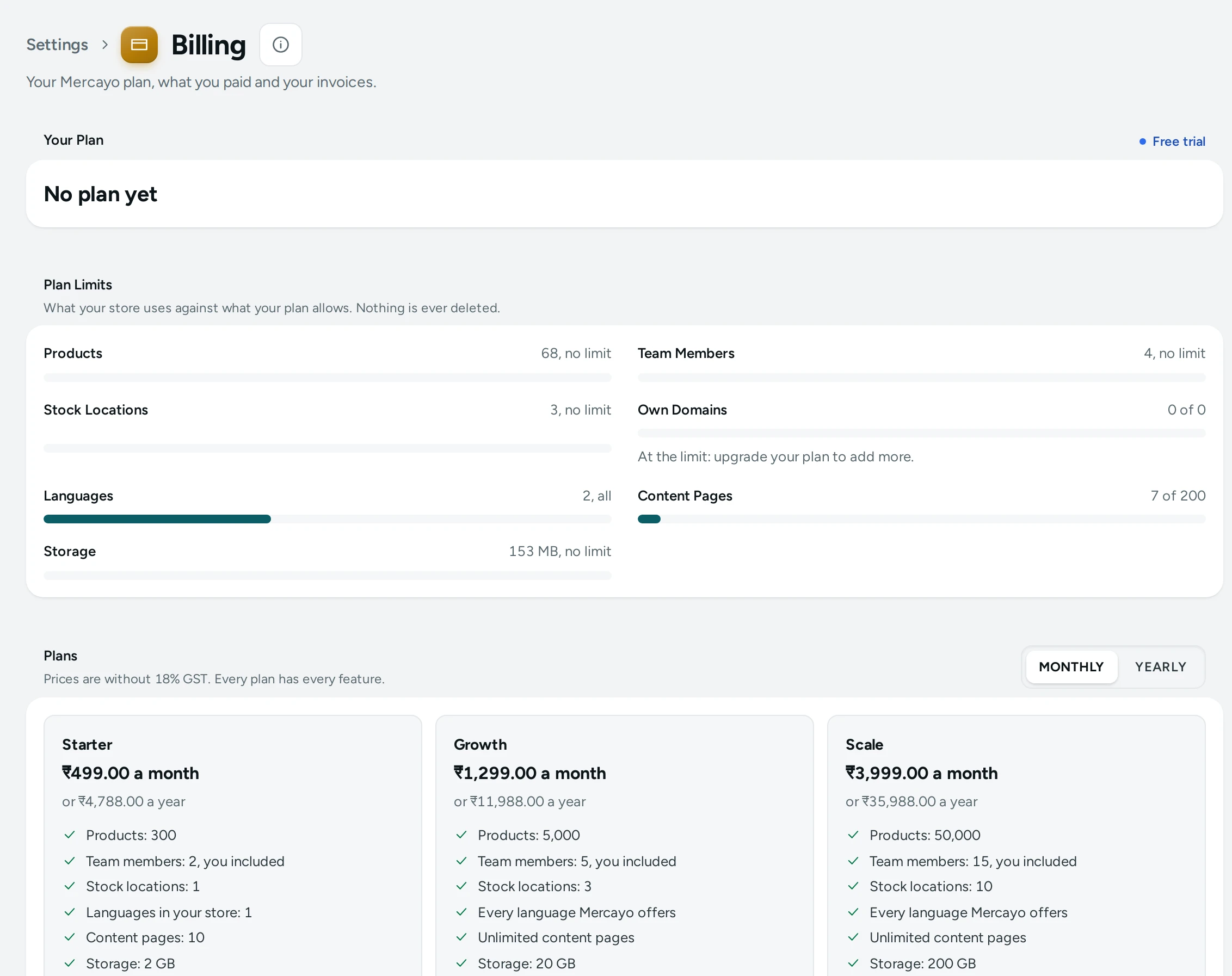
Your Plan
The top card shows your plan ("Growth plan", or No plan yet during the trial), its state and the key dates:
| State | Meaning |
|---|---|
| Free trial | Your free trial; "Your free trial ends on …" |
| Active | Your plan is paid |
| Payment due | Your paid time ended; "Please pay by … to keep your store open." |
| Suspended | The store is paused (for example in limited mode, below) |
| Closed | The store is closed |
With a subscription you also see the Billing Period (Paid monthly or Paid yearly), the Payment Method (Card, charged automatically, UPI autopay, Bank mandate), the Next Payment ("₹1,532.82 on 12 Nov 2026") and Paid until. When the plan is paid before launch: "Your plan is paid. You can launch your store." with GO TO LAUNCH.
The Plans
"Prices are without 18% GST. Every plan has every feature." The plans differ in how much your store can hold:
| Plan | Monthly | Yearly | Products | Team Members (you included) | Stock Locations | Own Domains |
|---|---|---|---|---|---|---|
| Starter | ₹499 | ₹4,788 | 300 | 2 | 1 | 1 |
| Growth | ₹1,299 | ₹11,988 | 5,000 | 5 | 3 | 1 |
| Scale | ₹3,999 | ₹35,988 | 50,000 | 15 | 10 | 5 |
Prices are as listed on Mercayo's pricing page today; the Billing screen always shows the current ones. "Paying yearly costs about 20% less than paying monthly." Each plan also includes a monthly bundle of messages to shoppers (for example Growth: 3,000 emails, 750 SMS, 750 WhatsApp), used before your notification credits.
Switch between MONTHLY and YEARLY above the plans to compare.
Plan Limits
"What your store uses against what your plan allows. Nothing is ever deleted." Each limit shows "… of …" (for example "212 of 300" products), or "At the limit: upgrade your plan to add more." At a limit you cannot add more (for example "Your plan allows at most 300 products. Upgrade the plan in Settings → Billing, or remove some first."), but nothing you have is removed.
How You Pay
The screen shows the way that applies to your store.
By Subscription (Online)
When Mercayo has online payment switched on, each plan has CHOOSE (or UPGRADE, SWITCH):
- Press CHOOSE on a plan. The dialog says what you pay: "You pay ₹1,532.82 (₹1,299 plus 18% GST) monthly, charged automatically to your card or UPI by Razorpay. You get a GST invoice for each payment."
- During the trial, choose When to Start:
- When my free trial ends: the first payment is taken on the trial's last day.
- Today, so I can launch my store now: the trial days left come off as credit on this first payment.
- Press CONTINUE TO PAYMENT. Razorpay's secure page opens in a new tab; authorise the payment there. The Billing screen updates by itself ("Finish Setting Up Your Payment" until it is done).
By Bank Transfer or UPI
Otherwise, How to Pay shows instead: plans are paid by bank transfer or UPI. Write to Mercayo's billing address (Write to) with your plan and whether you pay monthly or yearly, and Mercayo sends the payment details. As soon as Mercayo records your payment, the GST invoice appears on this screen and your store can launch. "Pay during your trial and the trial days left are added to your plan."
Changing Your Plan
- Upgrade (a bigger plan, or monthly to yearly): at once. "The unused part of your current plan comes off today's payment and goes back to your payment method." Press UPGRADE NOW: "Your store is now on the … plan."
- Switch down (a smaller plan, or yearly to monthly): at the end of the period you paid for. "Your store moves to … on …; until then nothing changes." The dialog lists anything above the new plan's limits ("Your store has 412 products; Starter allows 300."): "Nothing is removed, but you cannot add more until you are under the limit." Press SWITCH PLAN.
- UPDATE PAYMENT METHOD: a new card, UPI or mandate, authorised on Razorpay's page. Also the way to pay when a payment is failing.
Cancelling
CANCEL SUBSCRIPTION asks "Cancel Your Subscription?": the plan keeps running until the end of what you paid, and no more payments are taken. After that your store goes into limited mode until you choose a plan again. "Nothing in your store is deleted. You can subscribe again at any time." A subscription that has not started yet ends at once without a payment. Press KEEP MY PLAN to change your mind.
When a Payment Fails
- Your Last Payment Did Not Go Through: "Razorpay is trying again. Your store stays open until …; to be safe, update your payment method."
- If Razorpay stops trying: "Update your payment method to pay and keep your store open."
- Grace: "If the next payment has not reached us by …, your store is paused until it does. Your data is kept." The grace is 7 days by default.
- Your Store Is in Limited Mode: "Your storefront is closed to shoppers and your admin can only be looked at, because the plan is not paid. Nothing is deleted: pay and everything opens again at once."
Mercayo Credit
Credit from Mercayo (a goodwill credit, Unused time on your old plan, Trial days left when you started) is listed under Mercayo Credit. "Credit comes off your next payment to Mercayo, before GST. The part it covers goes back to your payment method."
Payments and Invoices
Every payment, with its period ("Growth, monthly: 12 Oct 2026 to 11 Nov 2026"), how it was paid, the total with GST, and DOWNLOAD INVOICE. Each is a GST tax invoice from Mercayo for your input tax credit. A Proforma is shown while Mercayo's own GST details are being completed: "A proforma is not a tax invoice. Your tax invoice follows once Mercayo's GST details are in place."
Add-ons
"Extra features on top of your plan, paid with it each period." When Mercayo offers one, it shows here with its price ("… a month, plus GST") and ADD; one included in your plan says Included in your plan.
Questions
Is GST added to the plan price?
Yes. Plan prices are shown without GST; 18% GST is added, and your invoice shows both.
Do I lose anything if I go over a limit or my payment fails?
No. Nothing is ever deleted. Over a limit you cannot add more; unpaid, the store is paused until you pay.
More answers in the Billing FAQ.