Bag and Bag Drawer
A Bag That Helps Shoppers Finish
The bag is where a shopper decides. Mercayo's bag shows how close they are to free delivery or the next bundle price, lets them add a note or a code in one tap, and suggests what goes well with what they chose.
- In every plan
- Free for 14 days

Kosha is a demo store on Mercayo. Its products, orders and customers are sample data.
In short
What It Does
Adding to the bag opens the bag drawer, in the style you choose; there is also a full bag page. Both carry the same help:
- Free-delivery bar: "Add ₹X more for free delivery", with a bar that fills, whenever your delivery rate has a free-above amount; then "Your order gets free delivery."
- Lines you can change with steppers or remove; a removed line shrinks away, an added one pops in, and the prices dim while the bag is priced again. A line that is short of stock or no longer sold says so on the line.
- NOTE and DISCOUNT CODE buttons that open small panels. The note (up to 500 characters, "a gift message or a delivery instruction") goes to the order and its packing slip. Codes are checked at once and explained in plain words when they do not apply; you decide whether a bag may carry one code or up to three.
- Bundle progress: with a bundle offer, "Add 1 more: 2 for ₹1,299".
- "Add more" lines: when a little more would unlock an automatic offer, "Add ₹300 more to get 10% off".
- Pairs well with: your add-ons for what is in the bag, leaving out what is already there or sold out. One suggestion fills the row; more become a slider with "1 / 3" beside the heading, arrows where there is a mouse and a swipe on touch. ADD puts a single-option add-on straight in the bag; one with options opens its options sheet. An add-on special price shows on the line.
- Free gift picker: with a free gift offer, "Choose Your Free Gift" (or "Add ₹350 more to choose a free gift"), only from gifts in stock; a sold-out gift is greyed, and when only one is in stock it is chosen for the shopper.
- Recently viewed: a tab beside the bag; an empty bag shows recently viewed products, or your best sellers.
- Totals: delivery (Free once unlocked, else "At checkout"), GST as your prices need it, "You save ₹X on MRP", the Round Off line, and "Cash on Delivery available" where it is.
Four Drawer Styles
| Style | What It Looks Like |
|---|---|
| Compact Drawer | Tabs, pill buttons and a rounded checkout button, in your store's button shape. |
| Gallery Drawer | A bag / recently viewed switch on top, framed suggestions, large note and code tiles and a full-width checkout bar. |
| Bottom Sheet | A sheet from the bottom on phones, a drawer from the right on wide screens. |
| Mini Bag | A small panel under the bag icon on wide screens, with the item added and CHECKOUT; the sheet on phones. |
All four draw the same lines, gift picker, suggestions, note, code panels and totals. On a short drawer the footer folds so the lines keep most of the room.
Kept on the Server
The bag lives on Mercayo's server against a private key in the shopper's browser (kept for 30 days), not as prices in the browser: every quote reads today's prices, stock and GST. Bag reminders can bring the shopper back with a link that puts the same items into a bag on whichever phone opens it. A link with ?code=WORD in an email, a message or an ad puts that code on the shopper's bag and says at once whether it works.
For your store
Why It Matters
Every one of these small aids answers a question the shopper has at that moment: how much more for free delivery, does my code work, can I tell them it is a gift, what else do I need with this. Answering them in the bag, instead of at the last step of checkout, keeps the shopper moving.
The aids also raise the order value honestly. The bars and nudges come from your real offers and real prices, worked out by the same engine as checkout, never from invented urgency, so shoppers learn to trust them.
And because the drawer comes in four styles, you can make it feel like your brand: compact for a big catalogue, gallery-like for a premium one, a sheet that feels like an app on phones, or a small mini bag that never covers the page on a computer.
For your team, the note and the gift choice arrive on the order and the packing slip, so a "please do not ring the bell" or a gift of the shopper's choice is never lost between the bag and the parcel.
Step by step
How It Works
Choose the Drawer's Style
In Settings → Bag and Wishlist, Bag Drawer Style offers four layouts, each with a small picture: Compact, Gallery, Sheet and Popover (the Mini Bag). The same choice is in the Theme editor under Section Styles → Bag. Your theme's colours, fonts and button shape apply to all of them.
Decide What Happens After ADD TO BAG
In the Theme editor's Bag section, What Happens Next is one of The Bag Slides In, Go to the Bag Page or Stay With a Short Note. The same section switches the Free Delivery Progress bar on or off, and Call It lets you name it Bag, Cart or Basket on every button and title.
Switch On the Aids You Want
In Settings → Bag and Wishlist: the order note, recently viewed in the bag, bundle progress, free gifts, codes in links, and add-ons (with how many to show, 1 to 6). Each is a switch, on to start with. "Add more" lines and how many codes a bag may carry are in Settings → Discounts.
Set Free Delivery Above an Amount
The free-delivery bar appears when a delivery rate has a "free above" amount, set in Settings → Shipping and Delivery. It counts the bag the way the rate does, after offers. See delivery charges.
Shoppers Add, and the Bag Opens
ADD TO BAG opens the drawer with the line just added, the bar, the aids and CHECKOUT with the total. Steppers change quantities; the bag is priced again on the server each time, with your offers applied, so the drawer, the bag page and checkout always show the same total.
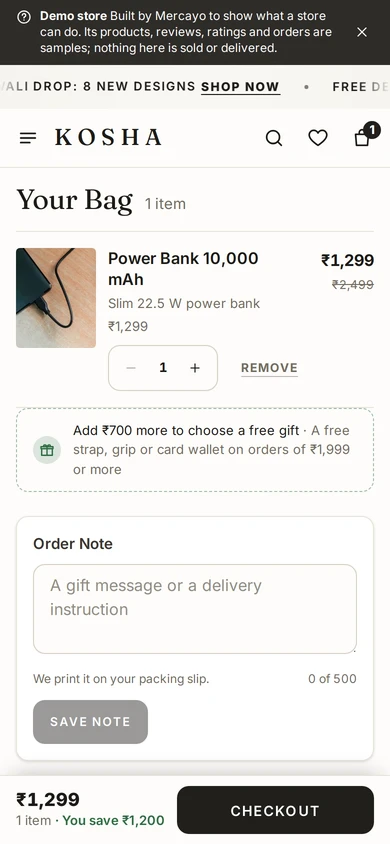
The full bag page on a phone, on Kosha, a demo store on Mercayo. Arrange the Bag Page
The bag page and the bag drawer are templates in the page editor: the note, the bundle progress, the add-ons and the gift picker are sections you can move or remove there. The drawer is the same on every page.
Share Links That Carry a Code
Add ?code=WORD to any link to your store, for example in an Instagram story. The code is put on the bag of whoever opens it, checked, and explained if it does not apply ("WELCOME10 applied. You save ₹130."). It is taken out of the address bar, so a copied link does not apply it twice.

Your shoppers
What Your Shoppers See
A drawer that opens with what they just added, tells them how close they are to free delivery or a bundle price, takes a note or a code in one tap, and suggests what goes with their choice. They see their saving on MRP, whether cash on delivery is available, and the same total they will see at checkout. On a phone it is a sheet they can drag, and the back button closes it.
Settings
Settings You Control
Each one is in your admin. A new store starts with the value shown.
Mercayo
Mercayo's Controls
Each bag setting can be fixed or limited by Mercayo for one store, with a reason your admin shows; every change is in Mercayo's audit log, and the effective value is Mercayo's override, then your setting, then the default. The bag's prices always come from Mercayo's one discount engine on the server, so the drawer, the bag page, checkout and the order always agree on the total, and a free gift is never a ₹0 line made up in a browser. A change to any of these settings shows on your store at once, even on cached pages.
Limits today
Good to Know Before You Start
- One free gift per bag.
- The note is one text for the whole order (up to 500 characters), not per item.
- Recently viewed products are kept in the shopper's own browser, so they do not follow the shopper to another device.
- A guest's bag belongs to the browser it was made in; once the shopper signs in, it joins their account's one bag, which follows them to every device.
- A gift adds no weight to the delivery rate.
- The drawer and the bag page are built from sections in the page editor; a required section cannot be removed.
Questions
About Bag and Bag Drawer
Is the bag kept if the shopper leaves?
Yes. The bag lives on Mercayo's server, and the shopper's browser keeps its private key for 30 days, so they find it again when they come back on the same phone or computer. A bag reminder's link puts the same items into a bag on any device.
Can I switch off the drawer and send shoppers to the bag page?
Yes. What happens after ADD TO BAG is part of your theme: open the drawer, go to the bag page, or stay on the page with a short note. Choose it in the Theme editor's Bag section.
Where do the add-ons come from?
From the add-ons you set on products, collections or categories ("Pairs well with"). The bag shows the add-ons of everything in it, leaving out what is already there and what is out of stock, up to the number you choose. An add-on can have its own lower price when bought with its main product.
What does a shopper see when a code does not work?
A plain reason: "Add ₹350 more to use FESTIVE150", "WELCOME10 has ended", "You have already used WELCOME10". The code is taken off the bag, so nothing is charged on a promise.
Does the free-delivery bar count discounts?
It counts the bag the way your delivery rate does: after offers, so a shopper who reaches the amount really gets free delivery.
Can the bag be called a cart?
Yes. In the Theme editor's Bag section, Call It sets Bag, Cart or Basket, and every button and title on your store uses that word, from ADD TO CART to the empty cart page.
Can a shopper use more than one code?
If you allow it. Codes per bag in Settings → Discounts is 1 to start with and goes up to 3; each code must be allowed to combine with the others. The bag's button then shows the codes on it, like CODES WELCOME10 +1.
Related
Related Features
- Bundles and Add-OnsAny 2 for ₹1,299, 3 or more for 15% off, and add-ons at a special price with the main product, chosen on the product page and applied in the bag.
- Free GiftsOffer a free gift above a spend or a number of items: shoppers choose it in the bag, its stock is checked, and it ships as its own ₹0 line.
- Discount CodesMake codes for a percentage or an amount off, free delivery and more, with minimums, dates, limits and rules for who may use them.
- Abandoned Bag RemindersUp to three reminders to shoppers who left at checkout, with a link that restores their bag, an optional code, quiet hours and recovered sales counted.
- Phone-First CheckoutOne page that starts with the mobile number and the PIN code, fills in the city and state, shows clear errors and a price breakdown that adds up.
- Combining OffersChoose for each offer what it combines with, which offers apply alone, and whether the shopper gets the biggest saving or your own order of offers.
More in Checkout and Payments: Phone-First Checkout · Online Payments · Delivery Options at Checkout · Gift Options · Quick Checkout for Returning Shoppers · Thank-You Page · Bot Protection
Try It on Your Own Store
Every feature is in every plan, free for 14 days.
