Bundles and Add-Ons
Bundle Prices and Add-Ons Shoppers Can See
Bundles and add-ons are how a single sale becomes a bigger one. Shoppers pick the bundle size on the product page, see the add-ons that go with it, and the bag prices everything exactly as promised.
- In every plan
- Free for 14 days

Kosha is a demo store on Mercayo. Its products, orders and customers are sample data.
In short
What It Does
Bundle Prices
A bundle gives a price for a number of items from the products, collections or categories you choose:
- A price for each size: "any 2 for ₹1,299, any 3 for ₹1,799". Up to 5 sizes, 2 to 99 items each; a bigger bundle must cost more.
- A percentage off: "2 or more: 10% off, 3 or more: 15% off". The biggest size the bag reaches applies to every eligible item; the saving is rounded to a whole rupee.
With a price per size, the bag finds the cheapest grouping for the shopper: the dearest items are bundled first, and with 5 items in a "2 for, 3 for" bundle the shopper gets a 3 and a 2. You can name the item ("case", "cases") so shoppers read "Add 1 more case".
Add-ons
An add-on is a product you offer beside another one ("Pairs Well With"), with a quick ADD. You pair them in the product editor's Sold with It card: up to 6 add-ons per product, at their own price.
An add-on price makes an add-on cheaper with its main product: "the screen guard for ₹199 (was ₹299) with any case". It is an automatic offer with its main products and up to 6 add-ons, each with its special price; one add-on item per main item gets it. The product page shows the special price beside the usual one, struck through, whenever the bag would charge it.
For "Frequently bought together" and "You may also like", see cross-sell.
For your store
Why It Matters
A bundle price is the most familiar offer in Indian retail ("any 3 for ₹999"), and shoppers trust it because the maths is on the label. It moves more units per parcel, which spreads your delivery and packing cost over more items.
Showing the sizes on the product page matters: shoppers choose "Any 2" before they add, instead of discovering the offer in the bag or never. The tray in the bag then says "Add 1 more case: 2 for ₹1,299, just ₹500 more", which is often the nudge that completes the bundle.
Add-ons work the same way at a smaller scale. A screen guard with a case, a blouse piece with a saree, a strap with a watch: the shopper needed it anyway, and a special price right beside ADD TO BAG makes it an easy yes.
Step by step
How It Works
Make the Bundle
In Discounts → CREATE DISCOUNT, choose Automatic offer and Bundle price under Value. Pick the products, collections or categories it covers. Under Each Size Gives, choose A price for each size or A percentage off, and fill in each size and its price, adding more with ADD A SIZE.
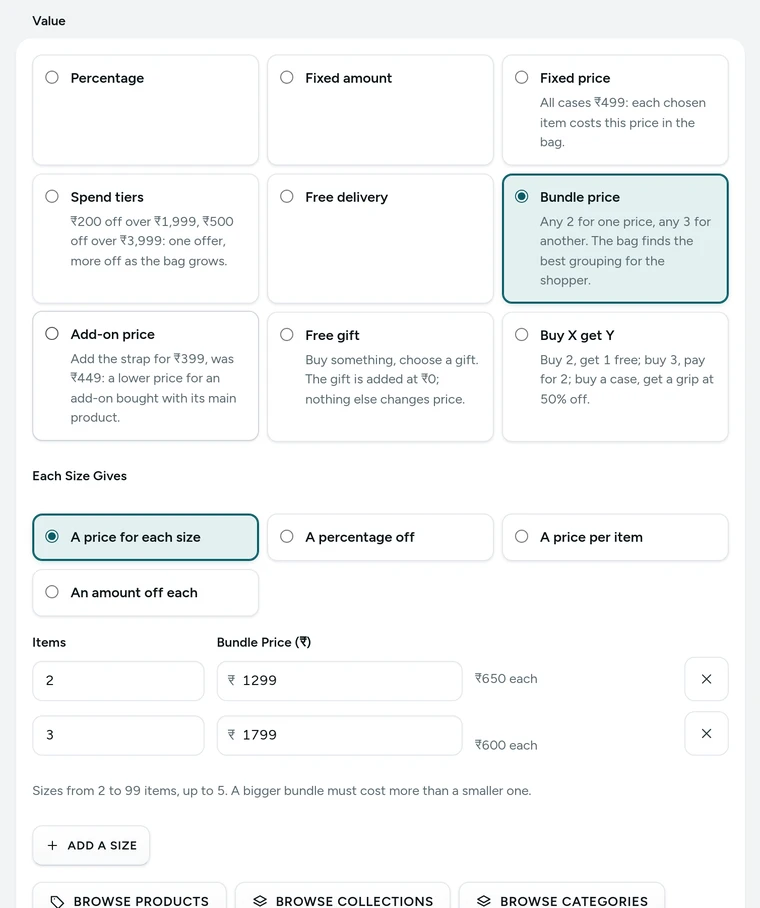
The Value card of Case bundle, any 2 for one price, in the discount editor, on Kosha, a demo store on Mercayo. Name the Item
In the Bundle Sizes card, One Item Is Called and Several Are Called set the words shoppers read ("1 case", "Add 1 more case"). Leave them empty for "item".
Show the Sizes on Product Pages
Tick Show the bundle sizes on product pages. Shoppers choose 1, any 2 or any 3 above ADD TO BAG; the product's own price never changes. In the Theme editor, Theme → Product Page sets Bundle Sizes Layout (a slider that swipes on phones, or a grid of boxes) and whether the slider moves by itself.
Pair Add-Ons With a Product
In a product's editor, the Sold with It card takes up to 6 Add-ons (Pairs Well With). Press SAVE PAIRINGS; the product page shows them at once with an ADD button, and the bag lists add-ons for what is already in it.
Give an Add-On a Special Price
In the same card, SET A SPECIAL PRICE opens a new Add-on price offer with this product and that add-on filled in. Or create one from Discounts: choose the Main Products, then each add-on and its Special Price (₹). An option that already costs the special price or less keeps its own price.
Watch the Bag Do the Rest
The bag applies the bundle and the add-on price by itself. Its tray shows the bundle's progress ("Bundle 1 of 2"), the add-on line says "2 at ₹199 with your item", and removing the main product removes the special price.

Your shoppers
What Your Shoppers See
On the product page, shoppers see Buy More, Pay Less: "1 case ₹799", "Any 2 ₹1,299 · ₹650 each, Save ₹299", with BEST VALUE on the best size. Choosing a size only sets how many ADD TO BAG adds. Pairs Well With shows each add-on with ADD, and an add-on price as "₹199, was ₹299, Special price with this item". In the bag, the tray reads "Bundle 1 of 2 · Add 1 more case: 2 for ₹1,299, just ₹500 more", or "Bundle complete" with the saving.

Settings
Settings You Control
Each one is in your admin. A new store starts with the value shown.
Mercayo
Mercayo's Controls
Mercayo's team can force or lock any of these settings for your store, including the bundle layout, with a reason your admin shows beside it and a record in Mercayo's audit log. A layout Mercayo forced wins over the page editor's own choice for that section. Mercayo never edits your bundles, pairings or prices.
Limits today
Good to Know Before You Start
- A bundle here is an offer on items you already sell; a bundle sold as one product is a fixed bundle, made in Products.
- One bundle is all prices or all percentages, never a mix of the two.
- An add-on price is a set price only (not an amount or a percentage off), and it is automatic, never a code.
- One bag line gets the single best add-on price, not two from different offers.
Questions
About Bundles and Add-Ons
What happens with 5 items in "any 2 for ₹1,299, any 3 for ₹1,799"?
The bag finds the cheapest grouping for the shopper: a 3 and a 2. With 4 items it makes a 3 and leaves one at its own price, waiting for a partner, because that saves the most.
Does choosing "Any 2" on the product page change the price?
No. It only sets how many ADD TO BAG adds. The product's price stays its own, and the bag applies the bundle once the items are in it.
Can a shopper mix designs in a bundle?
Yes. A bundle counts every item it covers, across products, so two different designs make "any 2".
Where do add-ons show?
On the product page under Pairs Well With, up to the number you set in Add-Ons Shown at Most. In the bag, the add-ons of everything in it are offered, leaving out what is already in the bag and what is out of stock.
Can an add-on price and a bundle apply together?
Yes. The add-on price is ticked to combine with product offers when you create it, so the special price promised on the product page holds beside a bundle.
Will the product page show a size the bag would not give?
No. The page shows each size's total as the engine works it out, and leaves out a size the engine would not apply because another offer saves more.
Related
Related Features
- Quantity PricesSet a price per item by quantity, a sale price for chosen products, or more off as the bag grows, all shown on the product page and applied in the bag.
- Buy X Get YBuy 2 get 1 free, buy 3 pay for 2, or buy one item and get another at a lower price, with the bag telling shoppers what to add.
- Cross-Sell RowsFrequently bought together, You may also like, More from the collection and Recently viewed rows on product pages, from your pairings or from real orders.
- Bag and Bag DrawerA bag drawer and bag page with a free-delivery bar, the order note, discount codes, bundle progress, add-ons, a free gift picker and recently viewed products.
- Product PagesPhotos that zoom, options that never guess, delivery dates by PIN code, a buy bar that follows and rows of related products, on every product.
More in Discounts and Offers: Discount Codes · Automatic Offers · Buy X Get Y · Quantity Prices · Free Gifts · One-Time Codes · Combining Offers · Offer Labels and Sale Page · Offer Reports · Gift Cards · Store Credit · Rewards Tiers · Refer and Earn · Affiliates
Try It on Your Own Store
Every feature is in every plan, free for 14 days.
