Offer Labels and Sale Page
Offer Labels, a Sale Page and Honest Countdowns
An offer nobody sees is an offer nobody uses. Labels on product cards, a sale page that lists every offer and a countdown in an offer's last hours tell shoppers what is on, without ever changing your product prices.
- In every plan
- Free for 14 days


Kosha is a demo store on Mercayo. Its products, orders and customers are sample data.
In short
What It Does
Labels on Cards and Product Pages
A live automatic offer for everyone can show a short label on the picture of each product card it covers, and under the price on the product page with "The offer comes off in your bag." The words come from the offer: "Extra 15% off", "Any 2 for ₹1,299", "Buy 3+, save 15%", "4+ at ₹199 each", "Offer price ₹499", "Buy 2 get 1 free", "Free gift". You can write your own, one line of up to 24 characters.
Labels are for offers that are the same for everyone: product offers and gifts for chosen products, with no shopper condition and no days and hours. A card shows one label, the first offer in your priority order. Codes never become labels (shoppers must type them), and order or delivery offers would be on every card, so they belong in your announcement bar. A sold-out card shows no label. Prices on cards and pages always stay the product's own.
The Sale Page
/sale lists every product with an MRP above its price, and the products of live offers for everyone, with the usual filters, sorts and pages. At the top, Offers on Now shows each offer in words, its title, its end date and SHOP THE OFFER. The sale page is a page in the page editor, so you can arrange its sections.
Countdowns, Only with a Real End
An offer with an end date shows "Until 31 Oct". In its last hours (48 to start with), the label on the product page and the sale strip turn into a live countdown, and the bag says "Case bundle ends in 3h 12m." An offer with no end never shows a timer.
The Sale Page, in the Page Editor
The sale page is a page type of its own in the page editor: its default is the page title, Offers on now (each live offer for everyone in words, its title, its end and SHOP THE OFFER to its collection or category) and the product grid, with the listing's filters, sorts and pages. Rearrange it like any page.
Endings in the Bag
In the bag, an applied offer that ends soon says so: "Case bundle ends in 3h 12m." Countdowns only ever show for offers with a real end date, and only in their last hours (48 to start with).
For your store
Why It Matters
Shoppers scrolling a category on their phone decide in a second which card to open. "Any 2 for ₹1,299" on the picture is the reason to open it, and it does not cost you a price change across your catalogue.
A sale page is where festive traffic lands: one link for your ads, your bio and your WhatsApp broadcast, always up to date because it reads the live offers.
And honest countdowns build trust. Fake timers that restart on every visit are easy to spot and make shoppers doubt everything else. Mercayo only counts down to an end you set, and the date shown is the same for everyone.
Step by step
How It Works
Keep Labels On, or Choose
Labels are on for every store: Offer labels on product cards and Offer label on the product page in Settings → Discounts. Each live automatic offer for everyone shows its label without any extra step.
Write an Offer's Own Words
Open the offer and press REPORT. The Card Label card has Show a label for this offer, Label Words (empty uses the words in the preview; one line, at most 24 characters), a Preview, and whether pages show it now or why not ("Codes are never labels: a shopper has to type them"). Press SAVE LABEL; pages show it within a few seconds.
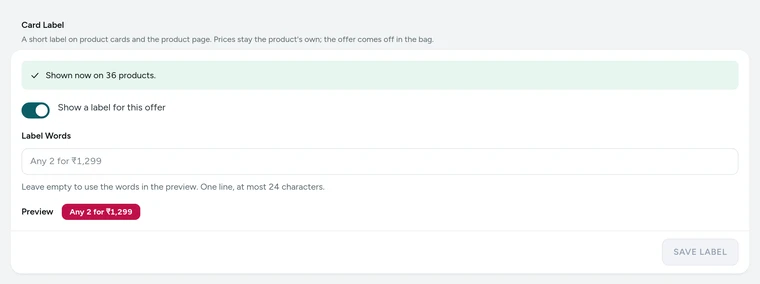
The Card Label card of Case bundle, with its preview, on Kosha, a demo store on Mercayo. Give Offers an End Date
Set Ends in Active Dates for a real countdown. Countdown Starts sets how many hours before the end it appears (1 to 168, 48 to start with).
Link to Your Sale Page
Your store's sale page is at /sale. In Settings → Online Store → Sale Page, Offers on the Sale Page decides whether it also lists products of live offers with the strip at the top. Arrange its sections in the page editor like any page.

Your shoppers
What Your Shoppers See
Shoppers see a small rounded label at the foot of a card's picture ("Any 2 for ₹1,299"), and on the product page the same label under the price with "The offer comes off in your bag." and its end date, or a live countdown in its last hours. At /sale, Offers on Now lists each offer with SHOP THE OFFER, above every product on offer. The prices they see are the products' own; the saving comes off in the bag.

Settings
Settings You Control
Each one is in your admin. A new store starts with the value shown.
Mercayo
Mercayo's Controls
Mercayo's team can switch labels, countdowns or the sale page's offers off for a store, or fix when countdowns start, with a reason your admin shows beside the setting and a record in Mercayo's audit log. Mercayo never writes your label words or changes which offers you run.
Limits today
Good to Know Before You Start
- Offers with days and hours ("weekend 10%") are not labels, because pages are the same at every hour.
- A gift on any order, an order offer and a delivery offer are not card labels; use the announcement bar for them.
- Add-on prices show in Pairs Well With on product pages, not as card labels.
- The admin's label preview uses the English words; your store's own texts show on the storefront.
Questions
About Offer Labels and Sale Page
Can I change the sale page's layout?
Yes. It is a page of its own in the page editor: move the offers strip, add sections, and keep the product grid.
Will a label change my product's price?
No. Card and product-page prices always stay the product's own. The label says what is on, and the bag takes it off.
Which offer's label shows when a product is in two offers?
The first one in your priority order (then the oldest). Change the order in the Priority tab of Discounts.
Why doesn't my code show as a label?
Codes are never labels, because a shopper has to type them. To show a code on product pages, tick Show this code on product pages: it appears under Available Offers with a COPY button.
Is the countdown real?
Yes. It only appears for an offer with an end date, in its last hours, and counts to that end. Before then, shoppers see the date.
Does the sale page update itself?
Yes. It reads the live offers and prices, so an offer that starts appears and one that ends goes, without you editing the page.
Do labels slow down my pages?
Labels are part of the page every shopper gets, worked out on Mercayo's server together with the cards, so pages stay cached and fast. A page is refreshed when an offer starts or ends.
Related
Related Features
- Automatic OffersOffers that need no code: the bag finds them, applies the best for the shopper and says what a little more would unlock.
- Combining OffersChoose for each offer what it combines with, which offers apply alone, and whether the shopper gets the biggest saving or your own order of offers.
- Announcement BarUp to six short messages over your header, each with an optional link and its own start and end time, as a rotating line, a ticker or a closable bar.
- Collections and FiltersEvery list of products gets filters with exact counts, quick chips, sorts, badges and LOAD MORE, the same on collections, categories, sale and search.
- Page SpeedPages are kept ready and refreshed the moment you change something, photos are sized for each screen at full quality, and nothing on the page jumps.
More in Discounts and Offers: Discount Codes · Automatic Offers · Buy X Get Y · Quantity Prices · Bundles and Add-Ons · Free Gifts · One-Time Codes · Combining Offers · Offer Reports · Gift Cards · Store Credit · Rewards Tiers · Refer and Earn · Affiliates
Try It on Your Own Store
Every feature is in every plan, free for 14 days.