Offer Reports
What Every Offer Really Brought In
An offer is an investment, and you should see its return. Each offer's report shows what it cost and what came with it, worked out from your confirmed orders to the paisa, and your offers move between stores as a file.
- In every plan
- Free for 14 days


Kosha is a demo store on Mercayo. Its products, orders and customers are sample data.
In short
What It Does
The Report of One Offer
Press REPORT on any offer to open its report, for a range you choose: Last 7, 30 or 90 Days, This Month, or Custom (up to 366 days, in India time). It shows:
- Four figures: Orders, Sales (the orders' totals, with delivery and tax), Discount Given (on goods and delivery waived) and Average Order.
- Average Order With and Without: this offer's orders beside your other orders in the same days, and the difference in rupees.
- Who Used It: new and returning shoppers (by checkout phone number: new means their first order), and cash on delivery against paid online.
- By Day: orders and discount given each day, as bars and a table.
- Top Products: the 5 products where the offer took the most off.
- Cancelled orders that had used it are counted apart (their uses were given back), and a line gives its lifetime: "Since it started: 214 orders, ₹48,200 given."
EXPORT CSV gives the days with orders, sales and discount, in rupees with paise. Every figure counts only the offer's own share of each order, never the order's whole discount, so two offers on one order are never double-counted.
The List's Summary
The Discounts list opens with the last 30 days: Live Offers (and how many are scheduled), Uses, Given, and Sales with Offers, the totals of orders that carried any offer, each order counted once, without cancelled or unpaid orders.
Import and Export
IMPORT / EXPORT on the list keeps a copy of your offers or moves them to another store. EXPORT JSON carries every offer in full (products and collections by their address, sizes, levels, conditions and labels); EXPORT CSV is one row per offer for a spreadsheet. An import is checked first (CHECK FILE says, row by row, what is ready and what needs fixing) and every offer is saved as a draft for you to check before it goes live.
The Discounts List and Its Numbers
The Discounts list has tabs by where each offer stands now (Active, Scheduled, Expired, Used Up, Draft, Archived), counted over your search and filters. Its summary covers the last 30 days against the 30 before: live and scheduled offers, uses, the amount given (goods and delivery waived) and sales with offers, the totals of the orders that carried any offer, each order counted once, never cancelled orders or unpaid online payments.
The report also holds the offer's Card Label card: whether the label shows on product cards and pages now, or why not (a code, a condition, not live, switched off), with its words and a preview.
For your store
Why It Matters
"Did the Diwali offer work?" is a question every merchant asks and few can answer, because the orders, the discounts and the ad spend live in different places. The report puts the first two together: what the offer gave away, what those orders came to, whether they were bigger than your usual orders, and whether it brought new shoppers or rewarded regulars.
The COD and prepaid split matters in India: an offer that only fills your cash on delivery queue may cost more in returned parcels than it earns. And Top Products shows where the money went, so next season's offer can be sharper.
Import and export save hours when you run more than one store, or when you rebuild last year's festive offers: export once, import as drafts, change the dates.
Step by step
How It Works
Open the Report
In Discounts, open an offer and press REPORT (on a phone it is in the editor's menu). The report opens for the last 30 days.
Choose the Days
Under Date Range, choose Last 7 Days, Last 30 Days, Last 90 Days, This Month, or Custom with From and To, then APPLY. The range is kept in the address, so you can share the exact view with your team.
Read the Comparison
Average Order With and Without puts this offer's orders beside your other orders in the same days: "Orders with this offer were ₹320 bigger on average." With too few orders on either side, it says so instead of guessing.
Export the Days
Press EXPORT CSV for the report by day, with your admin's words as headings and rupees with paise, ready for a spreadsheet.
Move Offers Between Stores
On the Discounts list, press IMPORT / EXPORT. Export JSON from one store; in the other, choose the file, press CHECK FILE, read each row's result, then IMPORT N AS DRAFTS. Open each draft, check it and set it live.
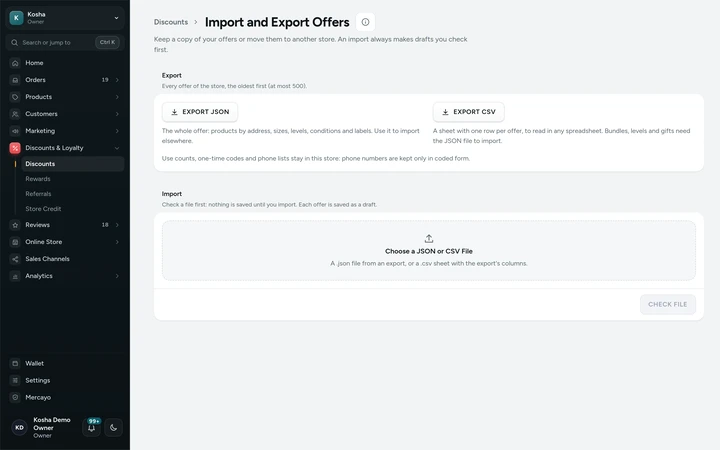
Import and Export Offers, on Kosha, a demo store on Mercayo.

Settings
Settings You Control
All are under Set by Mercayo.
Mercayo
Mercayo's Controls
Mercayo sets how many offers one import file may hold (200 to start with). The report reads only your store's orders: each store's data is kept apart by the database itself, and another store's offer reads as nothing. Use counts, one-time codes and phone lists never leave your store in an export, and an import runs with the rights of the staff member who imports it.
Limits today
Good to Know Before You Start
- The report counts confirmed orders; it does not know your ad spend, so it shows what an offer gave and brought, not its profit.
- Sales figures need the analytics or orders right as well as the discounts right; a role without them sees no figures.
- A CSV import carries simple offers only; bundles, levels, gifts and add-on prices need the JSON file.
- An import never overwrites: a code already used in the store, or twice in the file, is refused.
- An export holds at most 500 offers.
Questions
About Offer Reports
Why is my offer's label not showing?
The report's Card Label card says why: labels are for live automatic offers for everyone, so a code, a shopper condition, days and hours, or a label switched off keeps it off the cards.
What counts as a sale with this offer?
A confirmed order that used the offer, at the order's total with delivery and tax. Cancelled orders are left out and counted apart, and an unpaid online order is not counted.
How is "new shopper" decided?
By the phone number at checkout: an order is new when it was that number's first order in your store.
If two offers are on one order, is the order counted twice?
Each offer's report counts its own share of the discount, and the list's Sales with Offers counts each order once, however many offers it carried.
Can I import offers from another platform?
You can import a CSV with the export's columns: simple codes and automatic offers with their value, minimum and dates. Bundles, levels and gifts need Mercayo's JSON file.
Are imported offers live straight away?
No. Every imported offer is saved as a draft, so nothing reaches shoppers until you open it and set it live.
Which staff can see the report?
Staff with the right to see discounts, plus the analytics or orders right for the sales figures. Roles are set in Settings → Staff.
Does Discount Given include free delivery?
Yes. It is what the offer took off the goods plus any delivery charge it waived, for the offer's own share of each order.
Related
Related Features
- Discount CodesMake codes for a percentage or an amount off, free delivery and more, with minimums, dates, limits and rules for who may use them.
- Automatic OffersOffers that need no code: the bag finds them, applies the best for the shopper and says what a little more would unlock.
- ReportsSales by day, month, product, category, state and channel, discounts, landing pages, GST by rate, HSN summary, refunds, customers and stock, as CSV.
- Order AttributionSee the channel, device, referring site, campaign and first page behind each order, and sales by channel, without cookies or tracking shoppers.
- Staff and RolesInvite people by email or phone, give them roles with exactly the rights they need, switch access off at once, and hand over ownership safely.
More in Discounts and Offers: Discount Codes · Automatic Offers · Buy X Get Y · Quantity Prices · Bundles and Add-Ons · Free Gifts · One-Time Codes · Combining Offers · Offer Labels and Sale Page · Gift Cards · Store Credit · Rewards Tiers · Refer and Earn · Affiliates
Try It on Your Own Store
Every feature is in every plan, free for 14 days.