Combining Offers
Decide Exactly Which Offers Stack
A bundle, a sitewide sale, a welcome code and free delivery can all be live at once. Combining rules decide which of them a bag gets together, so shoppers get a fair deal and you never give two discounts you did not mean to.
- In every plan
- Free for 14 days


Kosha is a demo store on Mercayo. Its products, orders and customers are sample data.
In short
What It Does
Every offer belongs to one kind:
| Kind | Offers |
|---|---|
| Product offers | bundles, quantity prices, fixed prices, add-on prices, buy X get Y, money off chosen items |
| Order offers | money off the whole order, spend tiers |
| Free delivery | free or cheaper delivery |
| Gift offers | a free gift (changes no price) |
In each offer's Combinations card you tick the kinds it combines with. The rule is simple and strict: two offers apply together only when each ticks the other's kind. With nothing ticked, an offer competes alone and the shopper gets the bigger saving. An offer marked Applies on its own is exclusive: when it applies, no other offer, gift or add-on price does.
Two more rules keep it sane:
- One product offer per item. Where two product offers would touch the same item, one takes it and the other leaves it alone.
- A fixed order of applying. Product offers first, then order offers on what is left, then free delivery; each works on what the one before it left. GST is worked out on each line after all its discounts.
When offers compete, your store picks the winner in one of two ways (Which Offers Win): the biggest saving for the shopper (the default), alone or together, or priority: your order in the discounts list, where the first offer that applies is taken and each next one joins when it combines with those before it.
For your store
Why It Matters
Without clear rules, offers either never stack (and a shopper with a welcome code loses the festive sale) or always stack (and a bundle, a sitewide 20% and a code eat your margin on the same item). The per-kind ticks let you say exactly what you mean: "free delivery may come on top of anything", "this bundle combines with order offers but not with other product offers", "this clearance price applies on its own".
"Biggest saving" is the fair default: the shopper never needs to work out which code to use, and support never needs to explain why the cheaper combination was chosen. Priority is there for merchants who plan a season's offers in a strict order.
And everything is visible: the bag names each offer that applied, says when one did not combine, and Try a Bag shows you the answer before your shoppers see it.
Step by step
How It Works
Tick What Each Offer Combines With
In the discount editor, the Combinations card says what kind the offer is ("This is a product offer") and has three ticks under Combines With: Product offers, Order offers, Free delivery. Tick the kinds it may apply with.
Mark an Offer as Exclusive
Tick Applies on its own for an offer that should never share a bag: when it applies, no other offer, gift or add-on price does. An exclusive offer cannot tick anything else.
Choose How Offers Win
In Settings → Discounts, Which Offers Win is best (the shopper gets the biggest saving) or priority (your order decides). Combining Offers switched off gives every bag the single best offer. Codes per Bag lets shoppers use up to 3 codes, each combining with the others.
Set Your Priority Order
In Discounts, the Priority tab lists your live and scheduled offers in the order they compete. Drag them, or move them with the arrow buttons (on a phone or with the keyboard), and press SAVE ORDER. Each row says what the offer combines with. With "best", this order only settles a tie.
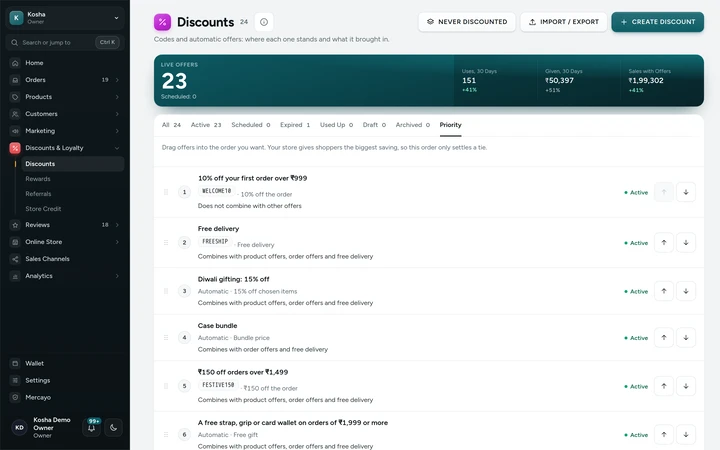
The Priority tab of the Discounts list, on Kosha, a demo store on Mercayo. Check a Bag
Try a Bag in any offer's editor prices a bag you choose and lists every offer it looked at: Applied, Not combined ("Would save ₹120 alone, but does not combine with the offers that save more together"), Waiting, Does not apply, or Saves nothing, with the reason.

Your shoppers
What Your Shoppers See
In the bag, each offer that applied is its own row with its title and saving. Under them, a quiet line names the biggest offer that did not combine: "Weekend: 10% off grips and wallets does not combine with the offers on your bag." The code box lists every code with its saving or its reason ("FESTIVE150 cannot be used with the offer already on your bag, which saves you more.") and a REMOVE for each.
Settings
Settings You Control
All are under Settings → Discounts → Discounts.
Mercayo
Mercayo's Controls
Mercayo's team can switch combining off for a store, fix which way offers win, or limit codes per bag, each with a reason your admin shows beside the setting and a record in Mercayo's audit log. Mercayo also caps how many automatic offers one store may have live at once (100 to start with), since every bag is checked against each. Mercayo never changes your offers' ticks or your priority order.
Limits today
Good to Know Before You Start
- An item gets at most one product offer: two product percentages never stack on the same item.
- Combinations are found by starting from each offer and adding the others in order of saving, not by trying every possible set.
- The priority order covers codes and automatic offers together; there is no separate "codes first" rule.
- A shopper may use at most 3 codes on one order.
Questions
About Combining Offers
Why didn't my sitewide 10% apply on top of the bundle?
Both must tick each other's kind. The bundle is a product offer and the sitewide 10% an order offer: the bundle must tick Order offers and the 10% must tick Product offers. Try a Bag shows you which tick is missing.
Can two product offers apply to the same item?
No. Each item gets one product offer at most. A product percentage and a bundle on different items of the same bag can both apply.
What does the shopper get on a tie?
With "best", a plan with more of the shopper's own codes wins a tie, else the single offer (fewer uses spent). Between single offers: automatic before a code, then your priority order, then the oldest.
Does free delivery combine with everything?
Only if you tick it. Free delivery is its own kind: tick Free delivery on the other offers and tick their kinds on the free delivery offer.
What does "Applies on its own" do to gifts and add-on prices?
Nothing else applies with an exclusive offer: no other offer, no gift and no add-on price.
Is the order of applying fixed?
Yes: product offers, then order offers on what is left, then delivery. So 15% off the order on top of a bundle is 15% of the bundle price, not of the full price.
Related
Related Features
- Automatic OffersOffers that need no code: the bag finds them, applies the best for the shopper and says what a little more would unlock.
- Discount CodesMake codes for a percentage or an amount off, free delivery and more, with minimums, dates, limits and rules for who may use them.
- Bundles and Add-OnsAny 2 for ₹1,299, 3 or more for 15% off, and add-ons at a special price with the main product, chosen on the product page and applied in the bag.
- Free GiftsOffer a free gift above a spend or a number of items: shoppers choose it in the bag, its stock is checked, and it ships as its own ₹0 line.
- Offer ReportsA report for each offer from confirmed orders: orders, sales, what it gave, average order with and without it, who used it and its top products.
More in Discounts and Offers: Discount Codes · Automatic Offers · Buy X Get Y · Quantity Prices · Bundles and Add-Ons · Free Gifts · One-Time Codes · Offer Labels and Sale Page · Offer Reports · Gift Cards · Store Credit · Rewards Tiers · Refer and Earn · Affiliates
Try It on Your Own Store
Every feature is in every plan, free for 14 days.
