Discount Codes
Discount Codes With the Rules You Need
A code is the simplest offer there is: a word a shopper types to save money. Mercayo lets you make one in a minute, and then gives you every rule a real sale needs, from a minimum order to the hours it works.
- In every plan
- Free for 14 days


Kosha is a demo store on Mercayo. Its products, orders and customers are sample data.
In short
What It Does
A discount code is a word your shoppers type in the bag, such as WELCOME10 or DIWALI500. It is one of the two ways to give an offer in Mercayo; the other is an automatic offer that applies by itself.
A code can give:
- a percentage off the whole order or chosen items, with an optional "up to ₹" cap;
- a fixed amount off the order (up to ₹1,00,000), or off each chosen item;
- free delivery, or an amount or percentage off delivery, or delivery at a set price;
- and the richer kinds: a fixed price or prices by quantity, a bundle price, buy X get Y and a free gift.
Around that value, each code takes the rules you need: a minimum amount or number of items, start and end dates and times (India time), a limit on total uses, uses per customer, and Who Can Use It: first orders only, signed-in shoppers, a reward tier or higher, a list of phone numbers, paid online or by cash on delivery only, deliveries to chosen states or PIN codes, and chosen days of the week or hours of the day. Exclusions leave out products, collections, categories, tags, or items already on sale.
Every code is priced on Mercayo's server by one engine, the same one that prices the bag, checkout, the order and the GST invoice, so the saving a shopper is shown is the saving they get, to the paisa.
For your store
Why It Matters
Codes are how most Indian brands talk to shoppers outside the store: on Instagram, in a WhatsApp message, on a card in the parcel, with an influencer. A code tells you which of those worked, and it gives the shopper a reason to order today.
The rules are what keep a code from costing you more than it earns:
- A minimum order keeps a ₹200-off code from being used on a ₹250 bag.
- First orders only turns a code into a welcome offer, counted by the phone number at checkout, so it works for guests too.
- Paid online only lets you reward UPI and card payments instead of cash on delivery, with the saving shown in the bag before the shopper chooses.
- Delivery areas and days and hours let you run a weekend sale or a city launch without a second store.
- Uses per customer and total uses put a ceiling on any campaign.
And because a shopper is always told why a code does not work ("Add ₹250 more to use SAVE10"), a code never becomes a support ticket.
Step by step
How It Works
Create the Discount
Open Discounts and press CREATE DISCOUNT. Under Method, choose Discount code and type the code, or press GENERATE for a random one. Codes are letters, digits, - and _, up to 40 characters, and shoppers can type them in any case. Give it a Title: shoppers see it in the bag and on their order, like "10% off your first order".
Choose What It Gives
Under Value, pick a percentage, a fixed amount, free delivery or one of the other kinds, and whether it Applies To the whole order or chosen products, collections and categories. For a percentage you can add Up To (₹), the most it takes off one order.
Set the Minimum and the Limits
Minimum Purchase takes an amount or a number of items, read on the eligible items before any discount. Limits takes Total Uses (empty for no limit) and Uses per Customer (1 to 99), counted by the phone number at checkout and the signed-in account. A cancelled order gives its use back.
Decide Who Can Use It
Who Can Use It adds conditions, all of which must hold: first order only, signed-in shoppers only, a reward tier or higher, only these phone numbers (upload a CSV file or paste them; numbers are stored only in a coded form and never shown again), payment, delivery area (states or the first digits of PIN codes) and days and hours. Exclusions leaves items out: "everything except these".
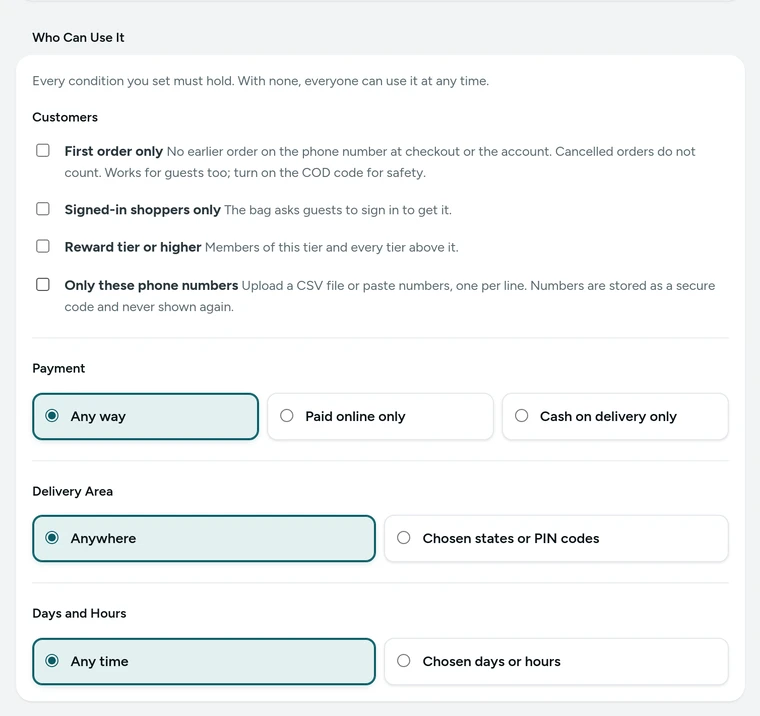
Who Can Use It in the discount editor, for the WELCOME10 code on Kosha, a demo store on Mercayo. Pick the Dates and Save
Active Dates take a start and an optional end, in India time. The Summary card writes the whole offer in one sentence, so you can read back exactly what you made. Status is Active, Draft (a shopper's code reads as unknown) or Archived (it reads as ended). Press SAVE. To make a similar code later, open it and press DUPLICATE.
Share It
Put the code in your messages, ads and posts. A link to any page of your store with ?code= and the code at the end (for example your home page with ?code=WELCOME10) puts the code on the shopper's bag and says at once whether it works. Tick Show this code on product pages to list it under Available Offers on the products it applies to, with a COPY button.

Your shoppers
What Your Shoppers See
Shoppers type a code in the bag: the drawer's DISCOUNT CODE button or the bag page's "Have a discount code?". The answer comes at once, in plain words: "Applied. You save ₹150.", or why not: "Add ₹250 more to use FESTIVE150.", "FESTIVE150 has ended.", "Pay online at checkout to use SAVE50 and save ₹50." A code in a link arrives already on the bag. On a product page, codes you chose to show are listed under Available Offers with their conditions ("On orders over ₹1,499", "Until 30 Nov") and a COPY button. The saving shows as its own line in the bag, at checkout, on the order and on the GST invoice.

Settings
Settings You Control
Each one is in your admin. A new store starts with the value shown.
Mercayo
Mercayo's Controls
Every discount setting follows Mercayo's one rule: Mercayo's override for your store if there is one, then your own choice, then the default. Mercayo's team can, for one store, switch discounts off, or force or lock any of the switches above (for example keep phone-list offers off), always with a written reason your admin shows beside the locked setting, and every change is kept in Mercayo's audit log. Mercayo also sets how many phone numbers one offer's list may hold (5,000 to start with). Mercayo never edits your codes, and the phone numbers on a list are stored only in a coded form that nobody can read back.
Limits today
Good to Know Before You Start
- Codes are typed in the bag (the drawer or the bag page); checkout shows the codes already on the bag but has no code box of its own.
- A payment condition knows online payment or cash on delivery; there are no offers for one bank, card or UPI app.
- There are no bag conditions such as a maximum subtotal, a weight, or "must also contain", and no conditions on a shopper's past orders beyond the first order.
- An offer for some shoppers only (first order, signed in, a tier, a list, a payment, a delivery area) is never shown on product pages, because those pages are the same for everyone.
- Importing your own list of codes is not built; Mercayo makes one-time codes for you instead.
Questions
About Discount Codes
Are codes case-sensitive?
No. Codes are stored in capitals, so welcome10, Welcome10 and WELCOME10 are the same code. A code can be 1 to 40 letters, digits, - or _, and it is unique in your store.
How do I make a welcome code for first orders?
Create a code, tick First order only under Who Can Use It, and set Uses per Customer to 1. A first order is checked by the phone number at checkout and the signed-in account, so guests can use it too; switching on the COD confirmation code makes sure the number is real.
Does a discount reduce the GST?
Yes. A discount shown on the invoice reduces the taxable value, so GST is worked out on each line after its discount. If your prices exclude GST, the discount comes off before tax is added.
Can a shopper use two codes on one order?
Only if you allow it. Codes per Bag is 1 to start with; raise it to 2 or 3, and tick each code's Combines With boxes for the kinds it may join. See combining offers.
What stops people guessing codes?
The store answers at most 30 code tries from one address every 10 minutes. A draft code, or another store's code, reads exactly like one that does not exist.
What happens if a code ends while a shopper is at checkout?
Checkout prices the bag again when the order is placed. If the code no longer applies, the shopper is told in plain words and sees the new total before ordering, so nobody pays a price they did not see.
Can I test a code before I share it?
Yes. The Try a Bag card in the editor prices a bag you pick (with a phone, payment, place and the code) through the real engine, including your unsaved changes. Nothing is saved and no use is counted.
Related
Related Features
- Automatic OffersOffers that need no code: the bag finds them, applies the best for the shopper and says what a little more would unlock.
- One-Time CodesMake up to 10,000 single-use codes for one discount, for influencers, printed cards or campaigns: each works once, and you see which order used it.
- Combining OffersChoose for each offer what it combines with, which offers apply alone, and whether the shopper gets the biggest saving or your own order of offers.
- Offer ReportsA report for each offer from confirmed orders: orders, sales, what it gave, average order with and without it, who used it and its top products.
- Bag and Bag DrawerA bag drawer and bag page with a free-delivery bar, the order note, discount codes, bundle progress, add-ons, a free gift picker and recently viewed products.
More in Discounts and Offers: Automatic Offers · Buy X Get Y · Quantity Prices · Bundles and Add-Ons · Free Gifts · One-Time Codes · Combining Offers · Offer Labels and Sale Page · Offer Reports · Gift Cards · Store Credit · Rewards Tiers · Refer and Earn · Affiliates
Try It on Your Own Store
Every feature is in every plan, free for 14 days.