Order Attribution
Know How Each Order Found You
Was it the Instagram reel, the Google search or the WhatsApp message to your customers? Each order in your admin says how the shopper arrived on the visit in which they ordered, and Analytics adds those up into sales by channel.
- In every plan
- Free for 14 days


Kosha is a demo store on Mercayo. Its products, orders and customers are sample data.
In short
What It Does
Your store notes, for every visit, where it came from: the referring site (only its name, such as instagram.com, never the full address), the campaign tags of the link if it had any (utm_source, utm_medium, utm_campaign), whether it came from an ad click, the first page, the device (phone, tablet or computer) and how many pages were seen. When a shopper reaches the thank-you page, their visit is linked to the order they just placed.
Each visit gets one channel:
| Channel | When |
|---|---|
| Paid ads | A link tagged as paid (cpc, ppc, paid, ads, display, retargeting, affiliate…) or carrying an ad click id from Google or Meta |
| A link tagged as your own message (email, newsletter, sms, whatsapp_message) | |
| Social | A link tagged as social, or a visit from Instagram, Facebook, WhatsApp, YouTube, X, Pinterest, LinkedIn, Reddit, Snapchat, Telegram, Threads, ShareChat or Moj |
| Search | A visit from Google, Bing, DuckDuckGo, Yahoo, Yandex, Baidu, Ecosia or a few others, or a link tagged organic |
| Another site | Any other site |
| Direct | No site and no tags: a typed address, a bookmark, or an app that sends no referrer |
You see it in three places:
- On the order: the How They Found You card shows Channel, Device, Came From, Campaign, First Page and Pages Viewed.
- In Analytics: the Traffic tab shows visits, and orders from visits, by channel and by device, with landing pages, referring sites and campaigns.
- In Reports: Sales by Channel gives visits, orders and sales by channel and device for any dates; Landing Pages gives visits, bags, checkouts and orders by first page.
For your store
Why It Matters
Small brands in India sell across Instagram, WhatsApp, Google and marketplaces at once, and spend real money on reels, influencers and ads. Without attribution, every decision about that money is a guess.
Here the answer is on each order and in one report: how many orders and how much in sales came from social, from search, from your own messages and from paid ads, for any dates. Tag the links you share (utm_campaign=diwali-reel) and each campaign gets its own line.
It is also built to be fair to your shoppers. There is no cookie and nothing stored in their browser; the visitor is a daily anonymous code that cannot be followed from one day to the next. You learn how your marketing performs without following anyone.
Step by step
How It Works
Keep Visit Recording On
Attribution comes from the store's visit recording, which is on for every new store: Settings → Admin and Reports → Analytics → Record Store Visits. With it off, orders show no source.
Tag the Links You Share
Add campaign tags to the links you put in ads, reels, influencer posts and messages, for example yourstore.in/collections/festive?utm_source=instagram&utm_medium=social&utm_campaign=diwali-reel. The campaign name appears on the order and in Analytics. Links with an ad click id from Google or Meta count as paid ads by themselves.
Read It on the Order
Open any order. The How They Found You card shows the channel, the device, the site it came from, the campaign, the first page and how many pages were seen. If no visit was linked, it says so: "No visit was linked to this order (placed before tracking began, or from a blocked browser)."
Add It Up in Analytics
Open Analytics → Traffic. Visits by Channel and Visits by Device show where visits came from, and the table under them adds the orders and sales those visits ended in. Landing Pages, Sites Sending Visits and Campaigns list the details from the visits of the last 30 days.
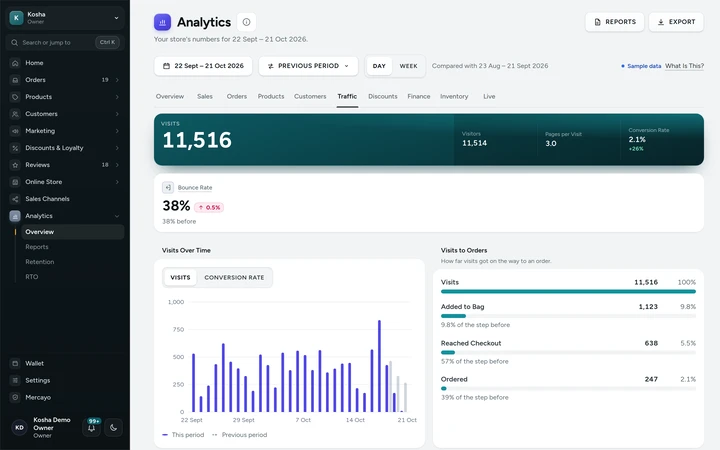
The Traffic tab: visits to orders, channels and devices, on Kosha, a demo store on Mercayo with sample visits. Download Sales by Channel
In Analytics → Reports, Sales by Channel gives visits, orders and sales by channel and device for any dates, as a CSV for you or your marketing partner. See reports.

Your shoppers
What Your Shoppers See
Shoppers notice nothing: no banner for it, no cookie, nothing stored on their phone, and the page is the same cached page every shopper gets. A small note is sent in idle time after each page has loaded, so it never slows a page down.
Settings
Settings You Control
All are under Settings → Admin and Reports → Analytics.
Mercayo
Mercayo's Controls
Mercayo's team can force visit recording off for a store, with a written reason that is logged. Mercayo keeps no address, browser details or cookie for any visit: the anonymous visitor code is made with a random daily key that is deleted after two days, so neither you nor Mercayo can turn it back into a person. Each store's visits are kept apart by the database itself.
Limits today
Good to Know Before You Start
- An order takes the source of the visit in which it was placed; a shopper who first came from Instagram and returned later by typing your address counts as Direct.
- An order is linked only when the shopper's browser reaches the thank-you page within an hour of ordering; some blocked browsers send nothing.
- The first page, referring site, campaign and pages viewed are kept with the visit for 30 days; after that an order keeps its channel and device only.
- Ad spend is not brought in, so there is no cost per order or return on ad spend.
- Visits by your own team browsing the store are counted like shoppers' visits.
Questions
About Order Attribution
Does this need a cookie consent banner?
No consent is needed for it: it uses no cookie and no browser storage and keeps no address or device detail. Ad pixels from Meta or Google are a different matter and wait for the shopper's consent; see ad pixels.
How do I see orders from WhatsApp?
Visits from WhatsApp links count as Social. Links you send in your own messages to customers, tagged utm_medium=whatsapp_message (or email, newsletter, sms), count as Email, so your own messages are told apart from shares by others.
Why do some orders say no visit was linked?
The order was placed before visit recording began, the shopper's browser blocked the small note the store sends, or the thank-you page was not reached within an hour (for example after a very slow payment).
Are bots counted as visits?
No. Browsers that say they are bots, crawlers, link previews or automated browsers are left out, as are your own preview links, and very fast repeated hits from one address are dropped.
Which campaign tags are read?
utm_source, utm_medium and utm_campaign on the first page of a visit, plus the ad click ids Google and Meta add to ad links. Other tags are ignored.
Related
Related Features
- Store AnalyticsTen tabs of sales, orders, products, customers, traffic, discounts, GST, stock and live numbers, each with one clear definition and compared over time.
- ReportsSales by day, month, product, category, state and channel, discounts, landing pages, GST by rate, HSN summary, refunds, customers and stock, as CSV.
- Ads Pixels and Analytics TagsAdd your Meta pixel, Google Analytics 4, Google Ads, Pinterest and Clarity tags by their ids; they load only after shoppers agree.
- Privacy and ConsentA cookie banner written for India's DPDP Act, marketing tags only after consent, double opt-in for subscribers, and a Delete My Account that really deletes.
- OrdersStatus tabs, saved views your team shares, search by number, phone or name, a money summary, bulk actions, and an order page with one clear next step.
More in Analytics: Store Analytics · Live View · Reports · Home Dashboard · Product Insights
Try It on Your Own Store
Every feature is in every plan, free for 14 days.
