Rewards is a tiered loyalty programme: shoppers move up tiers (for example Member, Silver, Gold) as they spend, and each tier pays a percentage back as store credit on every delivered order, with perks such as free delivery. It turns one-time buyers into regulars without discounting every order. Open Customers › Rewards: "Spend tiers that pay cashback into store credit, and the customers on each one." Seeing it needs the customers right; changing tiers needs the right to edit rewards tiers.
Turning Rewards On
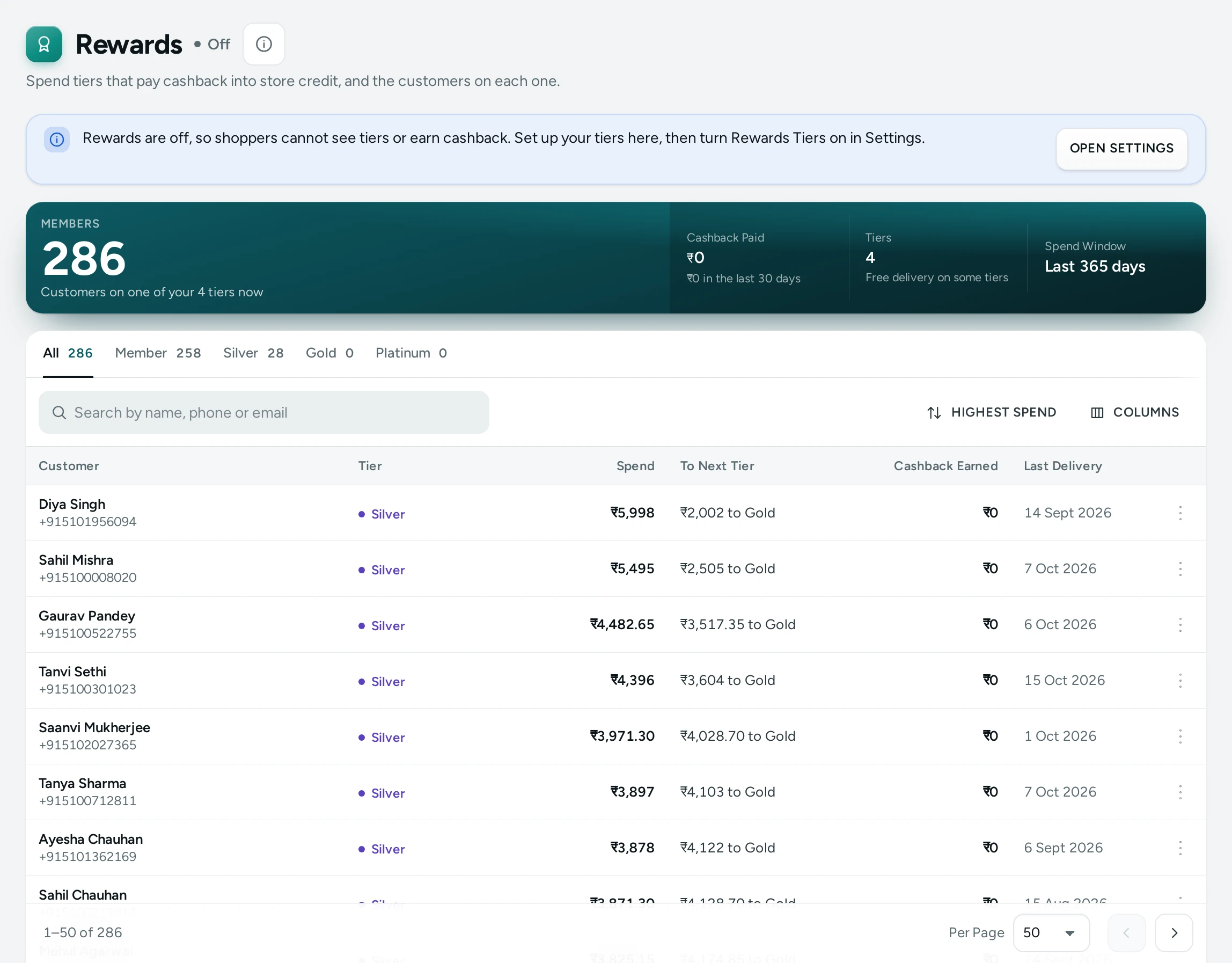
Rewards are off for a new store. While off, the screen says: "Rewards are off, so shoppers cannot see tiers or earn cashback. Set up your tiers here, then turn Rewards Tiers on in Settings." with OPEN SETTINGS. Set up the tiers first, then switch on Rewards Tiers in Settings › Rewards and Credit.
Cashback is paid as store credit, so Store Credit must be on too. If it is not: "Cashback is paid as store credit, and Store Credit is off. Turn it on in Settings so cashback can be paid."
The Totals
| Number | Meaning |
|---|---|
| Members | Customers on a tier now, worked out from what they spent on delivered orders in the spend window, less refunds. Shown even while rewards are off. |
| Tiers | The levels a customer can reach, up to 8 |
| Cashback Paid | Store credit paid as cashback since rewards began, less what was taken back after refunds and returns, with the last 30 days |
| Spend Window | Which delivered orders count toward a tier (Last 365 days, or Lifetime) |
Set Up Your Tiers
Under Tiers, press ADD A TIER, or START FROM A TYPICAL SET to begin with four ready tiers you can change:
| Tier | Starts at | Cashback | Free Delivery Above | Early Access |
|---|---|---|---|---|
| Member | ₹0 | 1% | (no perk) | No |
| Silver | ₹5,000 | 2% | ₹1,499 | No |
| Gold | ₹15,000 | 3% | ₹999 | Yes |
| Platinum | ₹40,000 | 5% | ₹0 (every order) | Yes |
Each tier has:
| Field | What It Does |
|---|---|
| Name | What shoppers see, up to 40 letters; each tier's name is different |
| Starts at (₹) | The spend at which a shopper reaches it. Each tier starts higher than the one before. |
| Cashback (%) | Paid back as store credit on each delivered order, 0 to 50 (decimals like 2.5 allowed) |
| Free Delivery Above (₹) | A perk: free delivery for this tier above the amount; 0 for every order; empty for no perk |
| Early access to new arrivals | Marks the tier for early access |
| Colour | The tier's colour on the shopper's Rewards page, like #b8860b; empty for your store's accent |
| Perks in Your Words | Up to 5 lines of up to 80 letters, such as Birthday gift; shown to shoppers only, they change nothing Mercayo charges or pays |
Each tier shows a preview in words, for example "From ₹5,000 spent: 2% back as store credit on each delivered order. Free delivery above ₹1,499. Counted over 365 days." Press SAVE TIERS: "Tiers saved. Shoppers see the new tiers now." Problems are marked in red ("Please fix the tiers marked in red, then save.").
How Customers Earn
The How Customers Earn card sums up your rules:
- A shopper is on the highest tier whose starting spend they have reached.
- Spend counts once an order is delivered, less anything refunded, within the spend window ("Spend counted: delivered orders in the last 365 days, less refunds.").
- Cashback is paid into store credit when an order is delivered, and taken back when the order is refunded or returned.
- A cap per order, when you set Most Cashback on One Order ("Cashback is capped at … an order."); otherwise "There is no cap on cashback per order."
Members
The Members list (tab per tier, or All) shows each Customer, their Tier, Spend, To Next Tier ("₹2,002 to Gold", or Top tier), Cashback Earned and Last Delivery. Search by name, phone or email; sort by Highest spend, Closest to next tier, Recent delivery or Name A–Z.
Change a Customer's Tier by Hand
Press Change tier on a member: "Priya is on Silver, with ₹7,400 counted." Pick a Tier, give a Reason (at least 3 letters) and press SAVE TIER. "The shopper keeps at least this tier, whatever they spend. They do not see your reason." Choose No tier set by hand to remove it. The change is in their Tier History.
Recent Tier Changes
The latest moves: Reached …, Moved up to …, Moved down to …, Left …, Set to … by staff, Hand-set tier removed.
Settings
In Settings › Rewards and Credit:
| Setting | What It Does | Default |
|---|---|---|
| Rewards Tiers | Shoppers move up tiers as they spend and earn store credit back on delivered orders | Off |
| Days of Spending That Count | A tier is earned from what a shopper spent in this many days; 0 counts all time | 365 |
| Most Cashback on One Order | Leave empty for no limit | No limit |
What Shoppers See
Signed-in shoppers see their tier, what it gives, and how much more spend reaches the next one in their account, and their cashback arrives as store credit after delivery.
Questions
Do cancelled or refunded orders count?
No. Spend counts on delivery, less refunds, and cashback on a refunded or returned order is taken back.
Can a shopper drop a tier?
Yes, with a spend window: when older orders fall out of the window, their counted spend falls. A tier set by hand is kept whatever they spend.
Is cashback real money?
It is store credit: spendable in your store, not withdrawable. See Store Credit.