Local Pickup
Local Pickup: Click and Collect From Your Store
Some shoppers live round the corner, some want it today, some would rather not pay for delivery. With Local Pickup they choose Pick Up at checkout, you tell them when it is ready, and they collect it at your counter.
- No fee on your orders, on every plan
- Free for 14 days

Kosha is a demo store on Mercayo. Its products, orders and customers are sample data.
In short
What It Does
A pickup place is one of your stock locations (your shop, studio or warehouse) with an address, a PIN code, opening hours and a line on how to collect. Offer pickup at as many as you like.
At Checkout
With Local Pickup on, checkout's delivery step offers Delivery or Pick Up. Pick Up lists your places with their address and hours; the one chosen costs nothing to deliver. The shopper still gives their own address for their bill. Your PIN code rules never stop a pickup.
GST is charged where the goods are handed over (the pickup place), so a shopper from another state collecting in yours pays CGST and SGST, not IGST.
Pay at pickup: with it on (and cash on delivery on for your store), the shopper may pay in cash when they collect. Your COD limit and fee apply as usual.
The Order's Steps
| Step | What you press | What the shopper gets |
|---|---|---|
| The order arrives | ACCEPT when you start | The usual order email |
| Packed | MARK READY FOR PICKUP | "Ready to collect": the place, hours, how to collect, how long you keep it, the cash to bring |
| Collected | MARK COLLECTED | "Collected" (a cash order is marked paid; its invoice follows) |
A pickup order never gets a courier label or tracking, and the shipped and delivered messages are not sent for it. The order page shows a Local Pickup card with the place and the steps; the packing slip says Pick up at; the Mercayo Admin App shows the place and the next step in its dock. The orders list, on the computer and the phone, reads Ready for Pickup and Collected. The shopper's tracking page shows the place, its hours and whether it is ready.
Orders Your Team Makes, and Business Orders
A draft order lists your pickup places beside the delivery options, priced the same way (free, GST at the place), and becomes a pickup order when it is made. A business quote offers them too, and a business buying on credit (pay later) can choose Pick Up at checkout.
Orders Not Collected
Two switches, both off to start with:
- Remind to Collect: once, a set number of days after an order is ready (3 to start with), the shopper is emailed that it is still waiting (and sent the Ready for Pickup SMS again while pickup SMS is on).
- Cancel When Not Collected: once the days you keep an order are over, Mercayo cancels it exactly as your team's CANCEL would: its stock goes back, a paid order is listed in money owed back, its invoice gets a credit note and the shopper is told. The Ready and reminder emails then say the last day.
For your store
Why It Matters
Delivery is the most expensive part of a small order, and some shoppers would gladly come to you: they live nearby, they want it today, or they would rather see it before they take it home. A furniture shop, a bakery, a jeweller or a pharmacy can offer the counter as a choice without a second system: the order, its stock, its invoice and its messages are the same ones you already use, and nothing waits for a courier.
Step by step
How It Works
Set Up a Pickup Place
In Settings → Delivery Rates and PIN Codes → Local Pickup, press SET UP PICKUP on one of your locations (add a location in Inventory first if you need one). Give its address, city, PIN code, phone, opening hours and how to collect, and tick Offer pickup here.
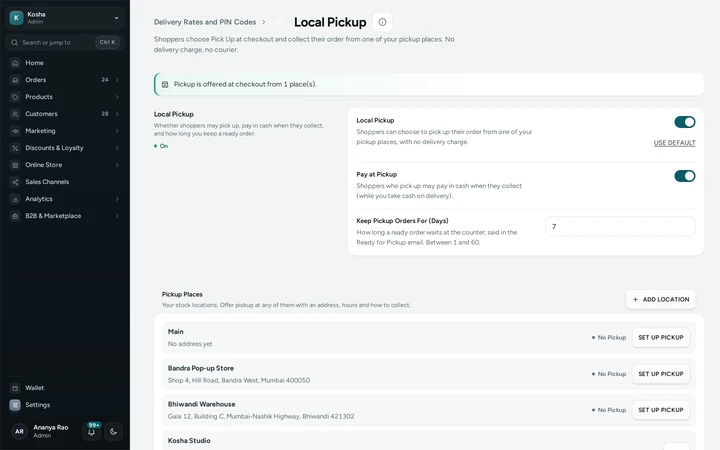
Local Pickup in a store's delivery settings, with its pickup place. Switch It On
Switch Local Pickup on and press SAVE. Pay at Pickup is on to start with; Keep Pickup Orders For says how long a ready order waits (7 days to start with) and is said in the email.
Mark It Ready, Then Collected
On the order, press ACCEPT, then MARK READY FOR PICKUP once it is packed: the shopper is emailed. When they collect it, press MARK COLLECTED.

Your shoppers
What Your Shoppers See
At checkout the shopper chooses Delivery or Pick Up, sees each place with its address and hours, and pays nothing for delivery. They are emailed when it is ready and when it is collected; their tracking page shows the place and its hours.
Settings
Settings You Control
Each one is in your admin. A new store starts with the value shown.
Mercayo
Mercayo's Controls
Each setting can be set or limited by Mercayo for one store, like any other setting, with a reason your admin shows. Pickup places and pickup orders belong to your store only.
Limits today
Good to Know Before You Start
- The stock of a pickup order comes from your online stock, like every order; move stock to the counter with a transfer.
- Pickup places are in India (an India Post PIN code), so a market abroad offers delivery only.
- WhatsApp sends nothing of its own for these steps (the order cancelled message excepted); email and (if on) SMS do.
- A cancelled paid order's refund is sent from the order, as for any cancel.
Questions
About Local Pickup
Does the shopper still give an address?
Yes, their own, for their bill. Nothing is delivered there.
Which GST applies to a pickup order?
The place of supply is the pickup place, where the goods are handed over, so the tax follows its state.
Can the shopper pay in cash?
Yes, with Pay at Pickup on and cash on delivery on for your store. Your COD limit and fee apply.
What happens to an order nobody collects?
Nothing by itself until you switch it on. Remind to Collect sends one reminder; Cancel When Not Collected cancels it after the days you keep it, through the same cancel your team uses.
Can I offer pickup at more than one place?
Yes. Every stock location with pickup set up is listed at checkout.
Related
Related Features
- Closed Days, Holidays and Cut-offA daily cut-off, weekly off days and holidays move the day a parcel can leave, so every delivery date shoppers see is one you can keep.
- Shipping ProfilesPut heavy, fragile or large products in a profile with its own delivery rates. A bag with several profiles pays the sum, by one clear rule.
- Order TrackingShoppers follow their order on your store's own page: order steps, the courier's timeline, the AWB, documents, and messages from your team.
- Cash on DeliveryOffer cash on delivery with your own fee, a limit on the cash a courier collects, and the PIN codes and delivery options where it is not offered.
More in Shipping: Delivery Charges | Delivery Dates by PIN Code | Shipping Labels | Failed Deliveries | Order Tracking | Exchanges | Returns and Refunds | Packing Lists | Branded Shipping Labels | India Post and Your Own Couriers | Courier Rules and Rates | Shipments and Pickups | Return Pickups | Delhivery and Blue Dart Direct | Closed Days, Holidays and Cut-off | Shipping Profiles
