Cash on Delivery
Cash on Delivery With Rules You Set
Many shoppers in India still want to pay when the parcel is in their hands. Mercayo lets you say yes to them on your terms: a fee if you want one, a limit on the cash at the door, and the places and delivery options where you would rather be paid first.
- In every plan
- Free for 14 days


Kosha is a demo store on Mercayo. Its products, orders and customers are sample data.
In short
What It Does
Cash on delivery (COD) is one of the ways to pay at your checkout, next to UPI, cards and net banking. A shopper picks it, places the order, and pays the courier when the parcel arrives.
Whether COD is offered is worked out on Mercayo's server for every bag, in the same order every time:
- Your store's switch. COD is on for a new store; you can turn it off in one tap.
- The PIN code. A PIN code rule can stop COD, or all deliveries, for PIN codes that start with some digits: a whole district, or one PIN code.
- The delivery option. Each delivery method has its own "Allow Cash on Delivery" switch, so an express option can stay prepaid.
- The limit. You can set the most cash a courier may collect for one order, fee included. A bigger order must be paid online.
When COD is allowed, an optional COD fee is added only when the shopper chooses COD, never to prepaid orders. It shows as its own line in the total, and on the GST invoice it carries your GST rate for delivery and fees (18% to start with).
The shopper is never left guessing. If COD is not possible for their bag, checkout says why in one plain sentence ("Cash on delivery isn't available for this PIN code", "This order is above the cash on delivery limit"), and the online ways to pay stay open.
Cash on Delivery Across Your Store
COD is not only a line at checkout. The same rules show up wherever a shopper or your team meets them:
| Where | What It Shows |
|---|---|
| Product page | A shopper types a PIN code and sees the delivery date and "Cash on delivery available" or "Cash on delivery not available here" |
| Offers | A discount can be for online payment only ("Pay online to get ₹50 off") or for cash on delivery only; see discount codes |
| Orders list | The summary strip shows Cash to Collect: cash still to come in on orders to ship or on their way |
| Packing slip | "Collect ₹X in cash on delivery", so the person packing knows what the courier will ask for |
| Order page | MARK DELIVERED counts a cash order as paid; the payment card shows what was paid online and what is due in cash |
| Analytics → Finance | A Cash on Delivery card: cash collected in the dates you pick and cash with couriers now |
Every order also gets a risk score with its reasons from RTO Shield, so you can see which cash orders are worth a call before they leave.
For your store
Why It Matters
For many shoppers, especially those buying from a brand for the first time, cash on delivery is the reason they order at all. Turning it off loses those orders. Offering it with no rules means paying for parcels that come back.
The rules here let you keep COD for the shoppers who need it and protect yourself where it costs you most:
- A limit keeps a high-value order from riding on a promise to pay.
- PIN code rules stop COD only where your returned parcels come from, instead of everywhere.
- A per-method switch keeps fast, expensive delivery prepaid.
- A small fee can cover your courier's COD charge, if you choose to pass it on.
With the one-time code, part payment and the confirmation call, you decide how much protection your store needs, and you can change it any day.
Step by step
How It Works
Decide on a Fee and a Limit
Open Settings → Checkout and COD. In the Cash on Delivery card, COD is already on. Type a Cash on Delivery fee if you want to charge one (₹0 means no fee) and, if you like, a Cash on Delivery limit: the most cash a courier may collect for one order, fee included. Leave the limit empty for no limit.
Stop COD Where You Need To
In Settings → Shipping and Delivery, the PIN Code Rules card takes rules for PIN codes that start with 1 to 6 digits: "110" covers every PIN code starting with 110, "110092" just one. A rule can stop deliveries altogether, stop only cash on delivery, or add days to the delivery estimate. When two rules match, the longer one wins.
Choose Which Delivery Options Allow COD
Each delivery method (for example Standard and Express) has an Allow Cash on Delivery switch. Turn it off for a method you only want paid online. The method still shows to shoppers; COD is simply not offered with it.
Check a PIN Code Before Shoppers Do
The Test a PIN Code card on the same screen shows what a shopper at a PIN code would be offered for a parcel of a given weight and bag value: the zone, each delivery option with its price and days, the PIN rule that applies, and "COD" or "No COD" for each option. It uses the same rules as checkout.
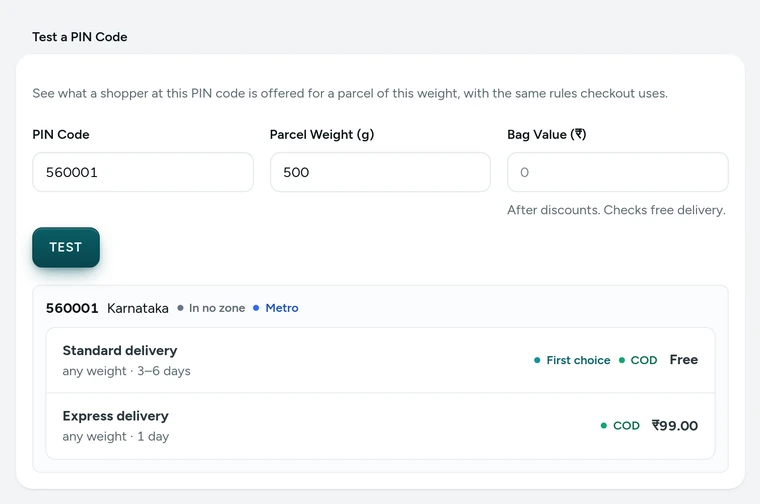
Test a PIN Code in Settings → Shipping and Delivery, on Kosha, a demo store on Mercayo. Shoppers Choose COD at Checkout
At checkout, cash on delivery appears beside the online ways to pay when the bag, the PIN code and the delivery option allow it. With a fee, the fee shows as its own line before the order is placed. The order is placed at once (or after the one-time code, if you use it), and its stock is committed, so the same piece cannot be sold twice.
The Courier Collects the Cash
When you make the courier label from your admin, the courier is told the amount to collect at the door. The order moves to delivered when the courier reports it, or when you mark it delivered. (An order with a part paid online is the one exception for labels; see part payment.)
Follow the Cash
Cash to Collect at the top of Orders is the cash still to come in, on orders to ship or on their way; tap it to see those orders. In Analytics → Finance, the Cash on Delivery card shows the cash collected on orders delivered in the dates you choose, and the cash with couriers today. A parcel that comes back counts against that PIN code and mobile number in RTO Shield.

Your shoppers
What Your Shoppers See
Shoppers see cash on delivery as one of the ways to pay, with "Pay in cash when your order arrives" under it, and your COD fee as its own line in the total when you charge one. If COD is not possible for their bag, one plain sentence says why, and they can still pay by UPI or card. After the order, the thank-you page, the order email and the order page say how much to keep ready in cash.

Settings
Settings You Control
Each one is in your admin. A new store starts with the value shown.
Mercayo
Mercayo's Controls
Every COD setting follows Mercayo's one rule for settings: what counts is Mercayo's override for your store if there is one, then your own choice, then the default. Mercayo's team can, for one store, switch COD off, fix the fee, or cap how high your COD limit may go (for example "no more than ₹10,000"), always with a written reason that your admin shows beside the locked setting. Every such change is kept in Mercayo's audit log with who made it and when. Mercayo never edits your PIN code rules or delivery methods.
Limits today
Good to Know Before You Start
- PIN code rules work on the first digits of a PIN code; there is no rule by city name, product or collection.
- COD is decided for the whole bag: it cannot be switched off for single products.
- The COD limit is one amount for every delivery option, and it counts the fee.
- Mercayo does not collect or hold COD cash: your courier collects it and pays it to you under your agreement with them.
- Courier payouts are recorded by your team with RECORD REMITTANCE in Analytics → Finance; Mercayo does not read them from the courier by itself.
Questions
About Cash on Delivery
Is cash on delivery on when I open a store?
Yes. A new store offers cash on delivery with no fee and no limit, on every delivery method. You can change any of that in Settings → Checkout and COD and Settings → Shipping and Delivery before you launch.
Can I charge a COD fee?
Yes. Type the amount in the Cash on Delivery card. It is added only when the shopper chooses cash on delivery, shows as its own line before they order, and goes on the GST invoice at your GST rate for delivery and fees (18% to start with). If you switch on part payment for COD, its rules are used instead, so a shopper never pays two COD charges.
How do I stop COD in one area?
Add a PIN code rule in Settings → Shipping and Delivery: type the first digits of the PIN codes and choose "No COD". Deliveries still go there; only cash on delivery is not offered. Test a PIN Code shows you the result before any shopper sees it.
What does the COD limit include?
The whole amount the courier would collect at the door, the COD fee included. A bag above the limit can still be ordered by paying online, and checkout tells the shopper so.
What happens to stock on a COD order?
Stock is committed when the order is placed, so the last piece cannot be sold twice. If the order is cancelled (by you, by the shopper within the time you allow, or by the optional clean-up of orders nobody ships), the stock goes back.
Does Mercayo take a share of COD orders?
No. Mercayo charges no fee on any order. Your courier's own COD charges are between you and your courier.
Can I give shoppers a reason to pay online?
Yes. A discount can carry a payment condition: "online payment only", so the bag shows the saving and checkout applies it when the shopper pays by UPI or card ("Pay online to get ₹50 off"), or "cash on delivery only". Your COD fee is never discounted.
Do my store's policies mention cash on delivery?
Yes. The policies Mercayo writes for your store in Settings → Store Policies are filled from these settings: your COD limit, the confirmation code, and the part payment amounts. After a change, REFRESH FROM MY DETAILS rewrites the policies you have not edited yourself.
Related
Related Features
- COD Confirmation CodeShoppers confirm their mobile number with a 6-digit code before a cash on delivery order is placed, so orders with wrong numbers never happen.
- Part Payment for CODCash on delivery shoppers pay a small COD charge or an advance online first and the rest in cash, so a refused parcel still covers its trip.
- COD Confirmation CallMark new cash on delivery orders Unconfirmed until your team has phoned the shopper, with a warning when the shopper has refused parcels before.
- RTO ShieldEvery cash on delivery order gets a 0-100 risk score with plain reasons, and your store chooses what happens to risky ones: a call, a code or part payment.
- Delivery ChargesSet delivery methods, group states into zones, price by weight, give free delivery above an amount, and add rules for PIN codes, then test any PIN code.
- Phone-First CheckoutOne page that starts with the mobile number and the PIN code, fills in the city and state, shows clear errors and a price breakdown that adds up.
More in Cash on Delivery: COD Confirmation Code · Part Payment for COD · COD Confirmation Call · Order Clean-Up · RTO Shield
Try It on Your Own Store
Every feature is in every plan, free for 14 days.
