Shipments and Pickups
Every Parcel in One List, With Bulk Actions That Never Make You Wait
Shipping day is many parcels at once: which are labelled and waiting for the courier, which have not moved for days, which need a manifest for the pickup person. Orders → Shipments shows every parcel in one list you can filter and act on, and anything that talks to a courier for many parcels runs in the background while you carry on.
- In every plan
- Free for 14 days


Kosha is a demo store on Mercayo. Its products, orders and customers are sample data.
In short
What It Does
Orders → Shipments lists every parcel: those made through your Shiprocket or Shipway account and those you shipped with your own courier and its tracking number.
Tabs, Filters and Search
| Tab | What Is in It |
|---|---|
| To Pick Up | Labelled parcels nobody has asked the courier to collect yet |
| Pickup Requested | Parcels the courier is due to collect |
| In Transit | On the way to the shopper |
| Exceptions | Parcels that need attention, failed deliveries, returns and lost parcels |
| Delivered | Delivered parcels |
| All | Every parcel |
Each tab shows its count under your search and filters. Filters narrow by state, courier, account (Shiprocket, Shipway or your own courier), payment (COD or prepaid), pickup address, and the date a parcel was created, shipped or delivered. Needs Attention finds the parcels to chase: a failed delivery waiting for your answer, no courier scan for the days you choose (3 to start with), or labelled more than a day ago and still not collected. Search takes an AWB, the order's number as typed (#KO-1042, 1042), the customer's name or phone, or a PIN code. Save any combination as a view: a tab of its own, shared with your team.
The columns (parcel and AWB with COPY, order, customer and city, courier and account, state with the reason it needs attention, COD, weight, created, pickup, last update and the label) can be hidden, moved and resized. On a phone the parcels are cards: a long press chooses, and the actions sit in a bar at the bottom.
Acting on Many Parcels
Choose parcels on the page, a range with shift-click, or Select all … matching (up to 5,000). The bar says how many each action applies to, such as REQUEST PICKUP (19 OF 47), and an action that applies to none is greyed out:
| Action | What It Does |
|---|---|
| REQUEST PICKUP | Asks the courier to collect the labelled parcels; one already booked is skipped and says so |
| MANIFEST | Mercayo's A4 hand-over sheet: a section per courier with each AWB as a barcode, the order, city and PIN, prepaid or the cash to collect, weight and pieces, totals and two signature lines |
| COURIER'S MANIFEST | The courier account's own manifest (Shiprocket makes one; Shipway does not) |
| PRINT LABELS | The parcels' labels in one PDF, on the paper you choose |
| CHECK COURIER | Finds a booking someone made in the courier's own panel and takes it over, so its tracking follows here |
| CANCEL SHIPMENT | Cancels the courier booking and its AWB, not the order |
| EXPORT CSV | The parcels as a spreadsheet |
Background Jobs
Any action on two or more parcels (and GENERATE LABELS for two or more orders on the Orders list) is a shipping job: it is accepted at once, a message says "Pickups for 19 parcels requested. We'll tell you when it's done.", and the work goes on in the background while you use the admin. Orders → Shipments → Shipping Jobs shows each job's live progress and, inside it, every parcel's outcome (done, skipped and why, or failed and why) and its files. When it ends, the bell tells the person who started it: "Pickups requested (19 of 47)". A job of labels, a manifest or a print takes up to 100 parcels and makes one PDF, so a bigger selection becomes several jobs; the others take up to 1,000. A job that was interrupted carries on from where it stopped, and nothing is done twice.
One parcel at a time (from its own page, the order page's parcel card or the phone app) stays immediate, with its answer shown on the spot.
Pickup Addresses
Settings → Labels and Pickups lists the pickup addresses of each connected courier account, read from the account itself, with its Primary address marked and "Phone not verified" where Shiprocket says so. Choose the one your parcels leave from, or keep the primary. ADD PICKUP ADDRESS adds a new one to your courier account from Mercayo, with the PIN code filling in the city and state.
Cancel a Shipment
CANCEL SHIPMENT (on a parcel, the order's parcel card, the Orders list or the Shipments list) cancels the courier booking and its AWB while keeping the order: the order goes back to To Ship, the old label stops working, and the order's history records who cancelled it and why. Ship it again with the same courier or another. It works until the courier's pick-up scan; once the courier has the parcel, ask for a return instead.
For your store
Why It Matters
A label run is only the start of shipping day. Then come the pickups, the hand-over sheet for the courier's person, the parcels that have not moved for three days, the one booked twice by mistake. On a courier website that means a different screen for each, one parcel at a time.
Working from one list with tabs and a Needs Attention filter puts the parcels that need a person in front of that person. Bulk actions as background jobs mean a hundred pickups never freeze the screen: your team keeps packing and replying to shoppers while the courier calls run, and the bell says when they are done, with every parcel's outcome in plain words.
The small things count too. Cancelling a wrong booking without cancelling the order, taking over a parcel someone booked in the courier's panel, and a manifest your courier's person can sign at the door all remove reasons to leave your admin.
Step by step
How It Works
Start With To Pick Up
After a label run, open Orders → Shipments and the To Pick Up tab. Choose the parcels (or Select all … matching) and press REQUEST PICKUP. With Book the Pickup with the Labels on in Settings → Labels and Pickups, the pickup is asked for as the labels are made instead.
Print the Manifest
Choose the parcels going out today and press MANIFEST: one PDF with a section per courier, ready for the courier's person to sign. COURIER'S MANIFEST gets Shiprocket's own instead, when your courier asks for it.
Follow the Job
A message confirms the job at once, with VIEW. Keep working: Shipping Jobs shows its progress, and the bell tells you when it is done, with each parcel's outcome inside.
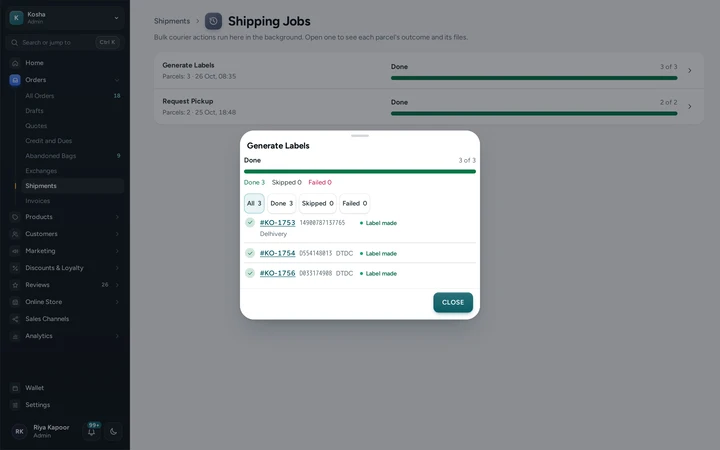
Shipping Jobs with a finished label job open: each order's outcome, on Kosha, a demo store on Mercayo. Chase the Exceptions
The Exceptions tab, or the Needs Attention filter, lists parcels with a failed delivery waiting, no courier scan for too long, or not collected a day after their label. Set how many days without a scan count in A Parcel Is Stuck After (Days) in Settings → Labels and Pickups. NDR QUEUE opens the failed deliveries to answer.
Cancel or Take Over a Booking
On a parcel's card, CANCEL SHIPMENT asks for an optional reason and cancels the booking and AWB; the order returns to To Ship. CHECK COURIER looks for a booking made in the courier's own panel for that order and takes it over with its AWB.
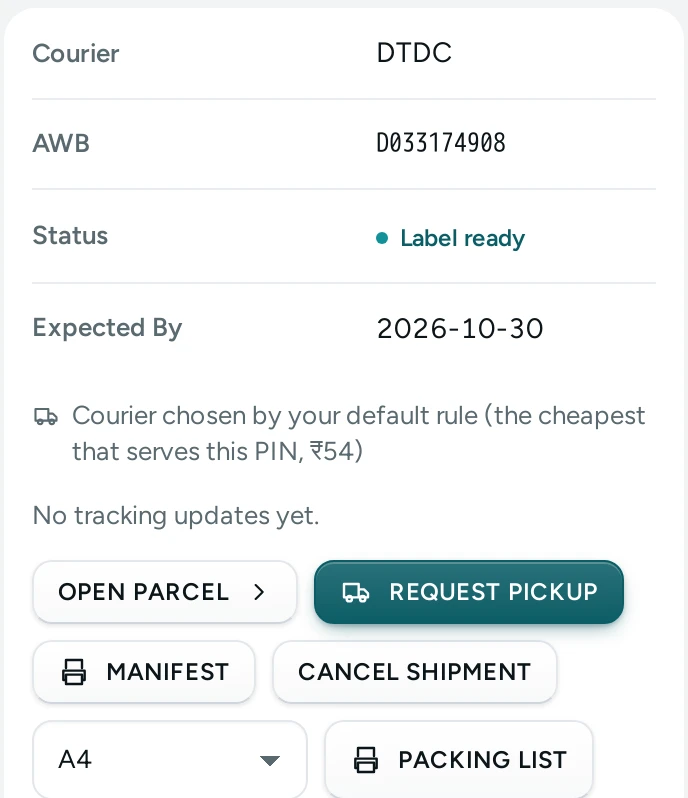
An order's parcel card with REQUEST PICKUP, MANIFEST, CANCEL SHIPMENT and the reason its courier was chosen, on Kosha, a demo store on Mercayo. Work From Your Phone
On a phone, Shipments shows parcel cards with the tabs above them. Touch and hold to choose parcels; the first action and a sheet of the rest take the bottom bar's place, and the phone's Back button closes each sheet.
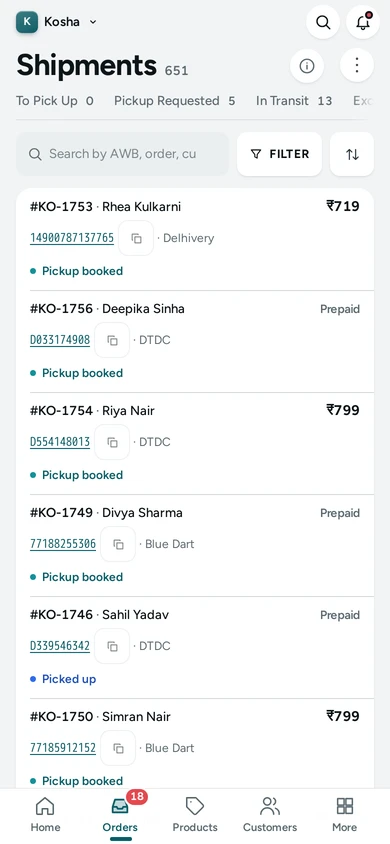
Shipments on a phone: tabs and parcel cards, on Kosha, a demo store on Mercayo.


Your shoppers
What Your Shoppers See
Nothing here shows to shoppers directly. When a shipment is cancelled, the order is back to be shipped and its tracking page waits for the new parcel; when a parcel moves, the shopper's tracking page shows the courier's updates as they arrive.
Settings
Settings You Control
All are under Settings → Labels and Pickups.
Mercayo
Mercayo's Controls
Mercayo's team can set or limit these settings for a store (the stuck days, the pickup address for each account) with a reason your admin shows, and every such change is kept in Mercayo's audit log. Jobs run as the person who started them: their rights are checked again at every step, and a store runs at most 10 jobs at a time. Who may do what is set by your staff roles: anyone who can see orders may print labels, make a manifest and export; requesting pickups, cancelling shipments and checking couriers need the right to edit orders. Mercayo never pays or collects courier money: pickups and AWBs are your courier account's, at your rates.
Limits today
Good to Know Before You Start
- Select all matching takes up to 5,000 parcels; labels, manifests and prints run in jobs of up to 100 parcels each, the other actions in jobs of up to 1,000.
- A shipment can be cancelled only until the courier's pick-up scan; after that, ask for a return (RTO).
- Shipway makes no courier's manifest of its own: use MANIFEST, Mercayo's sheet, instead.
- Pickups, the courier's manifest and CHECK COURIER work for parcels booked through Shiprocket or Shipway; a parcel sent with your own courier is handed over by you.
- Shiprocket asks you to verify a new pickup address's phone in its own panel before couriers collect from it.
- Finished jobs and their files are kept for 30 days.
Questions
About Shipments and Pickups
Can I close the page while a job runs?
Yes. The job runs on Mercayo's servers, not in your browser. Close the page or move on; the bell tells you when it is done, and Shipping Jobs keeps its outcome for each parcel.
What does REQUEST PICKUP (19 OF 47) mean?
You chose 47 parcels and 19 of them can have a pickup requested: they are labelled and not yet booked for collection. The other 28 are left out, so nothing is asked twice.
Does CANCEL SHIPMENT cancel the order?
No. It cancels the courier booking and its AWB only. The order goes back to To Ship, so you can make a new label, with the same courier or another. To cancel the order itself, use CANCEL ORDER on the order.
Someone booked a parcel in the Shiprocket panel. Can Mercayo pick it up?
Yes. CHECK COURIER asks your courier account about that order, and when it already has an AWB, Mercayo takes the booking over: the AWB and courier are recorded on the order and tracking follows as for any parcel. The label run does the same check first, so the parcel is not booked twice.
What is on Mercayo's manifest?
One section per courier, each on its own page: your logo or name, the pickup address, the date, and a row per parcel with its AWB as a barcode, the order, the shopper's city and PIN code, prepaid or the cash to collect, weight and pieces, then the totals and two signature lines for you and the courier's person.
How do I find parcels that have stopped moving?
Turn on the Needs Attention filter, or open the Exceptions tab. It lists parcels with no courier scan for the days you set (3 to start with), labelled parcels nobody collected after a day, and failed deliveries waiting for your answer.
Help Centre
In the Help Centre
Related
Related Features
- Courier Rules and RatesRules by payment, weight, zone, PIN code or product pick each parcel's courier, with a tester, the reason on every order and your account's live prices.
- Shipping LabelsSelect orders and press GENERATE LABELS: each gets a courier by your rules and an AWB, and one PDF of labels in your look, printed on the paper you choose.
- Failed DeliveriesWhen a courier cannot deliver, the case lands in one queue with its reason and deadline: ask for another attempt, send a new address, or call it back.
- Order TrackingShoppers follow their order on your store's own page: order steps, the courier's timeline, the AWB, documents, and messages from your team.
- ShiprocketConnect your own Shiprocket account with an API user, add Mercayo's webhook, and make labels, book pickups and follow parcels without opening Shiprocket.
More in Shipping: Delivery Charges · Delivery Dates by PIN Code · Shipping Labels · Failed Deliveries · Order Tracking · Exchanges · Returns and Refunds · Packing Lists · Branded Shipping Labels · India Post and Your Own Couriers · Courier Rules and Rates
Try It on Your Own Store
Every feature is in every plan, free for 14 days.