India Post and Your Own Couriers
Ship with India Post or Any Counter Courier, with the Same Labels
Not every parcel goes through Shiprocket or Shipway. For the ones you take to the India Post counter or a local courier yourself, Mercayo prints the same branded label with a box for the courier's sticker, a booking list for the counter, and takes the tracking number by a scan.
- In every plan
- Free for 14 days


Kosha is a demo store on Mercayo. Its products, orders and customers are sample data.
In short
What It Does
Own couriers are the couriers you book a parcel with yourself, at their counter or by calling them, without a connected courier account.
- Built in: India Post (Speed Post, Registered Post, Parcel), DTDC, Professional Couriers, Trackon, ST Courier, Shree Maruti and Gati, each with its own tracking page. Mercayo can add more couriers for every store.
- Your own: in Settings → Shipping and Delivery → Own Couriers, add up to 30 more, each with a name and its tracking address (with
{number}where the parcel's number goes, or none when the courier's page asks for the number itself).
The Self-Ship Label
SELF-SHIP LABEL (on an order's page) and PRINT SELF-SHIP LABELS (for a selection on the Orders list) print a label in your look and size for the courier and service you choose, with a COURIER STICKER HERE box where the AWB would be: the counter's sticker goes there. The rest is your usual label: the ship-to with the PIN large, your return address, the order number with its barcode, weight and pieces, the items, and COD / VPP · COLLECT ₹… for a cash parcel. Print As works here too.
The Counter Booking List
COUNTER BOOKING LIST prints an A4 list of the parcels you are handing over: your sender details, the date, the courier and service, then a row per parcel with the order, addressee and phone, city and PIN, weight, the COD or VPP amount and a wide Article No. box for the counter's sticker or a written number, with totals and signature lines for you and the counter.
The Tracking Number, by Scan
ADD TRACKING NUMBER takes the number by your computer's or phone's camera, by a barcode scanner, or typed. For a selection, it goes one order after another (SAVE AND NEXT, SKIP), showing each order's addressee and PIN. An India Post number is checked against the international S10 format, check digit included: a mistyped number is caught before it is saved, and saved only if you press SAVE ANYWAY. Tick Mark shipped now and the order ships at once: the shopper's shipped message carries the courier's tracking page and the number.
Once a parcel has its number, REPRINT LABEL prints the same label with the number as a barcode inside the sticker box, for couriers that give no sticker.
For your store
Why It Matters
India Post reaches every PIN code in the country, and for many small sellers a Speed Post or VPP parcel from the local post office is the cheapest, or the only, way to reach a customer in a small town. Local counter couriers are often the fastest for nearby cities. None of them come through an aggregator, so their parcels usually mean handwritten addresses, a separate register at the counter and tracking numbers copied by hand into WhatsApp.
Self-ship labels keep these parcels in the same routine as every other: the same label look, the same packing list, the same order stages. The booking list is the register the counter asks for, already filled in. And scanning the sticker instead of typing a 13-character number, with India Post's check digit tested on the spot, removes the most common mistake, a number that tracks someone else's parcel.
Step by step
How It Works
Check Your Couriers
Open Settings → Shipping and Delivery → Own Couriers. The built-in couriers are ready to use. To add another, type its Name and, if its tracking page takes a number in the address, its Tracking Address with
{number}, and press ADD COURIER.Print the Self-Ship Labels
On an order's page press SELF-SHIP LABEL, or select orders on the Orders list and choose PRINT SELF-SHIP LABELS. Choose the Courier, the Service (Speed Post, Registered Post or Parcel for India Post) and the paper in Print As, then press OPEN PDF.
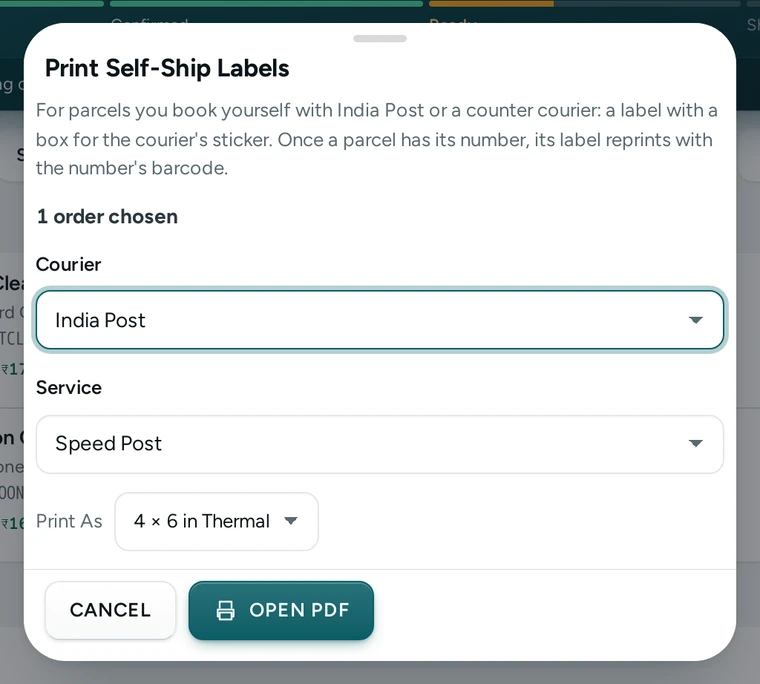
Print Self-Ship Labels with India Post and Speed Post chosen, on Kosha, a demo store on Mercayo. Print the Booking List
With the same orders selected, choose COUNTER BOOKING LIST, pick the courier and service, and print. Take it to the counter with the parcels; the clerk's stickers or numbers go in the Article No. column.
Scan the Numbers
Back at your desk, select the orders and choose ADD TRACKING NUMBERS (or ADD TRACKING NUMBER on one order). Scan each sticker with CAMERA or a scanner, or type it, and press SAVE AND NEXT. Keep Mark shipped now ticked to ship each order as you go.
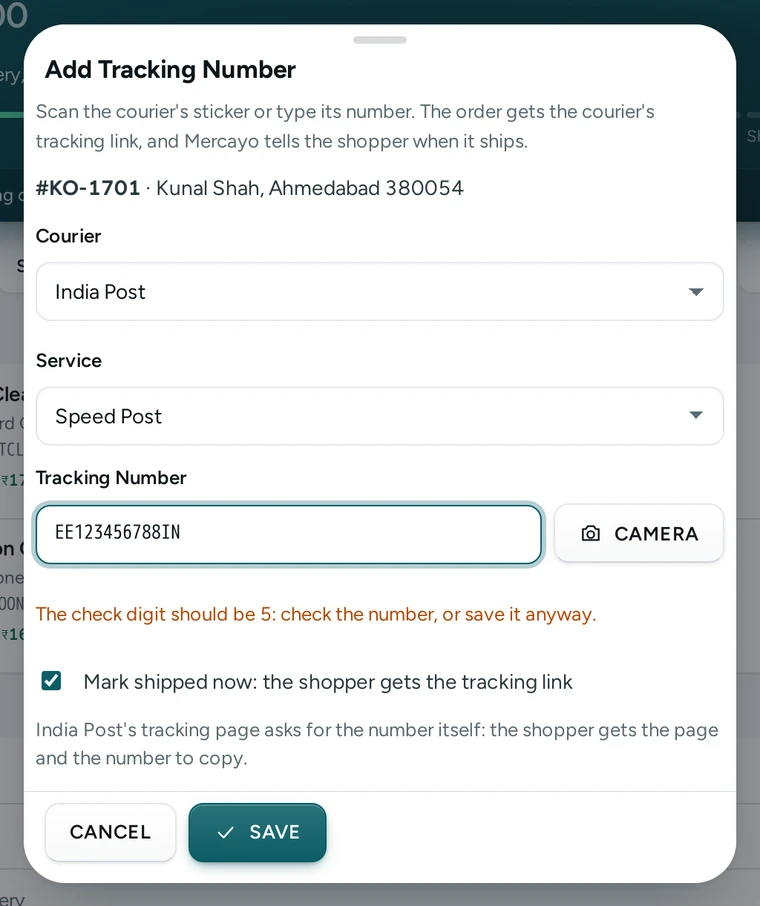
Add Tracking Number catching an India Post number whose check digit is wrong, on Kosha, a demo store on Mercayo. Mark Delivered
Mercayo gets no live updates from an own courier, so the parcel card says so. When the parcel arrives, press MARK DELIVERED on the order.
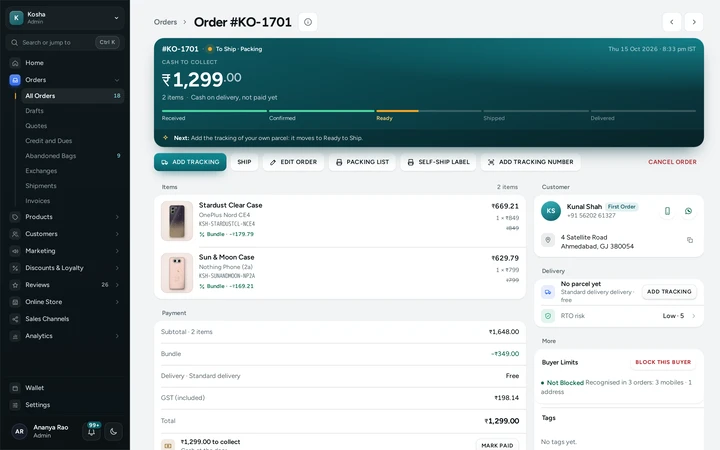
An order ready to ship with PACKING LIST, SELF-SHIP LABEL and ADD TRACKING NUMBER, on Kosha, a demo store on Mercayo.


Your shoppers
What Your Shoppers See
When the order ships, the shopper's shipped message carries the courier's name, the tracking number and a link to the courier's tracking page. Their order page on your store shows the same, with a COPY button for the number. Because own couriers send Mercayo no updates, the order shows as shipped until you mark it delivered.
Settings
Settings You Control
Each one is in your admin. A new store starts with the value shown.
Mercayo
Mercayo's Controls
Mercayo keeps the built-in courier list and can add couriers for every store, each with its tracking page. Mercayo never makes up a tracking link from a number: where a courier's page asks for the number itself (India Post's does), the shopper gets the page and the number to copy. The built-in tracking pages are the couriers' own public pages. Your own couriers are yours to add, change and delete; they are kept apart from every other store's.
Limits today
Good to Know Before You Start
- Mercayo gets no live tracking updates from own couriers; your team marks the parcel delivered.
- None of the built-in tracking pages takes the number in its address, so the shopper copies the number into the courier's page.
- The scanner reads Code 128 barcodes; Code 39 is read only where the phone's own browser can read it.
- Booking India Post parcels by Speed Post's business API is not part of this; parcels are booked at the counter.
- A parcel booked through a connected courier account cannot be given an own courier's number.
Questions
About India Post and Your Own Couriers
Does the self-ship label work with VPP and cash on delivery?
Yes. A cash parcel's label reads COD / VPP · COLLECT with the amount still to collect, and the booking list totals the COD or VPP amounts for the counter.
What is the S10 check?
India Post's article numbers follow an international format: two letters, eight digits, a check digit, then two letters (EE123456789IN). Mercayo works out the check digit from the eight digits and warns you when the number does not match, which catches almost every typing or scanning mistake.
Can I scan with my phone?
Yes. The admin's camera scanner works in a phone's browser, and the admin phone app has Add Tracking Number on the order screen with the phone's camera. A barcode scanner gun works on a computer too.
Can I add a courier that is not on the list?
Yes, up to 30 of your own in Settings → Shipping and Delivery → Own Couriers, with its tracking address if its page takes the number in the address.
My courier gives no sticker. What goes in the box?
Save the number first, then press REPRINT LABEL on the parcel card: the label prints again with the number as a barcode inside the sticker box.
Can I mix own couriers with Shiprocket or Shipway?
Yes. Book most parcels through your courier account and use own couriers for the rest. An order already booked with a connected courier is skipped when you print self-ship labels, and the message says how many.
Related
Related Features
- Branded Shipping LabelsSeven label looks with your logo, five sizes from 4 × 6 in thermal to A4, a live preview, and Print As to choose the paper each time you print.
- Shipping LabelsSelect orders and press GENERATE LABELS: each gets a courier by your rules and an AWB, and one PDF of labels in your look, printed on the paper you choose.
- Packing ListsA packing list for any order at any stage: every item in full with tick boxes, notes and gifts, the money if you show it, Packed by and Checked by lines.
- Order TrackingShoppers follow their order on your store's own page: order steps, the courier's timeline, the AWB, documents, and messages from your team.
More in Shipping: Delivery Charges · Delivery Dates by PIN Code · Shipping Labels · Failed Deliveries · Order Tracking · Exchanges · Returns and Refunds · Packing Lists · Branded Shipping Labels · Courier Rules and Rates · Shipments and Pickups
Try It on Your Own Store
Every feature is in every plan, free for 14 days.