Branded Shipping Labels
Shipping Labels in Your Own Look, Sharp on a Thermal Printer
The label is the first thing a shopper sees of your brand on their doorstep. Mercayo draws every parcel's label in your look, with your logo, your words and every part the courier needs, and it stays sharp on the cheapest thermal printer.
- In every plan
- Free for 14 days


Kosha is a demo store on Mercayo. Its products, orders and customers are sample data.
In short
What It Does
When your courier account (Shiprocket or Shipway) gives a parcel its AWB, Mercayo draws that parcel's label itself, in your store's look and size, and that is the label you print. The courier's own label is kept beside it on the parcel, under COURIER'S LABEL, in case you ever need it.
Seven Looks
| Look | What It Is Like |
|---|---|
| Classic Courier | The layout couriers know, with an items table and a dense details block |
| Brand-Forward | A big logo, a thank-you line and a tracking QR code; colour on A4 and A5 |
| Thermal Clear | Everything a courier needs, drawn for a basic thermal printer |
| Thermal Simple | The fewest parts and the biggest type |
| Bold Block | A black band and bold blocks, for good printers |
| Itemised | Every item with its full name, on more pages when the order is long |
| Label + Packing List | The label with a full packing list: on A4 and A5, the label on top and the list below a cut line |
Automatic (the start) prints Thermal Clear on thermal sizes and Classic Courier on A4 and A5. Thermal Clear, Thermal Simple, Itemised and Label + Packing List are the ones made for basic 203 dpi thermal printers: every line and barcode bar falls on the printer's dots, nothing is grey and no text is under 8 pt, so barcodes scan first time.
Five Sizes
4 × 6 in thermal (the start), 4 × 4 in thermal, A5 (one label), A4 · One (a true 4 × 6 in label with crop marks) and A4 · Four (four labels on a sheet, with cut lines). Thermal sizes always print in black; A4 and A5 can print in colour.
What Always Prints, and What You Choose
The parts a courier needs are locked: the courier and service, the AWB barcode with its number, the routing code (or the destination city large when the courier gives none), the ship-to name, address and PIN, PREPAID or COD with the amount to collect, weight, size and pieces, and the eWaybill number when the parcel has one. When an eWaybill applies (an order over ₹50,000), the order value prints even if you hide prices.
The rest is yours to show or hide: your logo and store name, the shopper's phone, item names (in full, up to two lines, or one line), SKU, item prices and order value, HSN codes, the invoice number and date, your GSTIN, the return address (full, short or hidden), an order barcode for your own packing scanner, a tracking QR code, a thank-you line of up to 60 characters with the shopper's first name, and a footer note of up to 160 characters.
Long Orders
Itemised and Label + Packing List never cut an item's name. With typical names, about four items fit on a 4 × 6 in label page; more items continue on pages that say plainly they are not labels ("Items, continued · Page 2 of 3"), without an AWB barcode, so a courier never scans the wrong page. The other looks fold a long order into "+ 4 more items".
Print As
Many sellers keep a thermal printer and an office printer. Wherever labels are printed (a label run's result, the order's label link, PRINT LABELS for selected orders that already have their AWB, and the phone app's ship sheet), Print As lets you choose the paper for that print. The labels are drawn again from the parcels' saved details: no courier call and no new booking.
For your store
Why It Matters
A parcel passes through a dozen hands before it reaches a shopper, and the label is the only part of your brand they all see. A plain aggregator label tells the shopper nothing about who sent it; a label with your logo and a thank-you line tells them at the door, before the box is open.
It also has to work for the courier. A label that looks nice but scans badly costs you more than it earns: a routing code a sorter cannot read, or a barcode smudged by a cheap thermal head, delays the parcel. That is why the parts the courier needs are locked and the thermal looks follow the printer's dot grid exactly, and why Mercayo keeps the courier's own label on every parcel as a backup.
Most Indian sellers print on a 4 × 6 in thermal printer, many on an office printer, and plenty on both depending on the day. Five sizes and Print As mean you never have to change a setting to use the other printer, and a long order of many items gets every name in full on the label or the packing list, so the packer checks the box against the paper rather than against a phone screen.
Step by step
How It Works
Pick a Look
Open Settings → Shipping and Delivery → Shipping Label. Leave Label on Branded Label (or choose Courier's Own Label to print exactly what your courier account makes). Under Look, choose one of the seven looks, or Automatic for Thermal Clear on thermal paper and Classic Courier on paper.
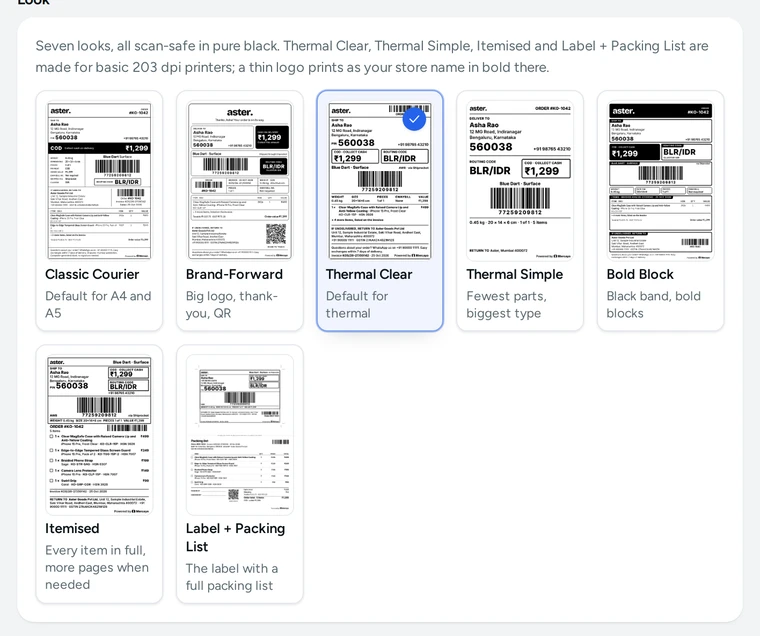
The seven label looks in the Shipping Label settings, on Kosha, a demo store on Mercayo. Choose the Size
Under Size, choose the paper you print on most: 4 × 6 in or 4 × 4 in thermal, A5, A4 · One or A4 · Four. On A4 and A5 you can switch on Print in colour. The live preview redraws at once with a sample order, or with your own products when the store has them.
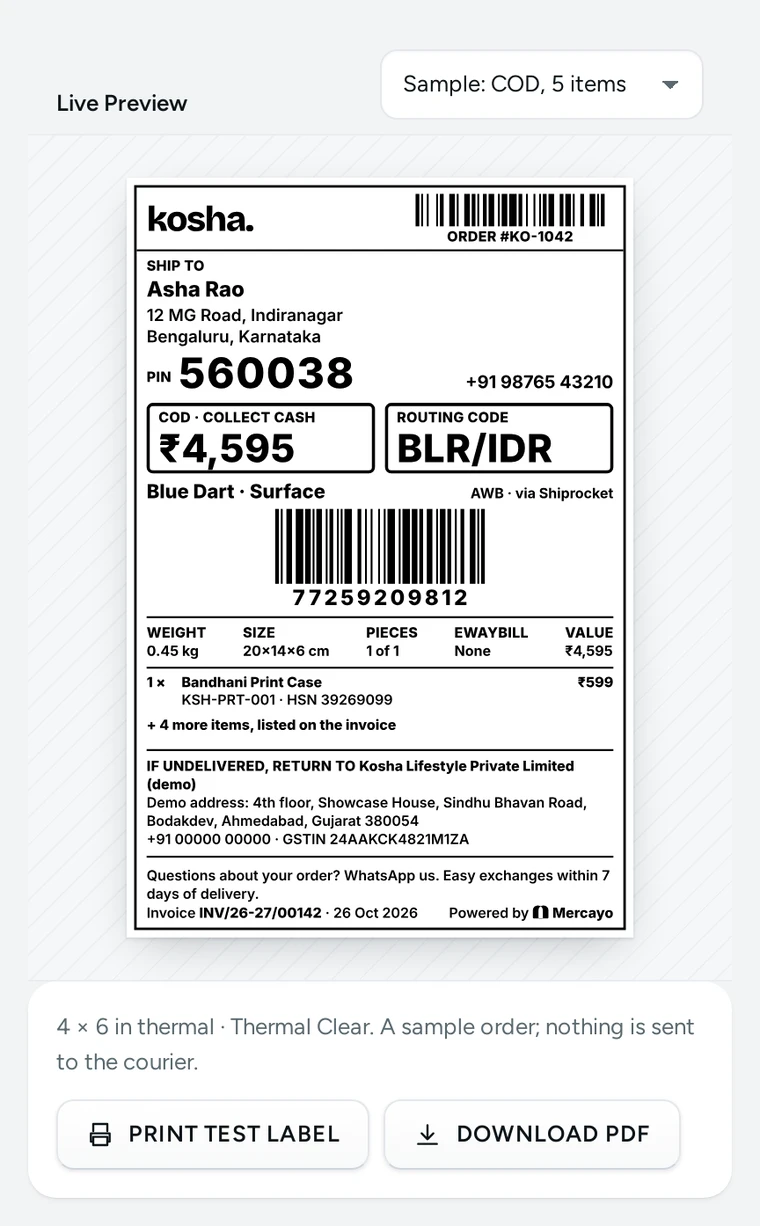
The live preview of a Thermal Clear label at 4 × 6 in, with a sample COD order, on Kosha, a demo store on Mercayo. Decide What It Shows
In What the Label Shows, the Always Printed list shows the locked parts. Under it, switch your own parts on or off, set how long item names may be, and type your thank-you line (
{first name}becomes the shopper's first name) and footer note, such as your exchange rule.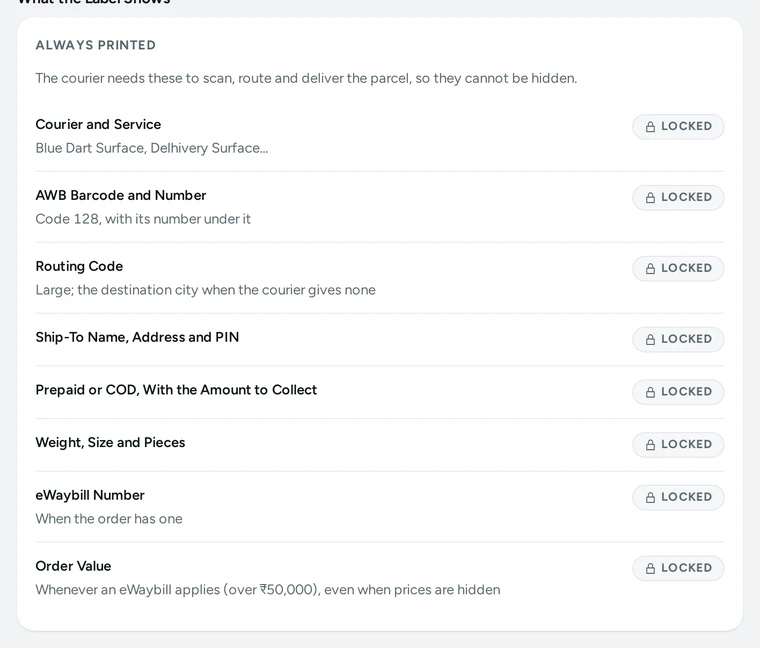
The parts every label always prints, in the Shipping Label settings. Print a Test Label
Press PRINT TEST LABEL or DOWNLOAD PDF to print the preview on your own printer before your first real parcel, then press SAVE. Nothing is sent to the courier.
Make Labels as Usual
Make labels from the Orders list or an order's page as before (see shipping labels). Each parcel's label now comes in your look, merged into one PDF for the run.
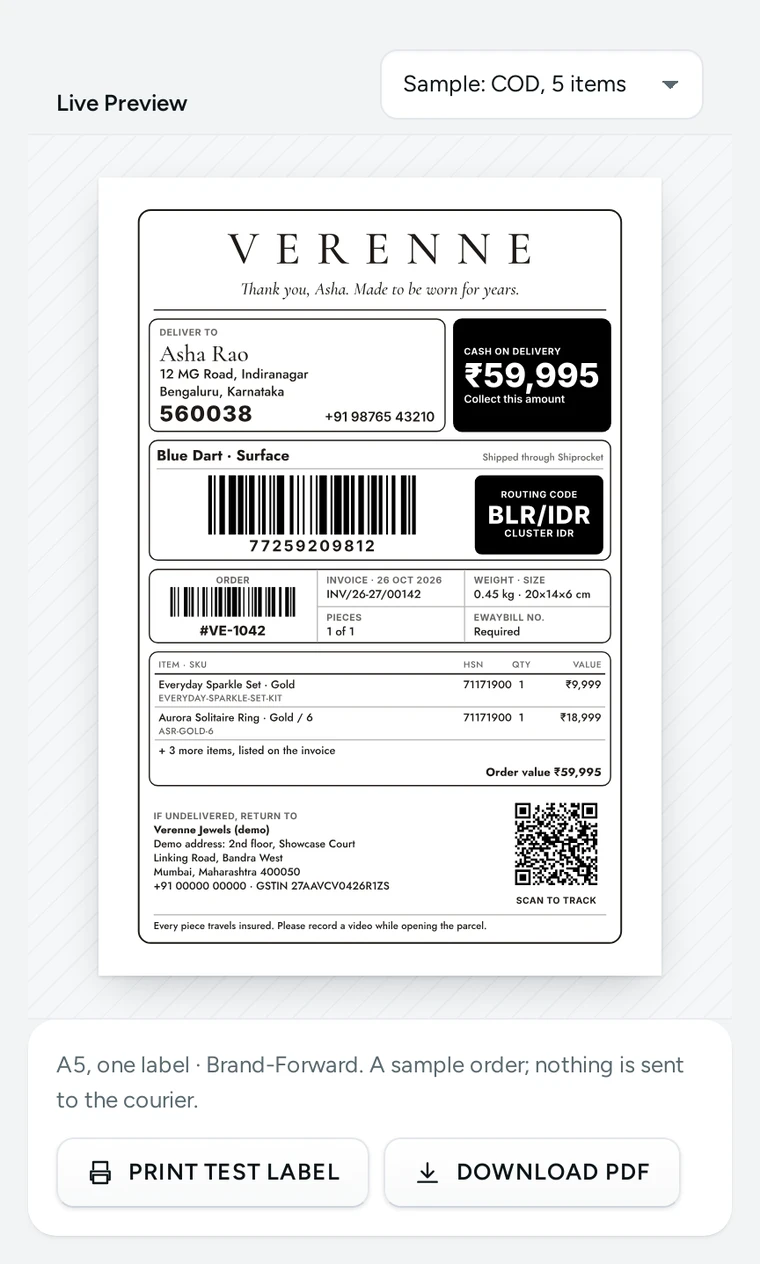
A Brand-Forward label on A5 in colour, with a thank-you line and a tracking QR code, on Verenne, a demo store on Mercayo. Print on Other Paper When You Need To
Choose Print As where you print, for example A4 · Four on the office printer when the thermal printer is out of rolls. The look is kept; a look left on Automatic follows the paper.
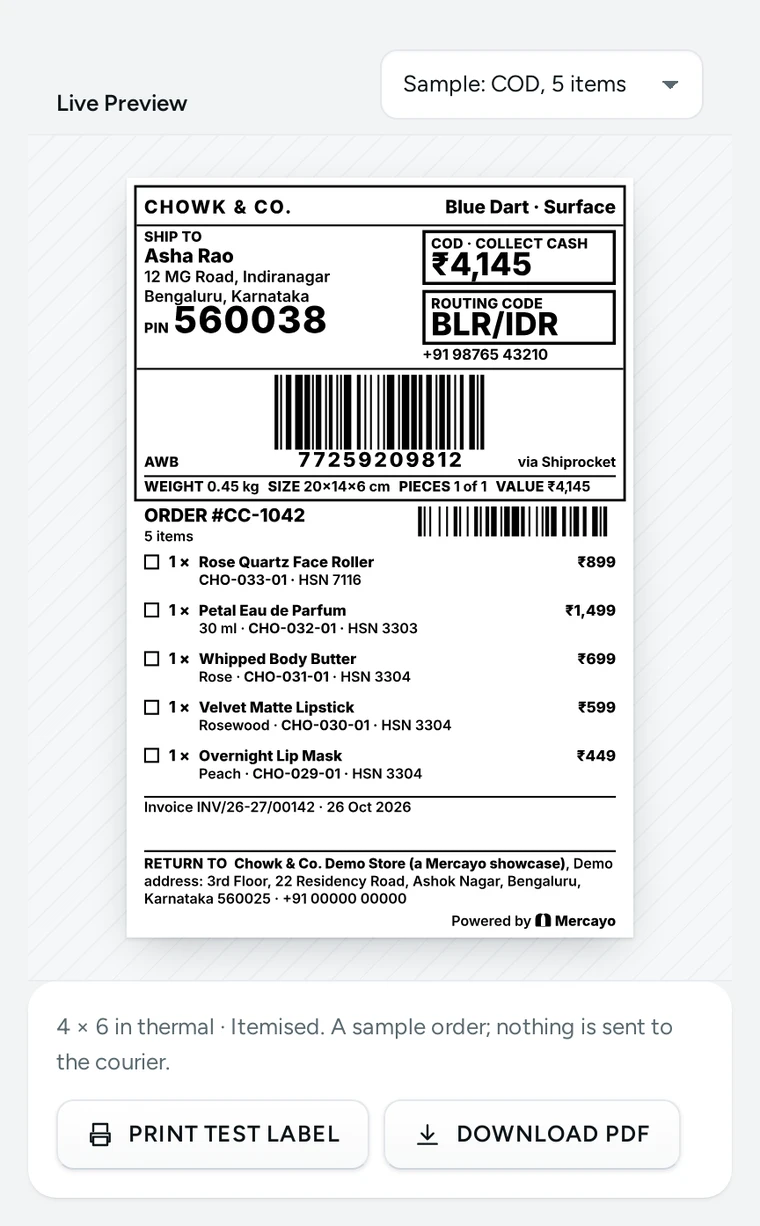
An Itemised label at 4 × 6 in with every item in full and a tick box for the packer, on Chowk & Co., a demo store on Mercayo.


Your shoppers
What Your Shoppers See
The shopper sees your label on the parcel: your logo or name, your footer note, and, on the Brand-Forward look and the packing list, your thank-you line with their first name and a QR code that opens your store's tracking page for their order. A gift sent with prices hidden carries no amount on the label beyond what the courier must collect.

Settings
Settings You Control
All are under Settings → Shipping and Delivery → Shipping Label.
Mercayo
Mercayo's Controls
Mercayo's team can fix any of your label settings for your store, such as the label source, the look or the size, with a reason your admin shows; every change is kept in Mercayo's audit log. Mercayo also keeps a list of couriers that accept only their own label: a parcel booked with one of them prints the courier's label, and the run says so on that parcel's row. If drawing a parcel's label ever fails, that parcel keeps the courier's own label, so a run is never held up. Label files are stored privately and reach only people in your store whose role lets them see orders; they never get a public address.
Limits today
Good to Know Before You Start
- Branded labels are drawn for parcels booked through Shiprocket or Shipway; a parcel with a courier on Mercayo's list of own-label couriers prints the courier's label.
- With Shiprocket, a parcel's courier label kept beside the branded one is the run's merged PDF from Shiprocket, not one page per parcel.
- The label's layout is chosen from the seven looks; it is not edited freely in the page editor.
- There is no field yet to type a parcel's eWaybill number before its label is made; the number prints when the parcel has one.
- A courier's own label is never redrawn in another size by Print As.
Questions
About Branded Shipping Labels
Will couriers accept a label Mercayo draws?
The label carries everything the courier needs in the places couriers expect it: the AWB barcode, the routing code, the address and PIN, the payment and the amount to collect. If a courier insists on its own label, Mercayo puts it on its list and parcels with that courier print the courier's label. You can also choose Courier's Own Label for your whole store.
Which printer do I need?
Any 4 × 6 in or 4 × 4 in thermal label printer, or any A4 or A5 printer. For a basic 203 dpi thermal printer, choose Thermal Clear, Thermal Simple, Itemised or Label + Packing List: they are drawn on the printer's own dot grid.
My logo is thin. Will it print on thermal paper?
Mercayo checks it. A logo with strokes too thin for a thermal printer prints as your store's name in bold capitals instead, and the screen tells you. You can also choose to always print the logo or always the name.
Can I print the same labels on A4 one day and on my thermal printer the next?
Yes. Choose Print As where you print. The labels are drawn again in that size from the parcels' saved details, without calling the courier or booking anything again.
What happens with an order of twelve items?
With Itemised or Label + Packing List, every item is listed in full: the first page is the label with as many items as fit, and the rest continue on pages marked as item lists, not labels. The other looks print the first items and a line such as "+ 9 more items".
Can I hide prices on the label?
Yes, switch off Item prices and order value. The amount a COD courier must collect always prints, and the order value prints when the parcel needs an eWaybill.
Can I remove "Powered by Mercayo" from the label?
On the Growth and Scale plans you can switch it off; on Starter it shows. It follows the same rule as your storefront's footer.
Related
Related Features
- Shipping LabelsSelect orders and press GENERATE LABELS: each gets a courier by your rules and an AWB, and one PDF of labels in your look, printed on the paper you choose.
- Packing ListsA packing list for any order at any stage: every item in full with tick boxes, notes and gifts, the money if you show it, Packed by and Checked by lines.
- India Post and Your Own CouriersSelf-ship labels with a box for the courier's sticker, a counter booking list, and the tracking number added by scan, with India Post's check digit.
- Courier Rules and RatesRules by payment, weight, zone, PIN code or product pick each parcel's courier, with a tester, the reason on every order and your account's live prices.
- ShiprocketConnect your own Shiprocket account with an API user, add Mercayo's webhook, and make labels, book pickups and follow parcels without opening Shiprocket.
More in Shipping: Delivery Charges · Delivery Dates by PIN Code · Shipping Labels · Failed Deliveries · Order Tracking · Exchanges · Returns and Refunds · Packing Lists · India Post and Your Own Couriers · Courier Rules and Rates · Shipments and Pickups
Try It on Your Own Store
Every feature is in every plan, free for 14 days.