Email Campaigns
Email Campaigns With Pictures, and What Each One Brought In
Send a new drop or a festival offer to the customers and subscribers who said yes, with your own photos in it. A day later, see how many opened it, which link they clicked, and how many orders came from those clicks.
- No fee on your orders, on every plan
- Free for 14 days


Kosha is a demo store on Mercayo. Its products, orders and customers are sample data.
In short
What It Does
In Marketing → Campaigns, a campaign is one email to many people: everyone who agreed to your emails, one of your segments, or an RFM group (champions, loyal, at risk and the others). Write a subject, a preview line, a heading and the text with {{name}} and {{store}} filled in for each person, add a button to a page of your store and a discount code, and see the email exactly as people will get it, in your email look, on a phone or a computer.
Pictures From Your Library
ADD PICTURE in the editor's Pictures card opens your media library: up to four pictures, each with a description (read out by screen readers and shown while a mail app holds pictures back), its place in the text (above it, or after a paragraph) and, if you like, a page of your store it opens. Each picture is shown at most 520 px wide in the email and loaded sharp for phone screens; the email itself stays small, because pictures are loaded by address. A picture used in a campaign cannot be deleted from your library, so an email already sent never loses it.
The Report
A campaign that went shows, beside Sent and Failed:
| Figure | What it counts |
|---|---|
| Delivered | Emails the receiving mail service accepted, as the email provider reports it |
| Opened (estimated) | People who opened it at least once |
| Clicked | People who clicked a link at least once, and Clicks by Link for each link |
| Bounced | Hard bounces (the address does not exist) and soft bounces (a full mailbox) |
| Spam Reports | People who marked it as spam |
| Unsubscribed | People who unsubscribed after it |
| Orders After a Click | Orders whose shopper's last click on any campaign email was on this one, within your window (5 days unless you change it), and their total |
Opens come from a tiny picture in each email and clicks from your links passing through your store's own address first. Apple Mail opens every picture of every email by itself, for privacy; those opens are counted apart and not as opens, which is why opens are called estimated. Clicks by link scanners in company mailboxes are left out the same way.
Blocked Addresses
Marketing → Blocked Addresses lists every address your emails do not reach, and why: a hard bounce, a spam report or an unsubscribe, with the date. Search it, export it as CSV, and REMOVE FROM LIST when someone asks you to email them again; the dialog says why the address was blocked first, and a spam report needs a tick that the person asked.
WhatsApp and Push to a Segment
The same editor sends by WhatsApp or as a Push notification, to the same audiences. A WhatsApp campaign is one of your own offer templates that WhatsApp approved, with its blanks filled in, and goes only to the numbers on your WhatsApp list that never replied STOP; it keeps your WhatsApp rules (your daily marketing limit per person, quiet hours, your notification credits). A push campaign is a title, a text and a page, and goes to the browsers that allowed your notifications: everyone, or a segment's people on the browsers they allowed them on while signed in. Each has its own preview (the WhatsApp bubble, the phone's notification), a test to your own phone or devices, SCHEDULE and STOP SENDING, and its own report:
| Figure | Push | |
|---|---|---|
| Delivered and Read | From WhatsApp's receipts | Not reported by browsers |
| Opened | Not reported | Notifications tapped open, each once |
| Replies and Replied STOP | Answers to the offer | Not reported |
| Cost | From your credits; failed messages given back | Free |
For your store
Why It Matters
A campaign that goes out and is never heard of again teaches you nothing. Knowing that 40% opened but few clicked says the subject worked and the offer did not; knowing which link took the clicks says what people wanted; and counting the orders that followed a click says what the email was worth, in rupees.
Honest numbers matter as much as the numbers themselves. Since Apple Mail opens every email by itself, an open rate that counts those opens looks wonderful and means little; Mercayo counts them apart and tells you so.
Your sender reputation is the other half. Sending again to an address that bounced, or to someone who reported you as spam, makes mail services treat all your emails as junk. Mercayo stops those addresses by itself, shows you which and why, and lets you lift one only when the person asked.
Step by step
How It Works
Choose Who Gets It
In Marketing → Campaigns, press NEW CAMPAIGN and choose everyone who agreed, a segment or an RFM group. The editor shows how many people it reaches; those who never agreed or unsubscribed are left out.
Write It and Add Pictures
Write the subject, preview line, heading and text; add a button and a code. In Pictures, press ADD PICTURE, choose from your library, describe the picture and choose its place. The preview shows the email as people will get it.
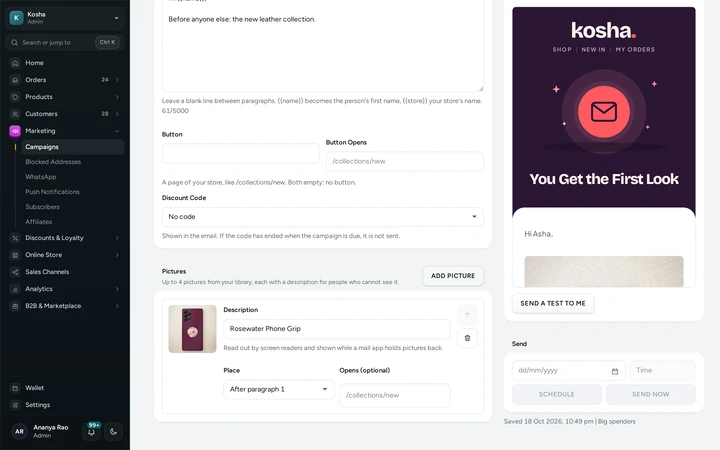
The campaign editor's Pictures card with a library photo and its description, on a Mercayo store. Test, Then Send or Schedule
SEND A TEST TO ME sends it to your own email. Then SEND NOW, or SCHEDULE a day and time from 5 minutes to 90 days ahead (India time).
Read the Report
Open the campaign a few hours later: delivered, opened, clicked, Clicks by Link, bounces, spam reports, unsubscribes and the Orders After a Click with their total. The figures fill in as people open and click.
Or Send It by WhatsApp or as a Notification
In Send By, choose WHATSAPP and pick an approved offer and fill in its blanks, or PUSH and write a title, a text and the page it opens. Choose the segment, test it on your own phone or devices, then send or schedule it. The report shows delivered and read for WhatsApp, opened for notifications.
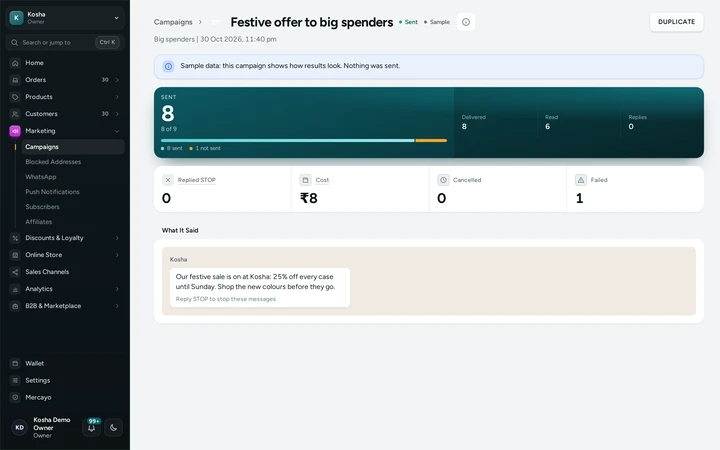
A WhatsApp campaign to a segment with its delivered, read and cost, on Kosha, a demo store on Mercayo (sample figures). Look After Your List
Marketing → Blocked Addresses shows the addresses your emails no longer reach, with the reason and date. Export it as CSV, or REMOVE FROM LIST an address whose owner asked to hear from you again.
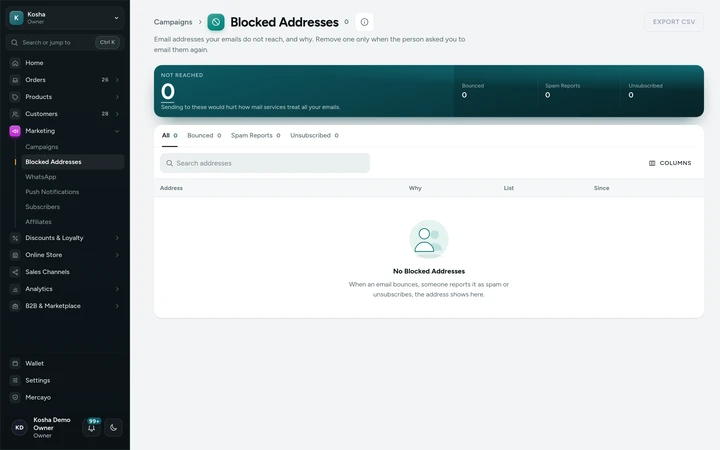
Blocked Addresses with bounces, a spam report and unsubscribes, on a Mercayo store (sample addresses).


Your shoppers
What Your Shoppers See
Shoppers get your email as before, in your email look, with a one-tap unsubscribe at the bottom. Links open your store's pages as usual (they pass through your own store address for a moment), and nothing about the person is shown to anyone but your team.
Settings
Settings You Control
Each one is in your admin. A new store starts with the value shown.
Mercayo
Mercayo's Controls
Mercayo's team can switch counting opens or clicks off for a store, or set its window, with every change in Mercayo's audit log. Addresses that bounce or report spam are held back for every store on Mercayo, to keep everyone's emails out of junk folders; when you lift one, it is lifted for your store only. Mercayo's own email also has a second provider: if the first one refuses or cannot be reached, order emails go out through the second at once (campaigns wait and try again).
Limits today
Good to Know Before You Start
- Opens are an estimate: Apple Mail opens every picture by itself, and some mail apps hold pictures back until the reader allows them.
- Delivered, bounces and spam reports come from the email provider and appear only for emails it reports on.
- Clicks in the plain-text version of an email are not counted.
- Up to four pictures in a campaign; pictures come from your media library.
- Orders after a click are matched by the shopper's email address: an order placed with another address is not counted.
- A WhatsApp campaign uses one of your own approved offer templates, with the same words for everyone; it goes only to people on your WhatsApp list.
- A push campaign to a segment reaches only the browsers its people allowed notifications on while signed in; browsers of guests are reached by everyone only.
- WhatsApp offers and notifications carry no link Mercayo counts clicks on: WhatsApp reports delivered and read, a notification its opens.
Questions
About Email Campaigns
Can a campaign go by WhatsApp or as a notification?
Yes. Choose WHATSAPP to send one of your approved WhatsApp offers to the people on your WhatsApp list, or PUSH to send a notification to the browsers that allowed yours, to everyone, a segment or an RFM group, now or at a time you choose.
Why are opens called estimated?
Apple Mail fetches every picture of every email it receives, whether or not the person reads it. Those opens are counted apart and left out, and some mail apps never load pictures at all, so the true number of readers is close to, but never exactly, the figure shown.
How are orders counted for a campaign?
When someone clicks a link in a campaign email and then orders within your window (5 days unless you change it), the order counts for the campaign they clicked last. Each order counts for one campaign only.
Can links in my email send people somewhere unexpected?
No. Each link passes through your store's own address and goes only to the link that was in that email; an address that was changed or made up shows a short page saying the link does not work.
Someone who unsubscribed wants my emails again. What do I do?
Open Marketing → Blocked Addresses, find them and press REMOVE FROM LIST. The dialog shows when and why they were blocked. For someone who reported your email as spam, you also tick that they asked to hear from you again.
Are order emails tracked too?
Not unless you turn on Count Opens and Clicks of Order Emails in Settings → Notifications. Emails to your team and Mercayo's own emails are never tracked.
Related
Related Features
- Subscribers, Popups and Floating ButtonsA sign-up popup with sensible rules, a footer band, double opt-in with consent kept, a subscribers list with CSV, and floating WhatsApp buttons.
- Abandoned Bag RemindersUp to three reminders to shoppers who left at checkout, with a link that restores their bag, an optional code, quiet hours and recovered sales counted.
- CustomersEvery customer with their orders, spending and returned parcels, guests included, ready-made segments like VIP and RTO-Prone, tags, notes, credit and export.
More in Marketing and Reviews: Product Reviews | Questions and Answers | Abandoned Bag Reminders | Subscribers, Popups and Floating Buttons | Cross-Sell Rows | Back in Stock and Pre-Orders | Product Feeds | Push Notifications and Recent Purchases