Profit & Loss
Your Real Profit Each Day, After Every Cost
Sales are easy to count; profit is not. Profit & Loss starts from what shoppers paid without GST and takes away every cost of getting it to them, from product cost and courier freight to RTO, ads and rent, with each line marked as actual, estimated or entered by you.
- In every plan
- Free for 14 days


Kosha is a demo store on Mercayo. Its products, orders and customers are sample data.
In short
What It Does
Analytics → Profit & Loss works out your profit day by day for the dates you choose, in two modes:
| Mode | What Counts as Revenue |
|---|---|
| Realised | A cash-on-delivery order on the day it is delivered; a paid order on the day it was paid |
| Booked | Every order on the day it was placed |
Cancelled orders and parcels returned to origin are never revenue. The costs taken away:
- Product cost, from the cost price kept on each order line when it was sold.
- Shipping: the courier's charge where your courier account reports it, the booking quote kept when the label was made, or your own rate.
- Gateway fees from your Razorpay settlements, or your gateway rate for payments not settled yet.
- COD fees on delivered cash orders, and RTO: both freights and your loss rate, on the day the parcel turned back.
- Refunds, your per-order costs (box, card), ads (a usual spend a day per channel, a different figure for any day, or an imported ad account export), fixed costs spread over each month to the paisa, one-off expenses, your message wallet and your Mercayo plan.
Every line has a badge, ACTUAL, ESTIMATED or YOU ENTERED, and How Sure Is This? lists exactly what is estimated and how to make it actual.
Courier Charges and COD reads what it can from your connections (READ NOW asks Shiprocket for parcels' charges) and takes a courier's statement file, CSV or Excel, for the rest: charges, or a COD remittance report matched to your parcels by AWB, with SHORT BY where a payment came in below the cash collected. WHAT IF works out a 30-day month from your own rates (orders a day, average order, COD share, RTO, ad spend) and keeps it as a target.
For your store
Why It Matters
For most Indian D2C brands the gap between sales and profit is cash on delivery: a COD order is not money until the courier pays it, an RTO costs freight both ways, and courier and gateway fees come off in different places on different days. A dashboard of sales hides all of that.
Profit & Loss puts the whole chain on one page, using the figures Mercayo already has (orders, costs, settlements, labels) and asking you only for what nobody else knows: rent, salaries, ad spend and packaging. It also tells you how much of the answer is an estimate, so you know when to trust it and what to fix first.
The COD money card answers the other daily question: how much cash is with the couriers, how much is overdue, and whether the last remittance was short.
Step by step
How It Works
Enter Your Costs Once
Open YOUR COSTS: fixed costs a month (rent, salaries, tools), costs on every order (box, card), your usual ad spend a day per channel, and fallback rates for courier, return, gateway and COD fees. IMPORT CSV takes Meta or Google ad exports, with a preview first.
Give Products Their Cost Prices
Each variant's cost price in the product editor is kept on every order line as it sells. Lines without a cost are counted under How Sure Is This? so you can fill them in.
Bring In Courier Figures
In COURIER CHARGES, press READ NOW for Shiprocket's charges, or drop a Shiprocket or Shipway statement (charges or COD remittance, CSV or Excel). The preview shows what matched by AWB; APPLY records it.
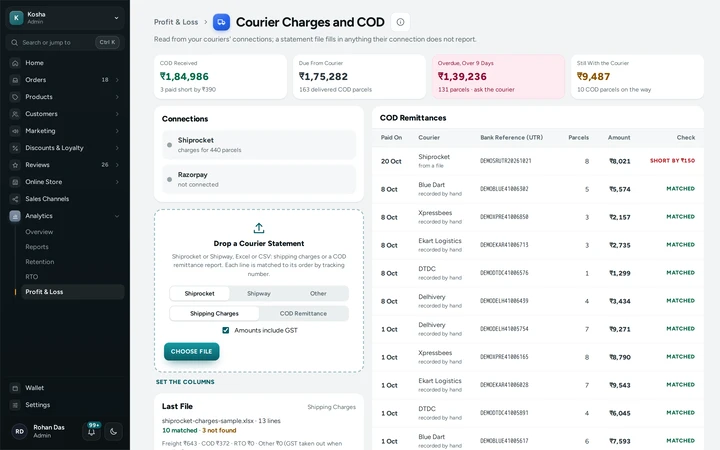
Courier Charges and COD with the statement drop and COD remittances checked against the parcels, on Kosha, a demo store on Mercayo. Read Your Profit
Choose Realised or Booked and the dates. The computer shows six figures, From Revenue to Profit and a daily ledger; a phone shows its own layout with Where the Money Went and Profit Each Day. EXPORT CSV gives the ledger to your accountant.
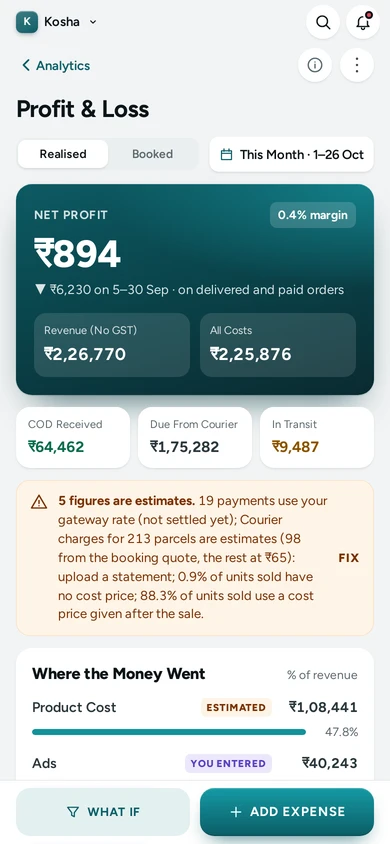
Profit & Loss on a phone, with WHAT IF and ADD EXPENSE at hand, on Kosha, a demo store on Mercayo. Try What If
WHAT IF starts from your own rates and lets you change orders a day, the average order, the COD share, RTO and ad spend to see a 30-day month's profit. SAVE AS A TARGET keeps it on the store.


Settings
Settings You Control
Each one is in your admin. A new store starts with the value shown.
Mercayo
Mercayo's Controls
Mercayo can switch Profit & Loss off for a store. It reads your Razorpay settlements and your courier account through the connections you made, and never changes anything there. Only the owner and full-access admins see Profit & Loss to start with; give it to anyone else by adding the Profit & Loss right to their role in Settings → Staff.
Limits today
Good to Know Before You Start
- Couriers do not report RTO freight or Shiprocket's COD remittances through their connections; those come from their statement files.
- Shipway's charges and remittances come only from its statement files.
- Statement columns are found by their header words; if your courier's file is different, set the columns once on the screen.
- Restocked returns are not valued back: the product cost of a refunded order stays a cost.
Questions
About Profit & Loss
How is this different from the Reports?
Reports show sales, orders and products. Profit & Loss takes every cost away from revenue, day by day, including courier, gateway and COD fees, RTO, ads and your fixed costs, and says how sure each figure is.
Do I have to type in courier charges?
No. The quote kept when each label was made is used first, READ NOW fills Shiprocket's charges, and a statement file covers the rest in one upload. Your fallback rate is used only where nothing else is known, and is marked as an estimate.
Which day does a COD order count on?
In Realised mode, the day it is delivered; in Booked mode, the day it was placed. A parcel that comes back is never revenue and its freight both ways is a cost on the day it turned back.
Who on my team can see it?
The owner and full-access admins. Add the Profit & Loss right to any other role in Settings → Staff.
Related
Related Features
- ReportsSales by day, month, product, category, state and channel, discounts, landing pages, GST by rate, HSN summary, refunds, customers and stock, as CSV.
- Store AnalyticsTen tabs of sales, orders, products, customers, traffic, discounts, GST, stock and live numbers, each with one clear definition and compared over time.
- RTO ShieldEvery cash on delivery order gets a 0-100 risk score with plain reasons, and your store chooses what happens to risky ones: a call, a code or part payment.
- RazorpayPaste your Razorpay keys, test with test keys first, and Mercayo sets up the webhook secret; the money goes straight to your account.
More in Analytics: Store Analytics · Live View · Reports · Order Attribution · Home Dashboard · Product Insights
Try It on Your Own Store
Every feature is in every plan, free for 14 days.