Live View
See What Is Happening on Your Store Right Now
During a sale, a launch or an Instagram post going round, you want to know now, not tomorrow. The Live tab shows who is on your store, how many have something in the bag or are at checkout, and how today compares with yesterday by this time, refreshed every 30 seconds.
- In every plan
- Free for 14 days


Kosha is a demo store on Mercayo. Its products, orders and customers are sample data.
In short
What It Does
Open Analytics → Live. It shows:
- Visitors Now: different visitors seen in the last 5 minutes.
- With a Bag: visitors of the last 5 minutes with something in the bag and no order yet.
- At Checkout: visitors of the last 5 minutes at checkout with no order yet.
- Sales Today: total sales of orders confirmed today, beside what you had sold by this time yesterday and today's number of orders.
- Visits in the Last Hour: new visits every 5 minutes, as a chart.
- Where Visitors Landed: the first pages of the visits of the last 30 minutes.
- Latest Orders: your newest orders with their totals and how they were paid.
The tab refreshes itself every 30 seconds while it is open in front of you, and is always read fresh, never from a remembered copy.
Home carries a small live view too: Today So Far shows sales today against the same time yesterday and yesterday's whole day, sales through the day as a chart against yesterday's, today's orders and, when your store records visits, visitors now and those in checkout. It refreshes every minute while Home is open.
Reading Live During a Sale
| What You See | What It Often Means |
|---|---|
| Visitors Now jumps | A post, a message or an ad has started bringing people in; Where Visitors Landed shows which page |
| Many visitors, few with a bag | The page they land on does not lead them to a product: check its first screen and its price |
| Many bags, few at checkout | Something in the bag stops them: delivery charges, a code that does not work, a missing size |
| Many at checkout, few orders | Look at checkout and payments: an online payment that fails, or COD switched off for their area |
| Sales Today behind yesterday by now | There is still time in the day to send a reminder or extend an offer |
These are prompts to look, not verdicts: Live shows numbers, and the reasons are yours to check.
For your store
Why It Matters
Selling in India is lumpy: a Diwali drop, a reel that takes off, a WhatsApp broadcast to your customers, a flash sale at 8 pm. In those hours, the question is not "how was last month" but "is it working right now?"
Live answers it without a separate tool. If visitors jump but nobody reaches checkout, the offer or the page needs a look. If many bags are open but orders are slow, checkout or payments may need a look. If today is behind yesterday by this time, you know before the day is over, while there is still time to act.
Because "by this time yesterday" is compared at the same minute of the day, a slow morning is not mistaken for a bad day.
Step by step
How It Works
Open the Live Tab
Open Analytics and choose the Live tab. The page says "Updates every 30 seconds while this page is open." Keep it open on a second screen or a phone during a sale.
Watch the Four Numbers
Visitors Now, With a Bag, At Checkout and Sales Today sit at the top. Tap a number's name for its definition, for example "Visitors of the last 5 minutes at checkout with no order yet."
See the Last Hour
Visits in the Last Hour draws new visits every 5 minutes. A spike tells you when a post, a message or an ad started bringing people in; Where Visitors Landed tells you which page they arrived on in the last 30 minutes.
Follow the Orders as They Come
Latest Orders lists the newest orders with their totals and payment. Open one to see it, including how the shopper found you.
Use Home for a Quick Look
When you only need a glance, Home's Today So Far card shows today's sales against the same time yesterday, today's orders and visitors now, refreshed every minute.
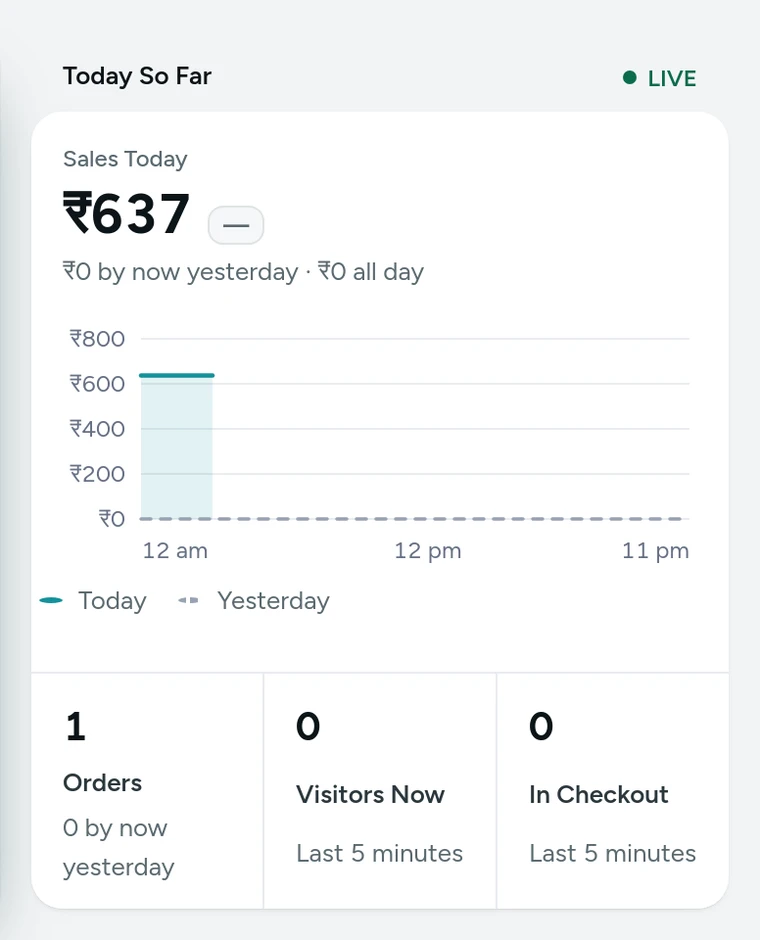
Today So Far on Home, today's sales against yesterday by this time, on Kosha, a demo store on Mercayo with sample data.

Settings
Settings You Control
All are under Settings → Admin and Reports → Analytics.
Mercayo
Mercayo's Controls
Live reads the same figures as the rest of Analytics. Mercayo's team can force visit recording off for a store, with a written reason that is logged; Live then shows sales and orders only. Nothing in Live identifies a shopper: there is no address, cookie or device detail to show.
Limits today
Good to Know Before You Start
- Live counts visitors from the last 5 minutes and landings from the last 30; it is a view of now, not a history.
- It shows no map or list of individual visitors, because nothing that identifies a visitor is kept.
- Visits by your own team browsing the store are counted like shoppers' visits.
- Without visit recording, Live shows sales and orders only.
Questions
About Live View
How often does Live update?
Every 30 seconds while the tab is open in front of you. Home's Today So Far card updates every minute.
What does Visitors Now count?
Different visitors seen in the last 5 minutes. A visitor is recognised for one day only, by an anonymous code, so the number is an honest count without following anyone.
Is "by now yesterday" the whole of yesterday?
No. It is what you had sold yesterday up to the same time of day as now, so the comparison is fair at any hour. Home also shows yesterday's whole day.
Are bots counted as visitors?
Visits from browsers that say they are bots, crawlers, link previews or automated browsers are not counted, nor views from your own preview links. Very fast repeated hits from one address are dropped.
Does Live count shoppers on phones and computers alike?
Yes. Every visit is counted whatever the device, and the Traffic tab in Analytics splits visits by phone, tablet and computer for any dates.
Can I see who exactly is on my store?
No. Nothing that identifies a visitor is kept: no address, no cookie, no device detail. Live shows how many, where they landed and what they have in progress, never who they are. Once they order, the order itself tells you who bought.
Can my packing team see Live?
Live is part of Analytics, so it needs a role that includes reports. Roles without it still see Home's queues (orders to ship, COD to confirm) without money figures.
Related
Related Features
- Store AnalyticsTen tabs of sales, orders, products, customers, traffic, discounts, GST, stock and live numbers, each with one clear definition and compared over time.
- Home DashboardToday's sales against yesterday, what needs your attention, recent activity, key numbers, top products and COD against prepaid, each part by role.
- Order AttributionSee the channel, device, referring site, campaign and first page behind each order, and sales by channel, without cookies or tracking shoppers.
- Automatic OffersOffers that need no code: the bag finds them, applies the best for the shopper and says what a little more would unlock.
More in Analytics: Store Analytics · Reports · Order Attribution · Home Dashboard · Product Insights
Try It on Your Own Store
Every feature is in every plan, free for 14 days.