Store Analytics
Analytics That Add Up to the Paisa
Analytics shows how your store is doing in numbers you can act on: what sold, what came back, how shoppers paid, where they came from and what is running out. Every number has one written definition, and every chart adds up to its total.
- In every plan
- Free for 14 days


Kosha is a demo store on Mercayo. Its products, orders and customers are sample data.
In short
What It Does
Analytics (in your admin's menu, under Analytics) has ten tabs:
| Tab | What It Shows |
|---|---|
| Overview | The key numbers, sales over time, the sales breakdown, top products, cash on delivery against prepaid, new and returning shoppers, and visits to orders |
| Sales | Gross sales to net sales step by step, sales by category and by state, and every number day by day |
| Orders | Where the orders are now, how cash on delivery and prepaid orders ended up, orders by weekday and hour, and time to ship and to deliver |
| Products | Products by net sales, with items sold and their share |
| Customers | New and returning shoppers, repeat rate, orders per shopper and top customers |
| Traffic | Visits, visitors, pages per visit, conversion, the funnel from visit to order, channels, devices, landing pages, referring sites and campaigns |
| Discounts | Each discount and code on the orders, with its uses and amount |
| Finance | GST by rate and supply, invoices and credit notes issued, cash on delivery collected and still with couriers, refunds by method |
| Inventory | Items in stock, stock value at price and at cost, sold out, running low and what runs out first |
| Live | What is happening on your store right now |
Above every tab you choose the Dates, what to Compare with (the previous period, the previous year, or nothing) and whether charts Show by day, week or month. Each number shows its change and its value before, and a tap on its name tells you exactly how it is worked out.
The dates, the tab and the comparison are part of the page's address, so Back and a shared link keep them. EXPORT downloads the tab's own report as a spreadsheet file.
For your store
Why It Matters
Numbers that disagree are worse than no numbers. If the dashboard counts a cash on delivery order as a sale before it is delivered, and a refund quietly rewrites last month, you stop trusting any of it.
Mercayo counts each thing once, on the day it happens:
- A sale is counted on the day the order is confirmed: a COD order when it is placed, a prepaid order when its payment is captured. An online order never paid is not a sale.
- Take-backs are counted on their own day: a cancellation on the day it is cancelled, a return to origin (RTO) on the day the parcel comes back, a refund on the day it is processed. Last month's sales never change.
- Net sales are gross sales less discounts, cancellations, RTO and returns; delivery and GST added on top are shown separately.
For a store where cash on delivery and returned parcels decide whether a month was good, the Orders tab's delivered, cancelled and RTO rates by payment, and the Finance tab's cash still with couriers, are the numbers to watch.
Step by step
How It Works
Open Analytics
Open Analytics in your admin's menu. It opens on the Overview tab for the last 30 days, compared with the days just before (you can change both defaults). While your store has sample orders, a Sample data pill says so, with what it means.
Choose the Dates and the Comparison
Pick the Dates (any range up to a year), what to Compare with: Previous Period, Previous Year or No Comparison, and Show by Day, Week or Month for the charts. The previous period is drawn dashed beside the current one.
Read a Number and Its Definition
The strip at the top of each tab holds its key numbers, each with its change and "before" value. Tap a number's name to read its definition, such as Net Sales: "Gross sales less discounts, cancellations, orders returned to origin and returns. Delivery and GST added on top are not included."
Open a Tab for the Detail
Move to Orders for where orders are now and how long they take to ship and deliver (the middle time and the time nine in ten orders beat), Customers for repeat shoppers, Traffic for where visits come from, Finance for GST by rate and COD collected, and Inventory for what runs out first at your current pace.
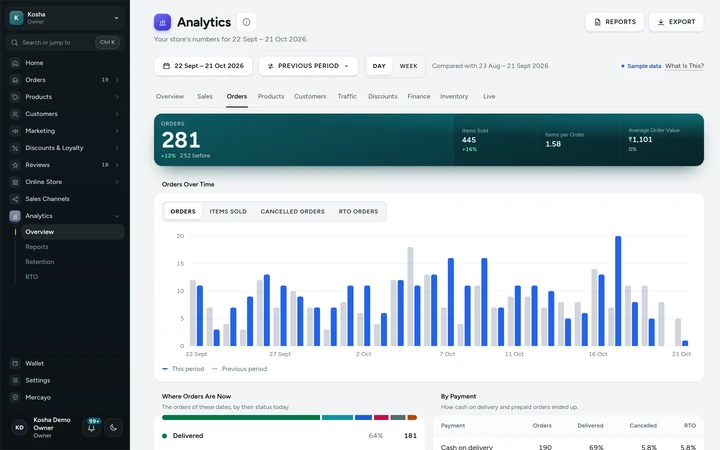
The Orders tab: where orders are now, by payment, by weekday and hour, on Kosha, a demo store on Mercayo with sample orders. Go From a Number to the Orders Behind It
Most rows open what they count: a status opens the orders list with that status and the same dates, a product its orders and its page, a customer their page, a discount its editor. Each opens only for a person with the right to see it.
Export What You See
Press EXPORT on any tab except Live to download its report as a spreadsheet file for the same dates. The file opens cleanly in Excel or Google Sheets, with ₹ and Indian scripts intact. All the reports are also in the reports library.

Settings
Settings You Control
All are under Settings → Admin and Reports → Analytics.
Mercayo
Mercayo's Controls
Each analytics setting follows Mercayo's rule: Mercayo's override for your store if there is one, then your choice, then the default. Mercayo's team can force or limit the opening dates, the comparison and visit recording for a store, with a written reason that is logged. Your numbers are your store's own: each store's figures are kept apart by the database itself, and only your team members with the right to see reports can read them.
Limits today
Good to Know Before You Start
- COD remittances from couriers are recorded by your team (RECORD REMITTANCE); Razorpay settlements are read with your own keys, daily and on SYNC NOW.
- Profit and margin are not on the Analytics tabs: they are in the Profit by Product report and on each product's Insights page.
- Landing pages, referring sites and campaigns come from the visits of the last 30 days; older days keep only their totals by channel and device.
- Visits by your own team browsing the store are counted like shoppers' visits.
- Cards cannot be rearranged or added per person; every tab shows its fixed set.
Questions
About Store Analytics
When is a cash on delivery order counted as a sale?
On the day it is placed, because that is when it is confirmed. If it is later cancelled or returned to origin, that is counted on the day it happens, as Cancelled or Returned to Origin, so the original day's sales never change.
Why does net sales not match my total sales?
Total sales is everything shoppers were charged: items after discounts, delivery, fees and GST. Net sales is the value of the items you kept: gross sales less discounts, cancellations, RTO and returns, without the delivery and GST added on top. The Sales tab walks from one to the other.
Do Analytics and Home ever disagree?
No. Home's numbers are the same figures from the same place, for the same dates. Every chart also adds up to the total in its strip, to the paisa.
How fresh are the numbers?
Every change that moves a number (an order, a cancellation, a refund) marks its day, and that day is worked out again the next time Analytics opens. An order shows on the next load; the Live tab refreshes every 30 seconds.
Who on my team can see Analytics?
Only people whose role includes reports. Inventory also needs the right to see products. Roles such as Order manager and Support see their own work on Home without any money figures.
Does recording visits need a cookie banner?
Visit recording uses no cookie and no browser storage, and keeps no address or device detail: a visitor is a daily anonymous code that cannot be followed from one day to the next. See privacy and consent for how ad pixels, which do need consent, are handled.
Related
Related Features
- ReportsSales by day, month, product, category, state and channel, discounts, landing pages, GST by rate, HSN summary, refunds, customers and stock, as CSV.
- Live ViewVisitors now, bags and checkouts in the last 5 minutes, today's sales against the same time yesterday, the latest orders and where visitors landed.
- Order AttributionSee the channel, device, referring site, campaign and first page behind each order, and sales by channel, without cookies or tracking shoppers.
- Home DashboardToday's sales against yesterday, what needs your attention, recent activity, key numbers, top products and COD against prepaid, each part by role.
- GST InvoicesEvery order gets the right GST document, a tax invoice or a bill of supply, numbered without gaps per financial year, as a PDF for you and your shopper.
- Offer ReportsA report for each offer from confirmed orders: orders, sales, what it gave, average order with and without it, who used it and its top products.
More in Analytics: Live View · Reports · Order Attribution · Home Dashboard · Product Insights
Try It on Your Own Store
Every feature is in every plan, free for 14 days.