Buyer Limits and Blocks
Limit Cash on Delivery per Buyer, or Block a Buyer Outright
Some buyers refuse parcel after parcel, each time with a slightly different number or email. Buyer limits recognise them as the same person across their orders, cap how often they can use cash on delivery, and let you block one from COD or from ordering at all, with your own polite words at checkout.
- In every plan
- Free for 14 days


Kosha is a demo store on Mercayo. Its products, orders and customers are sample data.
In short
What It Does
Three tools that work together:
- The same buyer, recognised. Every order leaves its buyer's signals: the mobile number (however it is typed), the email (capitals, a +tag and the dots in a Gmail address do not count), the customer account, the delivery address (the house and street at the same PIN code) and the browser used on your store (a first-party cookie of your store only). Orders that share a signal belong to the same buyer, and so do the orders those orders lead to, up to three steps and 500 orders. A new mobile number with an old email is still the same buyer.
- Limits by rule. In Settings → COD Rules and PIN Codes, a rule can use the condition Buyer's orders: at least a number of orders in the last days or months (up to 3 years), counting COD orders placed, COD parcels refused at the door, COD orders the buyer cancelled, or all orders. The order being placed never counts, so "3 COD orders in 60 days" lets three through and limits the fourth. Its outcome can be Online payment only or Block ordering.
- Blocked buyers. On an order or a customer, BLOCK THIS BUYER stops that buyer from cash on delivery (COD Only) or from ordering at all (All Orders), with a reason for your team and, if you like, the words the buyer sees, in each of your store's languages.
At Checkout
Checkout asks as soon as a mobile number or an email is whole, and again as the address is filled. A buyer blocked from COD sees cash on delivery greyed, with your words or "Cash on delivery is not available for you on this store. Please pay online." A buyer blocked from all orders sees the ways to pay closed and "Sorry, we can't take an order from you on this store right now. If you think this is a mistake, please contact us.", and the phone's bottom bar says "Ordering is not available". The words never say how the buyer was recognised.
Placing the order checks again, every way an order can be placed (cash on delivery, online, abroad, a gift card bought online), so the check cannot be skipped from the browser or the API. A matching block always wins over every other rule.
What Your Team Sees
The Buyer Limits card on each order and customer says in how many of your orders this buyer was recognised and by which signals, or that they are blocked (from what, why, the words they see, who blocked them and when, and how often checkout recognised them since). Customers → Blocked Buyers lists every block with counts (blocked now, COD only, all orders, unblocked), search by name, mobile, email or reason, and the date and person. An order your team makes for a blocked buyer shows a warning first; you can still create it, and the activity log notes it.
For your store
Why It Matters
A parcel refused at the door costs you the trip out, the trip back and the stock held for days. Most of that loss comes from a few buyers who do it again and again, and from buyers who come back with a new number once one is flagged.
Recognising the buyer by several signals at once, inside your store, catches the obvious repeats without asking honest shoppers for anything. A limit by rule handles the pattern ("COD three times in 60 days, then pay online") without anyone watching orders; a block handles the person you already know.
And it stays polite. The buyer sees your words, never "you are blocked because of your address", so a mistake costs an apology rather than an argument, and an UNBLOCK fixes it at once.
Step by step
How It Works
Decide Which Signals Count
In Settings → COD Rules and PIN Codes, the Buyer Limits and Blocks card has Use Buyer Limits and Blocks and a switch for each signal: mobile number, email, account, delivery address and browser, all on to start with. Switch address matching off if families or offices in your area share addresses.
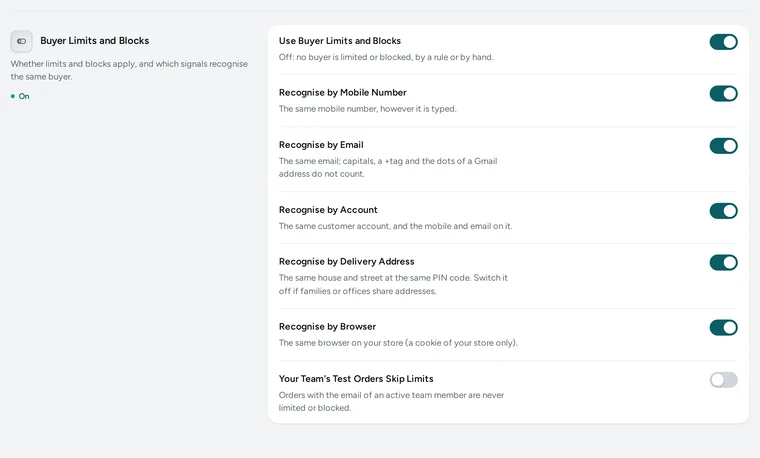
The Buyer Limits and Blocks settings in COD Rules and PIN Codes, on Kosha, a demo store on Mercayo. Add a Limit by Rule
Press ADD RULE, add the condition Buyer's orders, and set At Least, In the Last, Days or Months and Orders That Count. Choose the outcome: Online payment only, or Block ordering. Write the words the buyer sees, in each language, or leave them empty for checkout's own polite words. Try a Bag shows which rule a sample order would meet, and in how many of your orders its buyer was recognised.
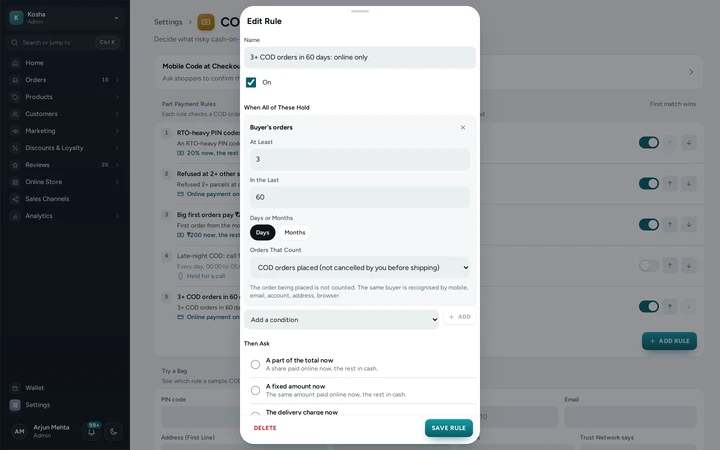
A rule with the condition Buyer's orders, 3 COD orders in 60 days, in the rule editor, on Kosha, a demo store on Mercayo. Block One Buyer
On an order or a customer, open the Buyer Limits card and press BLOCK THIS BUYER (also in the order's and the customer's actions). Choose COD Only or All Orders, add the reason for your team (the buyer never sees it) and, if you like, what the buyer sees at checkout. The block remembers every signal of this buyer and of their linked orders.
Watch the List
Customers → Blocked Buyers shows Active, Unblocked and All, with COD ONLY and ALL ORDERS filters and search. Each row says what recognises the buyer and how often checkout has met them since. Open a row to CHANGE the block or UNBLOCK the buyer; they can order again at once.
Keep Your Own Test Orders Free
If your team places test orders on the store, switch on Your Team's Test Orders Skip Limits: orders with the email of an active team member are then never limited or blocked. It is off to start with, so your own orders are limited like anyone's.


Your shoppers
What Your Shoppers See
Most shoppers never notice anything. A buyer you limited sees cash on delivery greyed with your words and can still pay online; a buyer you blocked from ordering sees your words in place of the ways to pay, and "Ordering is not available" in the bar at the bottom of a phone. Neither is ever told what recognised them.

Settings
Settings You Control
Each one is in your admin. A new store starts with the value shown.
Mercayo
Mercayo's Controls
Every setting here can be set or limited by Mercayo for one store, like any other setting, with a reason your admin shows: for example buyer limits switched off for a store, or one signal not used. Each change is in Mercayo's audit log. Buyer signals never leave your store: another store cannot see your blocks, and yours never matches a buyer by what they did elsewhere. When a shopper's data is erased, their mobile, email and account are taken out of every block, and a block left with nothing to match is lifted.
Limits today
Good to Know Before You Start
- A buyer with a new mobile, a new email, a new address and a new phone or browser is a new buyer.
- Linking through shared signals can join two people who used one family phone or one Gmail address; the card shows what linked them before you block.
- Only your own store's orders are used; a buyer's orders at other stores are never part of a block.
- The browser signal is kept only for bags whose checkout asked the check, so orders from before have the other signals only.
- Orders without a bag, such as imports and exchanges, are not checked.
Questions
About Buyer Limits and Blocks
How do I allow cash on delivery three times, then ask for online payment?
Add a rule in COD Rules and PIN Codes with Buyer's orders: at least 3, in the last 60 days, COD orders placed, and the outcome Online payment only. The order being placed is not counted, so the fourth COD order in 60 days is asked to pay online.
Can a blocked buyer still pay online?
With COD Only, yes: only cash on delivery is closed. With All Orders, no way of paying is open to them.
What does the buyer see?
Your words, in the language they shop in, or checkout's own polite words when you write none. They are never told how they were recognised.
Can my team still place an order for a blocked buyer?
Yes. An order made in the admin shows a warning with the reason first, and is placed if you go ahead; the activity log records it.
Does a block reach other stores on Mercayo?
No. Signals and blocks stay inside your store. The separate Trust Network shares only counts of parcels per sealed mobile number, never a block.
How do I undo a block?
Open the buyer in Customers → Blocked Buyers, or their order or customer, and press UNBLOCK. They can order again at once, and the unblocked tab keeps the record.
Related
Related Features
- RTO ShieldEvery cash on delivery order gets a 0-100 risk score with plain reasons, and your store chooses what happens to risky ones: a call, a code or part payment.
- Cash on DeliveryOffer cash on delivery with your own fee, a limit on the cash a courier collects, and the PIN codes and delivery options where it is not offered.
- Part Payment for CODCash on delivery shoppers pay a small COD charge or an advance online first and the rest in cash, so a refused parcel still covers its trip.
- CustomersEvery customer with their orders, spending and returned parcels, guests included, ready-made segments like VIP and RTO-Prone, tags, notes, credit and export.
- OrdersStatus tabs, saved views your team shares, search by number, phone or name, a money summary, bulk actions, and an order page with one clear next step.
More in Cash on Delivery: Cash on Delivery · COD Confirmation Code · Part Payment for COD · COD Confirmation Call · Order Clean-Up · RTO Shield
Try It on Your Own Store
Every feature is in every plan, free for 14 days.