Mercayo's team can design your store for you, mockup first. You order a package, tell us about your brand, and answer each preview in your admin. Nothing changes on your store until you approve it.
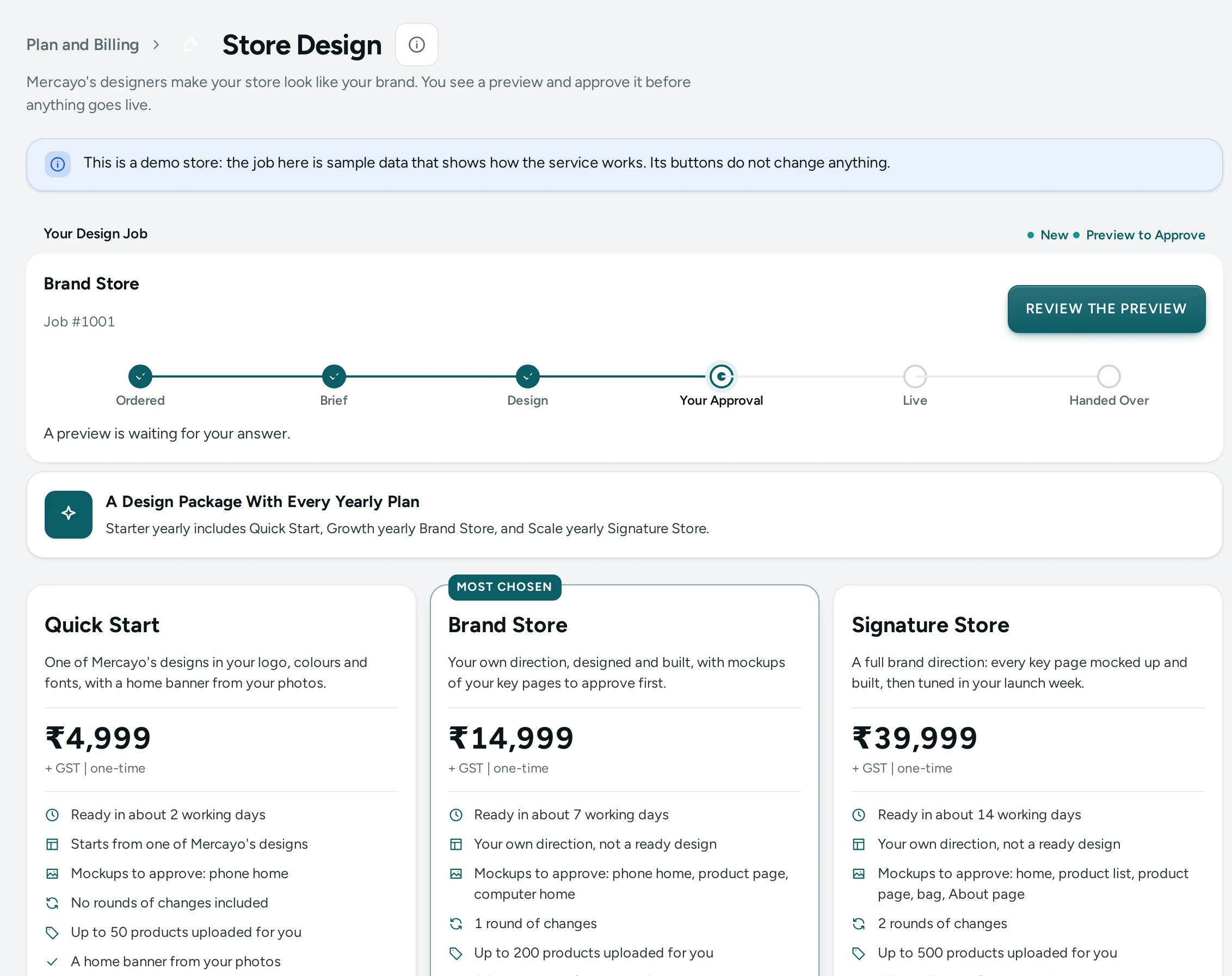
The Packages
| Package | Price before GST | About |
|---|---|---|
| Quick Start | ₹4,999 | One of the ready designs set up in your brand, 50 products uploaded, 2 working days |
| Brand Store | ₹14,999 | A design made for your brand, 200 products, one round of changes, 7 working days |
| Signature Store | ₹39,999 | The full store designed page by page, 500 products, two rounds, 14 working days |
A yearly plan includes one package once per store: Quick Start with Starter, Brand Store with Growth and Signature Store with Scale. A bigger package than the one included costs the difference. Extras (another round of changes, more pages, more products, photo clean-ups) can be added to an order or later.
Order and Send the Brief
- Open Settings › Plan and Billing and press STORE DESIGN.
- Choose a package and any extras, check the total with GST, and press ORDER AND PAY (or ORDER FREE when your plan includes it). You pay on Razorpay's page, or by bank transfer or UPI if Mercayo has asked you to.
- Press FILL IN THE BRIEF: your brand, who buys from you, colours, stores you like, your products and pictures. Press SEND TO MERCAYO.
Your designer starts once the brief and the payment are both in. Mercayo emails you at each step, and the job page shows what happened.
Answer a Preview
Each preview arrives on the job page:
- Mockups are pictures of the design. APPROVE moves your designer on to building it; nothing changes on your store.
- A build is your store's real look and pages, made in your own editors. Press PREVIEW THE LOOK or PREVIEW beside any page (the home page, a product page, a collection, a content page, the bag, checkout, your account pages and the rest) to open a private link of your store wearing the design, for 24 hours. APPROVE AND PUBLISH puts exactly that live. The look it replaced stays in the Theme editor's Earlier Looks, and each page's History keeps the page before.
- ASK FOR CHANGES uses one round of changes. Say what to change in at least ten characters. With no rounds left, ADD A ROUND.
A page that has changed in your editor since the preview was sent can no longer be opened by its link: the pictures show it.
If a Job Is Cancelled
- Before your designer starts and before you pay, CANCEL ORDER on the job page cancels it, and an included package comes back for a later order.
- After that, write to your designer on the job page. If Mercayo cancels a paid job, Mercayo refunds all of it or the part agreed with you. A payment made online goes back to the card, UPI or account it came from, usually within 5 to 7 working days. A payment made by bank transfer or UPI is sent back to your account.
- Mercayo emails you when the refund is sent. Under Payments and Invoices each payment shows its refund, and where Mercayo issued a GST tax invoice, its CREDIT NOTE is there to download.
Invoices
Every payment gets Mercayo's GST tax invoice (a proforma while Mercayo's GST details are being completed), under Payments and Invoices on the job page. The service is invoiced under SAC 998314, information technology design and development services, at 18% GST.
Questions
Who can order and answer?
The store owner (anyone who may manage billing) orders and pays. People who may publish the store's design can answer previews and write to the designer.
Can I change the design after it is handed over?
Yes. The Theme editor and the page editor work as always, and the design is yours.
What if I am not happy with the mockups?
Ask for changes with your notes. If you and Mercayo agree to stop, Mercayo cancels the job and refunds what was agreed.